A reliable test suite is essential for continuous delivery. This page describes the test
architecture that gives your pipeline the confidence to deploy any change - even when
dependencies outside your control are unavailable. The child pages cover each test type
in detail.
Beyond the Test Pyramid
The test pyramid - many unit tests at the base, fewer integration tests in the middle, a handful
of end-to-end tests at the top - has been the dominant mental model for test strategy since Mike
Cohn introduced it. The core insight is sound: push testing as low as possible. Lower-level
tests are faster, more deterministic, and cheaper to maintain. Higher-level tests are slower,
more brittle, and more expensive.
But as a prescriptive model, the pyramid is overly simplistic. Teams that treat it as a rigid
ratio end up in unproductive debates about whether they have “too many” integration tests or “not
enough” unit tests. The shape of your test distribution matters far less than whether your tests,
taken together, give you the confidence to deploy.
What actually matters
The pyramid’s principle - write tests with different granularity - remains correct. But for
CD, the question is not “do we have the right pyramid shape?” The question is:
Can our pipeline determine that a change is safe to deploy without depending on any system we
do not control?
This reframes the testing conversation. Instead of counting tests by type and trying to match a
diagram, you design a test architecture where:
Fast, deterministic tests catch the vast majority of defects and run on every commit.
These tests use test doubles for anything outside
the team’s control. They give you a reliable go/no-go signal in minutes.
Contract tests verify that your test doubles still match reality. They run asynchronously
and catch drift between your assumptions and the real world - without blocking your pipeline.
A small number of non-deterministic tests validate that the fully integrated system works.
These run post-deployment and provide monitoring, not gating.
This structure means your pipeline can confidently say “yes, deploy this” even if a downstream
API is having an outage, a third-party service is slow, or a partner team hasn’t deployed their
latest changes yet. Your ability to deliver is decoupled from the reliability of systems you do
not own.
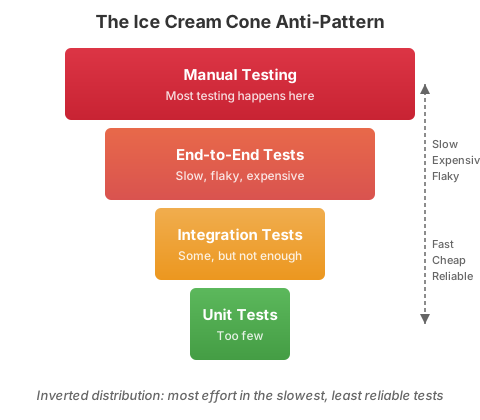
The anti-pattern: the ice cream cone
Most teams that struggle with CD have an inverted test distribution - too many slow, expensive
end-to-end tests and too few fast, focused tests.
The ice cream cone makes CD impossible. Manual testing gates block every release. End-to-end tests
take hours, fail randomly, and depend on external systems being healthy. The pipeline cannot give
a fast, reliable answer about deployability, so deployments become high-ceremony events.
Test Architecture
A test architecture is the deliberate structure of how different test types work together across
your pipeline to give you deployment confidence. Each layer has a specific role, and the layers
reinforce each other.
Verify complete user journeys through the fully integrated system
No
Monitoring, not gating - runs post-deployment
Static Analysis runs alongside layers 1-3, catching code quality, security, and
style issues without executing the code. Test Doubles are used throughout
layers 1-3 to isolate external dependencies.
How the layers work together
Test layers by pipeline stage
Pipeline stage    Test layer              Deterministic?   Blocks deploy?
─────────────────────────────────────────────────────────────────────────
On every commit   Unit tests              Yes              Yes
                  Integration tests       Yes              Yes
                  Functional tests        Yes              Yes

Asynchronous      Contract tests          No               No (triggers review)

Post-deployment   E2E smoke tests         No               Triggers rollback if critical
                  Synthetic monitoring    No               Triggers alerts
The critical insight: everything that blocks deployment is deterministic and under your
control. Everything that involves external systems runs asynchronously or post-deployment. This
is what gives you the independence to deploy any time, regardless of the state of the world
around you.
Pre-merge vs post-merge
The table above maps to two distinct phases of your pipeline, each with different goals and
constraints.
Pre-merge (before code lands on trunk): Run unit, integration, and functional tests. These
must all be deterministic and fast. Target: under 10 minutes total. This is the quality gate that
every change must pass. If pre-merge tests are slow, developers batch up changes or skip local
runs, both of which undermine continuous integration.
Post-merge (after code lands on trunk, before or after deployment): Re-run the full
deterministic suite against the integrated trunk to catch merge-order interactions. Run contract
tests, E2E smoke tests, and synthetic monitoring. Target: under 30 minutes for the full
post-merge cycle.
Why re-run pre-merge tests post-merge? Two changes can each pass pre-merge independently but
conflict when combined on trunk. The post-merge run catches these integration effects. If a
post-merge failure occurs, the team fixes it immediately - trunk must always be releasable.
Testing Matrix
Use this reference to decide what type of test to write and where it runs in your pipeline.
Run tests on every commit. If tests do not run automatically, they will be skipped.
Keep the deterministic suite under 10 minutes. If it is slower, developers will stop
running it locally.
Fix broken tests immediately. A broken test is equivalent to a broken build.
Delete tests that do not provide value. A test that never fails and tests trivial behavior
is maintenance cost with no benefit.
Test behavior, not implementation. Use a
black box approach - verify what the code
does, not how it does it. As Ham Vocke advises: “if I enter values x and y, will the
result be z?” - not the sequence of internal calls that produce z. Avoid
white box testing that asserts on internals.
Use test doubles for external dependencies. Your deterministic tests should run without
network access to external systems.
Validate test doubles with contract tests. Test doubles that drift from reality give false
confidence.
Treat test code as production code. Give it the same care, review, and refactoring
attention.
Run automated accessibility checks on every commit. WCAG compliance scans are fast,
deterministic, and catch violations that are invisible to sighted developers. Treat them
like security scans: automate the detectable rules and reserve manual review for
subjective judgment.
Do Not
Do not tolerate flaky tests. Quarantine or delete them immediately.
Do not gate your pipeline on non-deterministic tests. E2E and contract test failures
should trigger review or alerts, not block deployment.
Do not couple your deployment to external system availability. If a third-party API being
down prevents you from deploying, your test architecture has a critical gap.
Do not write tests after the fact as a checkbox exercise. Tests written without
understanding the behavior they verify add noise, not value.
Do not test private methods directly. Test the public interface; private methods are tested
indirectly.
Do not share mutable state between tests. Each test should set up and tear down its own
state.
Do not use sleep/wait for timing-dependent tests. Use explicit waits, polling, or
event-driven assertions.
Do not require a running database or external service for unit tests. That makes them
integration tests - which is fine, but categorize them correctly.
Fast, deterministic tests that verify a unit of behavior through its public interface, asserting on what the code does rather than how it works.
Definition
A unit test is a deterministic test that exercises a unit of behavior (a single
meaningful action or decision your code makes) and verifies that the observable outcome is
correct. The “unit” is not a function, method, or class. It is a behavior: given these inputs,
the system produces this result. A single behavior may involve one function or several
collaborating objects. What matters is that the test treats the code as a
black box and asserts only on what it produces,
not on how it produces it.
All external dependencies are replaced with test doubles so the test runs
quickly and produces the same result every time.
White box testing (asserting on internal method
calls, call order, or private state) creates change-detector tests that break during routine
refactoring without catching real defects. Prefer testing through the public interface (methods,
APIs, exported functions) and asserting on return values, state changes visible to consumers,
or observable side effects.
The purpose of unit tests is to:
Verify that a unit of behavior produces the correct observable outcome.
Cover high-complexity logic where many input permutations exist, such as business rules, calculations, and state transitions.
Keep cyclomatic complexity visible and manageable through good separation of concerns.
When to Use
During development: run the relevant subset of unit tests continuously while writing
code. TDD (Red-Green-Refactor) is the most effective workflow.
On every commit: use pre-commit hooks or watch-mode test runners so broken tests never
reach the remote repository.
In CI: execute the full unit test suite on every pull request and on the trunk after
merge to verify nothing was missed locally.
Unit tests are the right choice when the behavior under test can be exercised without network
access, file system access, or database connections. If you need any of those, you likely need
an integration test or a functional test instead.
Characteristics
Property
Value
Speed
Milliseconds per test
Determinism
Always deterministic
Scope
A single unit of behavior
Dependencies
All replaced with test doubles
Network
None
Database
None
Breaks build
Yes
Examples
A JavaScript unit test verifying a pure utility function:
JavaScript unit test for castArray utility
// castArray.test.jsdescribe("castArray",()=>{it("should wrap non-array items in an array",()=>{expect(castArray(1)).toEqual([1]);expect(castArray("a")).toEqual(["a"]);expect(castArray({a:1})).toEqual([{a:1}]);});it("should return array values by reference",()=>{const array =[1];expect(castArray(array)).toBe(array);});it("should return an empty array when no arguments are given",()=>{expect(castArray()).toEqual([]);});});
A Java unit test using Mockito to isolate the system under test:
Java unit test with Mockito stub isolating the controller
White box testing: asserting on internal
state, call order, or private method behavior rather than observable output. These
change-detector tests break during refactoring without catching real defects. Test through
the public interface instead.
Testing private methods: private implementations are meant to change. They are
exercised indirectly through the behavior they support. Test the public interface instead.
No assertions: a test that runs code without asserting anything provides false
confidence. Lint rules can catch this automatically.
Disabling or skipping tests: skipped tests erode confidence over time. Fix or remove
them.
Confusing “unit” with “function”: a unit of behavior may span multiple collaborating
objects. Forcing one-test-per-function creates brittle tests that mirror the implementation
structure rather than verifying meaningful outcomes.
Ice cream cone testing: relying primarily on slow E2E tests while neglecting fast unit
tests inverts the test pyramid and slows feedback.
Chasing coverage numbers: gaming coverage metrics (e.g., running code paths without
meaningful assertions) creates a false sense of confidence. Focus on behavior coverage
instead.
Connection to CD Pipeline
Unit tests occupy the base of the test pyramid. They run in the earliest stages of the
CD pipeline and provide the fastest feedback loop:
Local development: watch mode reruns tests on every save.
Pre-commit: hooks run the suite before code reaches version control.
PR verification: CI runs the full suite and blocks merge on failure.
Trunk verification: CI reruns tests on the merged HEAD to catch integration issues.
Because unit tests are fast and deterministic, they should always break the build on failure.
A healthy CD pipeline depends on a large, reliable suite of
black box unit tests that verify behavior
rather than implementation, giving developers the confidence to refactor freely and ship
small changes frequently.
Deterministic tests that verify how units interact together or with external system boundaries using test doubles for non-deterministic dependencies.
Definition
An integration test is a deterministic test that verifies how the unit under test interacts
with other units without directly accessing external sub-systems. It may validate multiple
units working together (sometimes called a “sociable unit test”) or the portion of the code
that interfaces with an external network dependency while using a test double to represent
that dependency.
For clarity: an “integration test” is not a test that broadly integrates multiple
sub-systems. That is an end-to-end test.
When to Use
Integration tests provide the best balance of speed, confidence, and cost. Use them when:
You need to verify that multiple units collaborate correctly (for example, a service
calling a repository that calls a data mapper).
You need to validate the interface layer to an external system (HTTP client, message
producer, database query) while keeping the external system replaced by a test double.
You want to confirm that a refactoring did not break behavior. Integration tests that
avoid testing implementation details survive refactors without modification.
You are building a front-end component that composes child components and needs to verify
the assembled behavior from the user’s perspective.
If the test requires a live network call to a system outside localhost, it is either a
contract test or an E2E test.
Characteristics
Property
Value
Speed
Milliseconds to low seconds
Determinism
Always deterministic
Scope
Multiple units or a unit plus its boundary
Dependencies
External systems replaced with test doubles
Network
Localhost only
Database
Localhost / in-memory only
Breaks build
Yes
Examples
A JavaScript integration test verifying that a connector returns structured data:
Integration test - connector returning structured data
describe("retrieving Hygieia data",()=>{it("should return counts of merged pull requests per day",async()=>{const result =await hygieiaConnector.getResultsByDay(
hygieiaConfigs.integrationFrequencyRoute,
testTeam,
startDate,
endDate
);expect(result.status).toEqual(200);expect(result.data).toBeInstanceOf(Array);expect(result.data[0]).toHaveProperty("value");expect(result.data[0]).toHaveProperty("dateStr");});it("should return an empty array if the team does not exist",async()=>{const result =await hygieiaConnector.getResultsByDay(
hygieiaConfigs.integrationFrequencyRoute,0,
startDate,
endDate
);expect(result.data).toEqual([]);});});
Subcategories
Service integration tests validate how the system under test responds to information
from an external service. Use virtual services or static mocks; pair with
contract tests to keep the doubles current.
Database integration tests validate query logic against a controlled data store. Prefer
in-memory databases, isolated DB instances, or personalized datasets over shared live data.
Front-end integration tests render the component tree and interact with it the way a
user would. Follow the accessibility order of operations for element selection: visible text
and labels first, ARIA roles second, test IDs only as a last resort.
Anti-Patterns
Peeking behind the curtain: using tools that expose component internals (e.g.,
Enzyme’s instance() or state()) instead of testing from the user’s perspective.
Mocking too aggressively: replacing every collaborator turns an integration test into a
unit test and removes the value of testing real interactions. Only mock what is necessary to
maintain determinism.
Testing implementation details: asserting on internal state, private methods, or call
counts rather than observable output.
Introducing a test user: creating an artificial actor that would never exist in
production. Write tests from the perspective of a real end-user or API consumer.
Tolerating flaky tests: non-deterministic integration tests erode trust. Fix or remove
them immediately.
Duplicating E2E scope: if the test integrates multiple deployed sub-systems with live
network calls, it belongs in the E2E category, not here.
Connection to CD Pipeline
Integration tests form the largest portion of a healthy test suite (the “trophy” or the
middle of the pyramid). They run alongside unit tests in the earliest CI stages:
Local development: run in watch mode or before committing.
PR verification: CI executes the full suite; failures block merge.
Trunk verification: CI reruns on the merged HEAD.
Because they are deterministic and fast, integration tests should always break the build.
A team whose refactors break many tests likely has too few integration tests and too many
fine-grained unit tests. As Kent C. Dodds advises: “Write tests, not too many, mostly
integration.”
Deterministic tests that verify all modules of a sub-system work together from the actor’s perspective, using test doubles for external dependencies.
Definition
A functional test is a deterministic test that verifies all modules of a sub-system are
working together. It introduces an actor (typically a user interacting with the UI or a
consumer calling an API) and validates the ingress and egress of that actor within the
system boundary. External sub-systems are replaced with test doubles to
keep the test deterministic.
Functional tests cover broad-spectrum behavior: UI interactions, presentation logic, and
business logic flowing through the full sub-system. They differ from
end-to-end tests in that side effects are mocked and never cross boundaries
outside the system’s control.
Functional tests are sometimes called component tests. Martin Fowler calls them
sociable unit tests
to distinguish them from solitary unit tests that stub all collaborators: a sociable test
allows real collaborators within the sub-system boundary while still replacing external
dependencies with test doubles.
When to Use
You need to verify a complete user-facing feature from input to output within a single
deployable unit (e.g., a service or a front-end application).
You want to test how the UI, business logic, and data layers interact without depending
on live external services.
You need to simulate realistic user workflows (filling in forms, navigating pages,
submitting API requests) while keeping the test fast and repeatable.
You are validating acceptance criteria for a user story and want a test that maps
directly to the specified behavior.
You need to verify keyboard navigation, focus management, and screen reader
announcements as part of feature verification. Accessibility behavior is user-facing
behavior and belongs in functional tests.
If the test needs to reach a live external dependency, it is an E2E test. If it
tests a single unit in isolation, it is a unit test.
A functional test for a REST API using an in-process server and mocked downstream services:
REST API functional test - order creation with mocked inventory service
describe("POST /orders",()=>{it("should create an order and return 201",async()=>{// Arrange: mock the inventory service responsenock("https://inventory.internal").get("/stock/item-42").reply(200,{available:true,quantity:10});// Act: send a request through the full application stackconst response =awaitrequest(app).post("/orders").send({itemId:"item-42",quantity:2});// Assert: verify the user-facing responseexpect(response.status).toBe(201);expect(response.body.orderId).toBeDefined();expect(response.body.status).toBe("confirmed");});it("should return 409 when inventory is insufficient",async()=>{nock("https://inventory.internal").get("/stock/item-42").reply(200,{available:true,quantity:0});const response =awaitrequest(app).post("/orders").send({itemId:"item-42",quantity:2});expect(response.status).toBe(409);expect(response.body.error).toMatch(/insufficient/i);});});
A front-end functional test exercising a login flow with a mocked auth service:
Front-end functional test - login flow with mocked auth service
describe("Login page",()=>{it("should redirect to the dashboard after successful login",async()=>{
mockAuthService.login.mockResolvedValue({token:"abc123"});render(<App />);await userEvent.type(screen.getByLabelText("Email"),"ada@example.com");await userEvent.type(screen.getByLabelText("Password"),"s3cret");await userEvent.click(screen.getByRole("button",{name:"Sign in"}));expect(await screen.findByText("Dashboard")).toBeInTheDocument();});});
Accessibility Verification
Functional tests already exercise the UI from the actor’s perspective, making them the
natural place to verify that interactions work for all users. Accessibility assertions
fit alongside existing functional assertions rather than in a separate test suite.
A functional test verifying keyboard-only interaction and running axe-core assertions
against the rendered page:
Accessibility functional test - keyboard navigation and axe-core WCAG assertions
import{ axe, toHaveNoViolations }from"jest-axe";
expect.extend(toHaveNoViolations);describe("Checkout flow",()=>{it("should be completable using only the keyboard",async()=>{render(<CheckoutPage />);// Navigate to the first form field using Tabawait userEvent.tab();expect(screen.getByLabelText("Card number")).toHaveFocus();// Fill in the form using keyboard onlyawait userEvent.type(screen.getByLabelText("Card number"),"4111111111111111");await userEvent.tab();await userEvent.type(screen.getByLabelText("Expiry"),"12/27");await userEvent.tab();// Submit with Enterawait userEvent.keyboard("{Enter}");expect(await screen.findByText("Order confirmed")).toBeInTheDocument();// Verify no accessibility violations in the final stateconst results =awaitaxe(document.body);expect(results).toHaveNoViolations();});});
Anti-Patterns
Using live external services: this makes the test non-deterministic and slow. Use test
doubles for anything outside the sub-system boundary.
Testing through the database: sharing a live database between tests introduces ordering
dependencies and flakiness. Use in-memory databases or mocked data layers.
Ignoring the actor’s perspective: functional tests should interact with the system the
way a user or consumer would. Reaching into internal APIs or bypassing the UI defeats the
purpose.
Duplicating unit test coverage: functional tests should focus on feature-level behavior
and happy/critical paths, not every edge case. Leave permutation testing to unit tests.
Slow test setup: if spinning up the sub-system takes too long, invest in faster
bootstrapping (in-memory stores, lazy initialization) rather than skipping functional tests.
Deferring accessibility testing to a manual audit phase: accessibility defects caught
in a quarterly audit are weeks or months old. Automated WCAG checks in functional tests
catch violations on every commit, just like any other regression.
Connection to CD Pipeline
Functional tests run after unit and integration tests in the pipeline, typically as part of
the same CI stage:
Pre-commit: functional tests run locally before every commit. Because they are
deterministic and scoped to the sub-system, they are fast enough to give immediate
feedback without slowing the development loop.
PR verification: functional tests run in CI against the sub-system in isolation,
giving confidence that the feature works before merge.
Trunk verification: the same tests run on the merged HEAD to catch conflicts.
Pre-deployment gate: functional tests can serve as the final deterministic gate before
a build artifact is promoted to a staging environment.
Because functional tests are deterministic, they should break the build on failure.
They are more expensive than unit and integration tests, so teams should focus on
happy-path and critical-path scenarios while keeping the total count manageable.
Non-deterministic tests that validate the entire software system along with its integration with external interfaces and production-like scenarios.
Definition
End-to-end (E2E) tests validate the entire software system, including its integration with
external interfaces. They exercise complete production-like scenarios using real (or
production-like) data and environments to simulate real-time settings. No test doubles are
used. The test hits live services, databases, and third-party integrations just as a real
user would.
Because they depend on external systems, E2E tests are typically non-deterministic: they
can fail for reasons unrelated to code correctness, such as network instability or
third-party outages.
When to Use
E2E tests should be the least-used test type due to their high cost in execution time and
maintenance. Use them for:
Happy-path validation of critical business flows (e.g., user signup, checkout, payment
processing).
Smoke testing a deployed environment to verify that key integrations are functioning.
Cross-team workflows that span multiple sub-systems and cannot be tested any other way.
Do not use E2E tests to cover edge cases, error handling, or input validation. Those
scenarios belong in unit, integration, or
functional tests.
Vertical vs. Horizontal E2E Tests
Vertical E2E tests target features under the control of a single team:
Favoriting an item and verifying it persists across refresh.
Creating a saved list and adding items to it.
Horizontal E2E tests span multiple teams:
Navigating from the homepage through search, item detail, cart, and checkout.
Horizontal tests are significantly more complex and fragile. Due to their large failure
surface area, they are not suitable for blocking release pipelines.
Characteristics
Property
Value
Speed
Seconds to minutes per test
Determinism
Typically non-deterministic
Scope
Full system including external integrations
Dependencies
Real services, databases, third-party APIs
Network
Full network access
Database
Live databases
Breaks build
Generally no (see guidance below)
Examples
A vertical E2E test verifying user lookup through a live web interface:
Vertical E2E test - user lookup via live web interface
@TestpublicvoidverifyValidUserLookup()throwsException{// Act -- interact with the live application
homePage.getUserData("validUserId");waitForElement(By.xpath("//span[@id='name']"));// Assert -- verify real data returned from the live backendassertEquals("Ada Lovelace", homePage.getName());assertEquals("Engineering", homePage.getOrgName());assertEquals("Grace Hopper", homePage.getManagerName());}
A browser-based E2E test using a tool like Playwright:
Browser-based E2E test - add to cart and checkout with Playwright
test("user can add an item to cart and check out",async({ page })=>{await page.goto("https://staging.example.com");await page.getByRole("link",{name:"Running Shoes"}).click();await page.getByRole("button",{name:"Add to Cart"}).click();await page.getByRole("link",{name:"Cart"}).click();awaitexpect(page.getByText("Running Shoes")).toBeVisible();await page.getByRole("button",{name:"Checkout"}).click();awaitexpect(page.getByText("Order confirmed")).toBeVisible();});
Anti-Patterns
Using E2E tests as the primary safety net: this is the “ice cream cone” anti-pattern.
E2E tests are slow and fragile; the majority of your confidence should come from unit and
integration tests.
Blocking the pipeline with horizontal E2E tests: these tests span too many teams and
failure surfaces. Run them asynchronously and review failures out of band.
Ignoring flaky failures: E2E tests often fail for environmental reasons. Track the
frequency and root cause of failures. If a test is not providing signal, fix it or remove
it.
Testing edge cases in E2E: exhaustive input validation and error-path testing should
happen in cheaper, faster test types.
Not capturing failure context: E2E failures are expensive to debug. Capture
screenshots, network logs, and video recordings automatically on failure.
Connection to CD Pipeline
E2E tests run in the later stages of the delivery pipeline, after the build artifact has
passed all deterministic tests and has been deployed to a staging or pre-production
environment:
Post-deployment smoke tests: a small, fast suite of vertical E2E tests verifies that
the deployment succeeded and critical paths work.
Scheduled regression suites: broader E2E suites (including horizontal tests) run on a
schedule rather than on every commit.
Production monitoring: customer experience alarms (synthetic monitoring) are a form of
continuous E2E testing that runs in production.
Because E2E tests are non-deterministic, they should not break the build in most cases. A
team may choose to gate on a small set of highly reliable vertical E2E tests, but must invest
in reducing false positives to make this valuable. CD pipelines should be optimized for rapid
recovery of production issues rather than attempting to prevent all defects with slow,
fragile E2E gates.
Non-deterministic tests that validate test doubles by verifying API contract format against live external systems.
Definition
A contract test validates that the test doubles used in
integration tests still accurately represent the real external system.
Contract tests run against the live external sub-system and exercise the portion of the
code that interfaces with it. Because they depend on live services, contract tests are
non-deterministic and should not break the build. Instead, failures should trigger a
review to determine whether the contract has changed and the test doubles need updating.
A contract test validates contract format, not specific data. It verifies that response
structures, field names, types, and status codes match expectations, not that particular
values are returned.
Contract tests have two perspectives:
Provider: the team that owns the API verifies that all changes are backwards compatible
(unless a new API version is introduced). Every build should validate the provider contract.
Consumer: the team that depends on the API verifies that they can still consume the
properties they need, following
Postel’s Law: “Be conservative in
what you do, be liberal in what you accept from others.”
When to Use
You have integration tests that use test doubles (mocks, stubs, recorded
responses) to represent external services, and you need assurance those doubles remain
accurate.
You consume a third-party or cross-team API that may change without notice.
You provide an API to other teams and want to ensure that your changes do not break their
expectations (consumer-driven contracts).
You are adopting contract-driven development, where contracts are defined during design
so that provider and consumer teams can work in parallel using shared mocks and fakes.
Characteristics
Property
Value
Speed
Seconds (depends on network latency)
Determinism
Non-deterministic (hits live services)
Scope
Interface boundary between two systems
Dependencies
Live external sub-system
Network
Yes (calls the real dependency)
Database
Depends on the provider
Breaks build
No (failures trigger review, not build failure)
Examples
A provider contract test verifying that an API response matches the expected schema:
Provider contract test - schema validation
describe("GET /users/:id contract",()=>{it("should return a response matching the user schema",async()=>{const response =awaitfetch("https://api.partner.com/users/1");const body =await response.json();// Validate structure, not specific dataexpect(response.status).toBe(200);expect(body).toHaveProperty("id");expect(typeof body.id).toBe("number");expect(body).toHaveProperty("name");expect(typeof body.name).toBe("string");expect(body).toHaveProperty("email");expect(typeof body.email).toBe("string");});});
A consumer-driven contract test using Pact:
Consumer-driven contract test with Pact
describe("Order Service - Inventory Provider Contract",()=>{it("should receive stock availability in the expected format",async()=>{// Define the expected interactionawait provider.addInteraction({state:"item-42 is in stock",uponReceiving:"a request for item-42 stock",withRequest:{method:"GET",path:"/stock/item-42"},willRespondWith:{status:200,body:{available: Matchers.boolean(true),quantity: Matchers.integer(10),},},});// Exercise the consumer code against the mock providerconst result =await inventoryClient.checkStock("item-42");expect(result.available).toBe(true);});});
Anti-Patterns
Using contract tests to validate business logic: contract tests verify structure and
format, not behavior. Business logic belongs in functional tests.
Breaking the build on contract test failure: because these tests hit live systems,
failures may be caused by network issues or temporary outages, not actual contract changes.
Treat failures as signals to investigate.
Neglecting to update test doubles: when a contract test fails because the upstream API
changed, the test doubles in your integration tests must be updated to match. Ignoring
failures defeats the purpose.
Running contract tests too infrequently: the frequency should be proportional to the
volatility of the interface. Highly active APIs need more frequent contract validation.
Testing specific data values: asserting that name equals "Alice" makes the test
brittle. Assert on types, required fields, and response codes instead.
Connection to CD Pipeline
Contract tests run asynchronously from the main CI build, typically on a schedule:
Provider side: provider contract tests (schema validation, response code checks) are
often implemented as deterministic unit tests and run on every commit as part of the
provider’s CI pipeline.
Consumer side: consumer contract tests run on a schedule (e.g., hourly or daily)
against the live provider. Failures are reviewed and may trigger updates to test doubles
or conversations between teams.
Consumer-driven contracts: when using tools like Pact, the consumer publishes
contract expectations and the provider runs them continuously. Both teams communicate when
contracts break.
Contract tests are the bridge that keeps your fast, deterministic integration test suite
honest. Without them, test doubles can silently drift from reality, and your integration
tests provide false confidence.
Code analysis tools that evaluate non-running code for security vulnerabilities, complexity, and best practice violations.
Definition
Static analysis (also called static testing) evaluates non-running code against rules for
known good practices. Unlike other test types that execute code and observe behavior, static
analysis inspects source code, configuration files, and dependency manifests to detect
problems before the code ever runs.
Static analysis serves several key purposes:
Catches errors that would otherwise surface at runtime.
Warns of excessive complexity that degrades the ability to change code safely.
Identifies security vulnerabilities and coding patterns that provide attack vectors.
Enforces coding standards by removing subjective style debates from code reviews.
Alerts to dependency issues such as outdated packages, known CVEs, license
incompatibilities, or supply-chain compromises.
When to Use
Static analysis should run continuously, at every stage where feedback is possible:
In the IDE: real-time feedback as developers type, via editor plugins and language
server integrations.
On save: format-on-save and lint-on-save catch issues immediately.
Pre-commit: hooks prevent problematic code from entering version control.
In CI: the full suite of static checks runs on every PR and on the trunk after merge,
verifying that earlier local checks were not bypassed.
Static analysis is always applicable. Every project, regardless of language or platform,
benefits from linting, formatting, and dependency scanning.
Characteristics
Property
Value
Speed
Seconds (typically the fastest test category)
Determinism
Always deterministic
Scope
Entire codebase (source, config, dependencies)
Dependencies
None (analyzes code at rest)
Network
None (except dependency scanners)
Database
None
Breaks build
Yes
Examples
Linting
A .eslintrc.json configuration enforcing test quality rules:
Statically typed languages catch type mismatches at compile time, eliminating entire classes
of runtime errors. Java, for example, rejects incompatible argument types before the code runs:
Java type checking example
publicstaticdoublecalculateTotal(double price,int quantity){return price * quantity;}// Compiler error: incompatible types: String cannot be converted to doublecalculateTotal("19.99",3);
Dependency Scanning
Tools like npm audit, Snyk, or Dependabot scan for known vulnerabilities:
npm audit output example
$ npm audit
found 2 vulnerabilities (1 moderate, 1 high)
moderate: Prototype Pollution in lodash <4.17.21
high: Remote Code Execution in log4j <2.17.1
Flags overly deep or long code blocks that breed defects
Type checking
Prevents type-related bugs, replacing some unit tests
Security scanning
Detects known vulnerabilities and dangerous coding patterns
Dependency scanning
Checks for outdated, hijacked, or insecurely licensed deps
Accessibility linting
Detects missing alt text, ARIA violations, contrast failures, semantic HTML issues
Accessibility Linting
Accessibility linting catches deterministic WCAG violations the same way a security scanner
catches known vulnerability patterns. Automated checks cover structural issues (missing alt
text, invalid ARIA attributes, insufficient contrast ratios, broken heading hierarchy) while
manual review covers subjective aspects like whether alt text is actually meaningful.
A .pa11yci configuration running WCAG 2.1 AA checks against rendered pages:
An axe-core unit test asserting that a rendered component has no accessibility violations:
axe-core accessibility test with jest-axe
import{ axe, toHaveNoViolations }from"jest-axe";
expect.extend(toHaveNoViolations);it("should have no accessibility violations",async()=>{const{ container }=render(<LoginForm />);const results =awaitaxe(container);expect(results).toHaveNoViolations();});
Anti-Patterns
Disabling rules instead of fixing code: suppressing linter warnings or ignoring
security findings erodes the value of static analysis over time.
Not customizing rules: default rulesets are a starting point. Write custom rules for
patterns that come up repeatedly in code reviews.
Running static analysis only in CI: by the time CI reports a formatting error, the
developer has context-switched. IDE plugins and pre-commit hooks provide immediate feedback.
Ignoring dependency vulnerabilities: known CVEs in dependencies are a direct attack
vector. Treat high-severity findings as build-breaking.
Treating static analysis as optional: static checks should be mandatory and enforced.
If developers can bypass them, they will.
Connection to CD Pipeline
Static analysis is the first gate in the CDpipeline, providing the fastest feedback:
IDE / local development: plugins run in real time as code is written.
Pre-commit: hooks run linters, formatters, and accessibility checks on changed
components, blocking commits that violate rules.
PR verification: CI runs the full static analysis suite (linting, type checking,
security scanning, dependency auditing, accessibility linting) and blocks merge on
failure.
Trunk verification: the same checks re-run on the merged HEAD to catch anything
missed.
Scheduled scans: dependency and security scanners run on a schedule to catch newly
disclosed vulnerabilities in existing dependencies.
Because static analysis requires no running code, no test environment, and no external
dependencies, it is the cheapest and fastest form of quality verification. A mature CD
pipeline treats static analysis failures the same as test failures: they break the build.
Patterns for isolating dependencies in tests: stubs, mocks, fakes, spies, and dummies.
Definition
Test doubles are stand-in objects that replace real production dependencies during testing.
The term comes from the film industry’s “stunt double.” Just as a stunt double replaces an
actor for dangerous scenes, a test double replaces a costly or non-deterministic dependency
to make tests fast, isolated, and reliable.
Test doubles allow you to:
Remove non-determinism by replacing network calls, databases, and file systems with
predictable substitutes.
Control test conditions by forcing specific states, error conditions, or edge cases that
would be difficult to reproduce with real dependencies.
Increase speed by eliminating slow I/O operations.
Isolate the system under test so that failures point directly to the code being tested,
not to an external dependency.
Types of Test Doubles
Type
Description
Example Use Case
Dummy
Passed around but never actually used. Fills parameter lists.
A required logger parameter in a constructor.
Stub
Provides canned answers to calls made during the test. Does not respond to anything outside what is programmed.
Returning a fixed user object from a repository.
Spy
A stub that also records information about how it was called (arguments, call count, order).
Verifying that an analytics event was sent once.
Mock
Pre-programmed with expectations about which calls will be made. Verification happens on the mock itself.
Asserting that sendEmail() was called with specific arguments.
Fake
Has a working implementation, but takes shortcuts not suitable for production.
An in-memory database replacing PostgreSQL.
Choosing the Right Double
Use stubs when you need to supply data but do not care how it was requested.
Use spies when you need to verify call arguments or call count.
Use mocks when the interaction itself is the primary thing being verified.
Use fakes when you need realistic behavior but cannot use the real system.
Use dummies when a parameter is required by the interface but irrelevant to the test.
When to Use
Test doubles are used in every layer of deterministic testing:
Unit tests: nearly all dependencies are replaced with test doubles to
achieve full isolation.
Integration tests: external sub-systems (APIs, databases, message
queues) are replaced, but internal collaborators remain real.
Functional tests: dependencies that cross the sub-system boundary
are replaced to maintain determinism.
Test doubles should be used less in later pipeline stages.
End-to-end tests use no test doubles by design.
Examples
A JavaScript stub providing a canned response:
JavaScript stub returning a fixed user
// Stub: return a fixed user regardless of inputconst userRepository ={findById: jest.fn().mockResolvedValue({id:"u1",name:"Ada Lovelace",email:"ada@example.com",}),};const user =await userService.getUser("u1");expect(user.name).toBe("Ada Lovelace");
A Java spy verifying interaction:
Java spy verifying call count with Mockito
@TestpublicvoidshouldCallUserServiceExactlyOnce(){UserService spyService =Mockito.spy(userService);doReturn(testUser).when(spyService).getUserInfo("u123");User result = spyService.getUserInfo("u123");verify(spyService,times(1)).getUserInfo("u123");assertEquals("Ada", result.getName());}
Mocking what you do not own: wrapping a third-party API in a thin adapter and mocking
the adapter is safer than mocking the third-party API directly. Direct mocks couple your
tests to the library’s implementation.
Over-mocking: replacing every collaborator with a mock turns the test into a mirror of
the implementation. Tests become brittle and break on every refactor. Only mock what is
necessary to maintain determinism.
Not validating test doubles: if the real dependency changes its contract, your test
doubles silently drift. Use contract tests to keep doubles honest.
Complex mock setup: if setting up mocks requires dozens of lines, the system under test
may have too many dependencies. Consider refactoring the production code rather than adding
more mocks.
Using mocks to test implementation details: asserting on the exact sequence and count
of internal method calls creates change-detector tests. Prefer asserting on observable
output.
Connection to CD Pipeline
Test doubles are a foundational technique that enables the fast, deterministic tests required
for continuous delivery:
Early pipeline stages (static analysis, unit tests, integration tests) rely heavily on
test doubles to stay fast and deterministic. This is where the majority of defects are
caught.
Later pipeline stages (E2E tests, production monitoring) use fewer or no test doubles,
trading speed for realism.
Contract tests run asynchronously to validate that test doubles still match reality,
closing the gap between the deterministic and non-deterministic stages of the pipeline.
The guiding principle from Justin Searls applies: “Don’t poke too many holes in reality.”
Use test doubles when you must, but prefer real implementations when they are fast and
deterministic.
Why test suite speed matters for developer effectiveness and how cognitive limits set the targets.
Why speed has a threshold
The 10-minute CI target and the preference for sub-second unit tests are not arbitrary. They come
from how human cognition handles interrupted work. When a developer makes a change and waits for
test results, three things determine whether that feedback is useful: whether the developer still
holds the mental model of the change, whether they can act on the result immediately, and whether
the wait is short enough that they do not context-switch to something else.
Research on task interruption and working memory consistently shows that context switches are
expensive. Gloria Mark’s research at UC Irvine found that it takes an average of 23 minutes for
a person to fully regain deep focus after being interrupted during a task, and that interrupted
tasks take twice as long and contain twice as many errors as uninterrupted
ones.1 If the test suite itself takes 30 minutes, the total cost of a single
feedback cycle approaches an hour - and most of that time is spent re-loading context, not fixing
code.
The cognitive breakpoints
Jakob Nielsen’s foundational research on response times identified three thresholds that govern
how users perceive and respond to system delays: 0.1 seconds (feels instantaneous), 1 second
(noticeable but flow is maintained), and 10 seconds (attention limit - the user starts thinking
about other things).2 These thresholds, rooted in human perceptual and
cognitive limits, apply directly to developer tooling.
Different feedback speeds produce fundamentally different developer behaviors:
Feedback time
Developer behavior
Cognitive impact
Under 1 second
Feels instantaneous. The developer stays in flow, treating the test result as part of the editing cycle.2
Working memory is fully intact. The change and the result are experienced as a single action.
1 to 10 seconds
The developer waits. Attention may drift briefly but returns without effort.
Working memory is intact. The developer can act on the result immediately.
10 seconds to 2 minutes
The developer starts to feel the wait. They may glance at another window or check a message, but they do not start a new task.
Working memory begins to decay. The developer can still recover context quickly, but each additional second increases the chance of distraction.2
2 to 10 minutes
The developer context-switches. They check email, review a PR, or start thinking about a different problem. When the result arrives, they must actively return to the original task.
Working memory is partially lost. Rebuilding context takes several minutes depending on the complexity of the change.1
Over 10 minutes
The developer fully disengages and starts a different task. The test result arrives as an interruption to whatever they are now doing.
Working memory of the original change is gone. Rebuilding it takes upward of 23 minutes.1 Investigating a failure means re-reading code they wrote an hour ago.
The 10-minute CI target exists because it is the boundary between “developer waits and acts on
the result” and “developer starts something else and pays a full context-switch penalty.” Below
10 minutes, feedback is actionable. Above 10 minutes, feedback becomes an interruption. DORA’s
research on continuous integration reinforces this: tests should complete in under 10 minutes to
support the fast feedback loops that high-performing teams depend on.3
What this means for test architecture
These cognitive breakpoints should drive how you structure your test suite:
Local development (under 1 second). Unit tests for the code you are actively changing should
run in watch mode, re-executing on every save. At this speed, TDD becomes natural - the test
result is part of the writing process, not a separate step. This is where you test complex logic
with many permutations.
Pre-push verification (under 2 minutes). The full unit test suite and the functional tests
for the component you changed should complete before you push. At this speed, the developer
stays engaged and acts on failures immediately. This is where you catch regressions.
CI pipeline (under 10 minutes). The full deterministic suite - all unit tests, all functional
tests, all integration tests - should complete within 10 minutes of commit. At this speed, the
developer has not yet fully disengaged from the change. If CI fails, they can investigate while
the code is still fresh.
Post-deploy verification (minutes to hours). E2E smoke tests and contract test validation
run after deployment. These are non-deterministic, slower, and less frequent. Failures at this
level trigger investigation, not immediate developer action.
When a test suite exceeds 10 minutes, the solution is not to accept slower feedback. It is to
redesign the suite: replace E2E tests with functional tests using test doubles, parallelize test
execution, and move non-deterministic tests out of the gating path.
Impact on application architecture
Test feedback speed is not just a testing concern - it puts pressure on how you design your
systems. A monolithic application with a single test suite that takes 40 minutes to run forces
every developer to pay the full context-switch penalty on every change, regardless of which
module they touched.
Breaking a system into smaller, independently testable components is often motivated as much by
test speed as by deployment independence. When a component has its own focused test suite that
runs in under 2 minutes, the developer working on that component gets fast, relevant feedback.
They do not wait for tests in unrelated modules to finish.
This creates a virtuous cycle: smaller components with clear boundaries produce faster test
suites, which enable more frequent integration, which encourages smaller changes, which are
easier to test. Conversely, a tightly coupled monolith produces a slow, tangled test suite that
discourages frequent integration, which leads to larger changes, which are harder to test and
more likely to fail.
Architecture decisions that improve test feedback speed include:
Clear component boundaries with well-defined interfaces, so each component can be tested
in isolation with test doubles for its dependencies.
Separating business logic from infrastructure so that core rules can be unit tested in
milliseconds without databases, queues, or network calls.
Independently deployable services with their own test suites, so a change to one service
does not require running the entire system’s tests.
Avoiding shared mutable state between components, which forces integration tests and
introduces non-determinism.
If your test suite is slow and you cannot make it faster by optimizing test execution alone, the
architecture is telling you something. A system that is hard to test quickly is also hard to
change safely - and both problems have the same root cause.
The compounding cost of slow feedback
Slow feedback does not just waste time - it changes behavior. When the suite takes 40 minutes,
developers adapt:
They batch changes to avoid running the suite more than necessary, creating larger and riskier
commits.
They stop running tests locally because the wait is unacceptable during active development.
They push to CI and context-switch, paying the full rebuild penalty on every cycle.
They rerun failures instead of investigating, because re-reading the code they wrote an hour
ago is expensive enough that “maybe it was flaky” feels like a reasonable bet.
Each of these behaviors degrades quality independently. Together, they make continuous integration
impossible. A team that cannot get feedback on a change within 10 minutes cannot sustain the
practice of integrating changes multiple times per day.4
Sources
Further reading
Build Duration - Measuring and improving CI pipeline speed
Nicole Forsgren, Jez Humble, and Gene Kim, Accelerate: The Science of Lean Software and DevOps, IT Revolution Press, 2018. ↩︎
9 - Testing Glossary
Definitions for testing terms as they are used on this site.
These definitions reflect how this site uses each term. They are not universal definitions -
other communities may use the same words differently.
Black Box Testing
A testing approach where the test exercises code through its public interface and asserts
only on observable outputs - return values, state changes visible to consumers, or side
effects such as messages sent. The test has no knowledge of internal implementation details.
Black box tests are resilient to refactoring because they verify what the code does, not
how it does it. Contrast with white box testing.
Automated tests that verify a system behaves as specified. Functional acceptance tests
exercise end-to-end user workflows in a
production-like environment and confirm the implementation
matches the acceptance criteria. They answer “did we build what was specified?” rather than
“does the code work?” They do not validate whether the specification itself is correct -
only real user feedback can confirm we are building the right thing.
A development practice where tests are written before the production code that makes them
pass. TDD supports CD by ensuring high test coverage, driving simple design, and producing
a fast, reliable test suite. TDD feeds into the testing fundamentals
required in Phase 1.
A test double that simulates a real external service over the network, responding to HTTP
requests with pre-configured or recorded responses. Unlike in-process stubs or mocks, a
virtual service runs as a standalone process and is accessed via real network calls, making
it suitable for functional testing and integration testing where your application needs to
make actual HTTP requests against a dependency. Tools such as WireMock, Mountebank, and
Hoverfly can create virtual services from recorded traffic or API specifications. See
Test Doubles.
A testing approach where the test has knowledge of and asserts on internal implementation
details - specific methods called, call order, internal state, or code paths taken. White
box tests verify how the code works, not what it produces. These tests are fragile
because any refactoring of internals breaks them, even when behavior is unchanged. Avoid
white box testing in unit tests; prefer black box testing that asserts
on observable outcomes.