Key question: “Can we integrate safely every day?”
This phase establishes the development practices that make continuous delivery possible.
Without these foundations, pipeline automation just speeds up a broken process.
Everything as code - Infrastructure, pipelines, schemas, monitoring, and security policies in version control, delivered through pipelines
Why This Phase Matters
These practices are the prerequisites for everything that follows. Trunk-based development
eliminates merge hell. Testing fundamentals give you the confidence to deploy frequently.
Small work decomposition reduces risk per change. Together, they create the feedback loops
that drive continuous improvement.
Integrate all work to the trunk at least once per day to enable continuous integration.
Phase 1 - Foundations
Trunk-based development is the first foundation to establish. Without daily integration to a shared trunk, the rest of the CD migration cannot succeed. This page covers the core practice, two migration paths, and a tactical guide for getting started.
What Is Trunk-Based Development?
Trunk-based development (TBD) is a branching strategy where all developers integrate their work into a single shared branch - the trunk - at least once per day. The trunk is always kept in a releasable state.
This is a non-negotiable prerequisite for continuous delivery. If your team is not integrating to trunk daily, you are not doing CI, and you cannot do CD. There is no workaround.
“If it hurts, do it more often, and bring the pain forward.”
Jez Humble, Continuous Delivery
What TBD Is Not
It is not “everyone commits directly to main with no guardrails.” You still test, review, and validate work - you just do it in small increments.
It is not incompatible with code review. It requires review to happen quickly.
It is not reckless. It is the opposite: small, frequent integrations are far safer than large, infrequent merges.
What Trunk-Based Development Improves
Problem
How TBD Helps
Merge conflicts
Small changes integrated frequently rarely conflict
Integration risk
Bugs are caught within hours, not weeks
Long-lived branches diverge from reality
The trunk always reflects the current state of the codebase
“Works on my branch” syndrome
Everyone shares the same integration point
Slow feedback
CI runs on every integration, giving immediate signal
There are two valid approaches to trunk-based development. Both satisfy the minimum CD requirement of daily integration. Choose the one that fits your team’s current maturity and constraints.
Path 1: Short-Lived Branches
Developers create branches that live for less than 24 hours. Work is done on the branch, reviewed quickly, and merged to trunk within a single day.
How it works:
Pull the latest trunk
Create a short-lived branch
Make small, focused changes
Open a pull request (or use pair programming as the review)
Merge to trunk before end of day
The branch is deleted after merge
Best for teams that:
Currently use long-lived feature branches and need a stepping stone
Have regulatory requirements for traceable review records
Use pull request workflows they want to keep (but make faster)
Are new to TBD and want a gradual transition
Key constraint: The branch must merge to trunk within 24 hours. If it does not, you have a long-lived branch and you have lost the benefit of TBD.
Path 2: Direct Trunk Commits
Developers commit directly to trunk. Quality is ensured through pre-commit checks, pair programming, and strong automated testing.
How it works:
Pull the latest trunk
Make a small, tested change locally
Run the local build and test suite
Push directly to trunk
CI validates the commit immediately
Best for teams that:
Have strong automated test coverage
Practice pair or mob programming (which provides real-time review)
Want maximum integration frequency
Have high trust and shared code ownership
Key constraint: This requires excellent test coverage and a culture where the team owns quality collectively. Without these, direct trunk commits become reckless.
How to Choose Your Path
Ask these questions:
Do you have automated tests that catch real defects? If no, start with Path 1 and invest in testing fundamentals in parallel.
Does your organization require documented review approvals? If yes, use Path 1 with rapid pull requests.
Does your team practice pair programming? If yes, Path 2 may work immediately - pairing is a continuous review process.
How large is your team? Teams of 2-4 can adopt Path 2 more easily. Larger teams may start with Path 1 and transition later.
Both paths are valid. The important thing is daily integration to trunk. Do not spend weeks debating which path to use. Pick one, start today, and adjust.
Essential Supporting Practices
Trunk-based development does not work in isolation. These supporting practices make daily integration safe and sustainable.
Feature Flags
When you integrate to trunk daily, incomplete features will exist on trunk. Feature flags let you merge code that is not yet ready for users.
Simple feature flag example
// Simple feature flag exampleif(featureFlags.isEnabled('new-checkout-flow', user)){returnnewCheckout(cart);}else{returnlegacyCheckout(cart);}
Rules for feature flags in TBD:
Use flags to decouple deployment from release
Remove flags within days or weeks - they are temporary by design
Keep flag logic simple; avoid nested or dependent flags
Test both flag states in your automated test suite
When NOT to use feature flags:
New features that can be built and connected in a final commit - use Connect Last instead
Behavior changes that replace existing logic - use Branch by Abstraction instead
New API routes - build the route, expose it as the last change
Bug fixes or hotfixes - deploy immediately without a flag
Simple changes where standard deployment is sufficient
The ability to make code changes that are not complete features and integrate them to trunk without breaking existing behavior is a core skill for trunk-based development. You never make big-bang changes. You make small changes that limit risk. Feature flags are one approach, but two other patterns are equally important.
Branch by Abstraction
Branch by abstraction lets you gradually replace existing behavior while continuously integrating to trunk. It works in four steps:
Branch by abstraction - four-step pattern
// Step 1: Create abstraction (integrate to trunk)classPaymentProcessor{process(payment){returnthis.implementation.process(payment)}}// Step 2: Add new implementation alongside old (integrate to trunk)classStripePaymentProcessor{process(payment){// New Stripe implementation}}// Step 3: Switch implementations (integrate to trunk)const processor = useNewStripe
?newStripePaymentProcessor():newLegacyProcessor()// Step 4: Remove old implementation (integrate to trunk)
Each step is a separate commit that keeps trunk working. The old behavior runs until you explicitly switch, and you can remove the abstraction layer once the migration is complete.
Connect Last
Connect Last means you build all the components of a feature, each individually tested and integrated to trunk, and wire them into the user-visible path only in the final commit.
Connect Last pattern - build components then wire to UI
// Commits 1-10: Build new checkout components (all tested, all integrated)functionCheckoutStep1(){/* tested, working */}functionCheckoutStep2(){/* tested, working */}functionCheckoutStep3(){/* tested, working */}// Commit 11: Wire up to UI (final integration)
router.get('/checkout', CheckoutStep1);
Because nothing references the new code until the last commit, there is no risk of breaking existing behavior during development.
Which Pattern Should I Use?
Pattern
Best for
Example
Connect Last
New features that do not affect existing code
Building a new checkout flow, adding a new report page
Branch by Abstraction
Replacing or modifying existing behavior
Swapping a payment processor, migrating a data layer
Feature Flags
Gradual rollout, testing in production, or customer-specific features
Dark launches, A/B tests, beta programs
If your change does not touch existing code paths, Connect Last is the simplest option. If you are replacing something that already exists, Branch by Abstraction gives you a safe migration path. Reserve feature flags for cases where you need runtime control over who sees the change.
Commit Small, Commit Often
Each commit should be a small, coherent change that leaves trunk in a working state. If you are committing once a day in a large batch, you are not getting the benefit of TBD.
Guidelines:
Each commit should be independently deployable
A commit should represent a single logical change
If you cannot describe the change in one sentence, it is too big
Target multiple commits per day, not one large commit at end of day
Test-Driven Development (TDD) and ATDD
TDD provides the safety net that makes frequent integration sustainable. When every change is accompanied by tests, you can integrate confidently.
TDD: Write the test before the code. Red, green, refactor.
ATDD (Acceptance Test-Driven Development): Write acceptance criteria as executable tests before implementation.
Both practices ensure that your test suite grows with your code and that trunk remains releasable.
Getting Started: A Tactical Guide
Step 1: Shorten Your Branches
If your team currently uses long-lived feature branches, start by shortening their lifespan.
Current State
Target
Branches live for weeks
Branches live for < 1 week
Merge once per sprint
Merge multiple times per week
Large merge conflicts are normal
Conflicts are rare and small
Action: Set a team agreement that no branch lives longer than 2 days. Track branch age as a metric.
Step 2: Integrate Daily
Tighten the window from 2 days to 1 day.
Action:
Every developer merges to trunk at least once per day, every day they write code
If work is not complete, use a feature flag or other technique to merge safely
Once the team is integrating daily with a green trunk, eliminate the option of long-lived branches.
Action:
Configure branch protection rules to warn or block branches older than 24 hours
Remove any workflow that depends on long-lived branches (e.g., “dev” or “release” branches)
Celebrate the transition - this is a significant shift in how the team works
Key Pitfalls
1. “We integrate daily, but we also keep our feature branches”
If you are merging to trunk daily but also maintaining a long-lived feature branch, you are not doing TBD. The feature branch will diverge, and merging it later will be painful. The integration to trunk must be the only integration point.
2. “Our builds are too slow for frequent integration”
If your CI pipeline takes 30 minutes, integrating multiple times a day feels impractical. This is a real constraint - address it by investing in build automation and parallelizing your test suite. Target a build time under 10 minutes.
3. “We can’t integrate incomplete features to trunk”
Yes, you can. Use feature flags to hide incomplete work from users. The code exists on trunk, but the feature is not active. This is a standard practice at every company that practices CD.
4. “Code review takes too long for daily integration”
If pull request reviews take 2 days, daily integration is impossible. The solution is to change how you review: pair programming provides continuous review, mob programming reviews in real time, and small changes can be reviewed asynchronously in minutes. See Code Review for specific techniques.
5. “What if someone pushes a bad commit to trunk?”
This is why you have automated tests, CI, and the “broken build = top priority” agreement. Bad commits will happen. The question is how fast you detect and fix them. With TBD and CI, the answer is minutes, not days.
A tactical guide for migrating from GitFlow or long-lived branches to trunk-based development, covering regulated environments, multi-team coordination, and common pitfalls.
Phase 1 - Foundations
This is a detailed companion to the Trunk-Based Development overview. It covers specific migration paths, regulated environment guidance, multi-team strategies, and concrete scenarios.
Continuous delivery requires continuous integration and CI requires very frequent code integration, at least daily, to
the trunk. Doing that either requires trunk-based development or worthless process overhead to do multiple merges to
accomplish this. So, if you want CI, you’re not getting there without trunk-based development. However, standing up TBD
is not as simple as “collapse all the branches.” CD is a quality process, not just automated code delivery.
Trunk-based development is the first step in establishing that quality process and in uncovering the problems in the
current process.
GitFlow, and other branching models that use long-lived branches, optimize for isolation to protect working code from
untested or poorly tested code. They create the illusion of safety while silently increasing risk through long feedback delays. The result is predictable: painful merges, stale assumptions, and feedback that arrives too late
to matter.
TBD reverses that. It optimizes for rapid feedback, smaller changes, and collaborative discovery, the ingredients required for CI and continuous delivery.
This article explains how to move from GitFlow (or any long-lived branch pattern) toward TBD, and what “good” actually looks like along the way.
Why Move to Trunk-Based Development?
Long-lived branches hide problems. TBD exposes them early, when they are cheap to fix.
Think of long-lived branches like storing food in a bunker: it feels safe until you open the door and discover half of it rotting. With TBD, teams check freshness every day.
If your branches live for more than a day or two, you aren’t doing continuous integration. You’re doing periodic
integration at best. True CI requires at least daily integration to the trunk.
The First Step: Stop Letting Work Age
The biggest barrier isn’t tooling. It’s habits.
The first meaningful change is simple:
Stop letting branches live long enough to become problems.
Your first goal isn’t true TBD. It’s shorter-lived branches: changes that live for hours or a couple of days, not weeks.
That alone exposes dependency issues, unclear requirements, and missing tests, which is exactly the point. The pain tells you where improvement is needed.
Before You Start: What to Measure
You cannot improve what you don’t measure. Before changing anything, establish baseline metrics, so you can track actual progress.
Essential Metrics to Track Weekly
Branch Lifetime
Average time from branch creation to merge
Maximum branch age currently open
Target: Reduce average from weeks to days, then to hours
If a change is too large to merge within a day or two, the problem isn’t the branching model. The problem is the decomposition of work.
3. Test Before You Code
Branch lifetime shortens when you stop guessing about expected behavior.
Bring product, QA, and developers together before coding:
Write acceptance criteria collaboratively
Turn them into executable tests
Then write code to make those tests pass
You’ll discover misunderstandings upfront instead of after a week of coding.
This approach is called Behavior-Driven Development (BDD), a collaborative practice where teams define expected behavior in plain language before writing code. BDD bridges the gap between business requirements and technical implementation by using concrete examples that become executable tests.
Participants: Product Owner, Developer, Tester (15-30 minutes per story)
Process:
Product describes the user need and expected outcome
Developer asks questions about edge cases and dependencies
Tester identifies scenarios that could fail
Together, write acceptance criteria as examples
Example:
BDD scenarios for password reset
Feature: User password reset

Scenario: Valid reset request
  Given a user with email "user@example.com" exists
  When they request a password reset
  Then they receive an email with a reset link
  And the link expires after 1 hour

Scenario: Invalid email
  Given no user with email "nobody@example.com" exists
  When they request a password reset
  Then they see "If the email exists, a reset link was sent"
  And no email is sent

Scenario: Expired link
  Given a user has a reset link older than 1 hour
  When they click the link
  Then they see "This reset link has expired"
  And they are prompted to request a new one
These scenarios become your automated acceptance tests before you write any implementation code.
From Acceptance Criteria to Tests
Turn those scenarios into executable tests in your framework of choice:
Acceptance tests for password reset scenarios
// Example using Jest and Supertestdescribe('Password Reset',()=>{it('sends reset email for valid user',async()=>{awaitcreateUser({email:'user@example.com'});const response =awaitrequest(app).post('/password-reset').send({email:'user@example.com'});expect(response.status).toBe(200);expect(emailService.sentEmails).toHaveLength(1);expect(emailService.sentEmails[0].to).toBe('user@example.com');});it('does not reveal whether email exists',async()=>{const response =awaitrequest(app).post('/password-reset').send({email:'nobody@example.com'});expect(response.status).toBe(200);expect(response.body.message).toBe('If the email exists, a reset link was sent');expect(emailService.sentEmails).toHaveLength(0);});});
Now you can write the minimum code to make these tests pass. This drives smaller, more focused changes.
4. Invest in Contract Tests
Most merge pain isn’t from your code. It’s from the interfaces between services.
Define interface changes early and codify them with provider/consumer contract tests.
This lets teams integrate frequently without surprises.
Path 2: Committing Directly to the Trunk
This is the cleanest and most powerful version of TBD.
It requires discipline, but it produces the most stable delivery pipeline and the least drama.
If the idea of committing straight to main makes people panic, that’s a signal about your current testing process, not a problem with TBD.
Note on regulated environments
If you work in a regulated industry with compliance requirements (SOX, HIPAA, FedRAMP, etc.), **Path 1 with short-lived branches** is usually the better choice. Short-lived branches provide the audit trails, separation of duties, and documented approval workflows that regulators expect, while still enabling daily integration. See [TBD in Regulated Environments](#tbd-in-regulated-environments) for detailed guidance on meeting compliance requirements, and [Address Code Review Concerns](#address-code-review-concerns) for how to maintain fast review cycles with short-lived branches.
How to Choose Your Path
Use this rule of thumb:
If your team fears “breaking everything,” start with short-lived branches.
If your team collaborates well and writes tests first, go straight to trunk commits.
Both paths require the same skills:
Smaller work
Better requirements
Shared understanding
Automated tests
A reliable pipeline
The difference is pace.
Essential TBD Practices
These practices apply to both paths, whether you’re using short-lived branches or committing directly to trunk.
Use Feature Flags the Right Way
Feature flags are one of several evolutionary coding practices that allow you to integrate incomplete work safely. Other methods include branch by abstraction and connect-last patterns.
Feature flags are not a testing strategy.
They are a release strategy.
Every commit to trunk must:
Build
Test
Deploy safely
Flags let you deploy incomplete work without exposing it prematurely. They don’t excuse poor test discipline.
Start Simple: Boolean Flags
You don’t need a sophisticated feature flag system to start. Begin with environment variables or simple config files.
Simple boolean flag example:
Simple boolean feature flags via environment variables
// config/features.js
module.exports ={newCheckoutFlow: process.env.FEATURE_NEW_CHECKOUT==='true',enhancedSearch: process.env.FEATURE_ENHANCED_SEARCH==='true',};// In your codeconst features =require('./config/features');
app.get('/checkout',(req, res)=>{if(features.newCheckoutFlow){returnrenderNewCheckout(req, res);}returnrenderOldCheckout(req, res);});
This is enough for most TBD use cases.
Testing Code Behind Flags
Critical: You must test both code paths, flag on and flag off.
Testing both flag states - enabled and disabled
describe('Checkout flow',()=>{describe('with new checkout flow enabled',()=>{beforeEach(()=>{
features.newCheckoutFlow =true;});it('shows new checkout UI',()=>{// Test new flow});});describe('with new checkout flow disabled',()=>{beforeEach(()=>{
features.newCheckoutFlow =false;});it('shows legacy checkout UI',()=>{// Test old flow});});});
If you only test with the flag on, you’ll break production when the flag is off.
Two Types of Feature Flags
Feature flags serve two fundamentally different purposes:
Lifecycle: Part of your product’s configuration system
The distinction matters: Temporary release flags create technical debt if not removed. Permanent configuration flags are part of your feature set and belong in your configuration management system.
Most of the feature flags you create for TBD migration will be temporary release flags that must be removed.
Release Flag Lifecycle Management
Temporary release flags are scaffolding, not permanent architecture.
Every temporary release flag should have:
A creation date
A purpose
An expected removal date
An owner responsible for removal
Track your flags:
Tracking flag metadata for lifecycle management
// flags.config.js
module.exports ={flags:[{name:'newCheckoutFlow',created:'2024-01-15',owner:'checkout-team',jiraTicket:'SHOP-1234',removalTarget:'2024-02-15',purpose:'Progressive rollout of redesigned checkout'}]};
Set reminders to remove flags. Permanent flags multiply complexity and slow you down.
When to Remove a Flag
Remove a flag when:
The feature is 100% rolled out and stable
You’re confident you won’t need to roll back
Usually 1-2 weeks after full deployment
Removal process:
Set flag to always-on in code
Deploy and monitor
If stable for 48 hours, delete the conditional logic entirely
Remove the flag from configuration
Common Anti-Patterns to Avoid
Don’t:
Let temporary release flags become permanent (if it’s truly permanent, it should be a configuration option)
Let release flags accumulate without removal
Skip testing both flag states
Use flags to hide broken code
Create flags for every tiny change
Do:
Use release flags for large or risky changes
Remove release flags as soon as the feature is stable
Clearly document whether each flag is temporary (release) or permanent (configuration)
Test both enabled and disabled states
Move permanent feature toggles to your configuration management system
Commit Small and Commit Often
If a change is too large to commit today, split it.
Large commits are failed design upstream, not failed integration downstream.
Use TDD and ATDD to Keep Refactors Safe
Refactoring must not break tests.
If it does, you’re testing implementation, not behavior. Behavioral tests are what keep trunk commits safe.
Prioritize Interfaces First
Always start by defining and codifying the contract:
What is the shape of the request?
What is the response?
What error states must be handled?
Interfaces are the highest-risk area. Drive them with tests first. Then work inward.
Getting Started: A Tactical Guide
The initial phase sets the tone. Focus on establishing new habits, not perfection.
Step 1: Team Agreement and Baseline
Hold a team meeting to discuss the migration
Agree on initial branch lifetime limit (start with 48 hours if unsure)
Document current baseline metrics (branch age, merge frequency, build time)
Identify your slowest-running tests
Create a list of known integration pain points
Set up a visible tracker (physical board or digital dashboard) for metrics
Step 2: Test Infrastructure Audit
Focus: Find and fix what will slow you down.
Run your test suite and time each major section
Identify slow tests
Look for:
Tests with sleeps or arbitrary waits
Tests hitting external services unnecessarily
Integration tests that could be contract tests
Flaky tests masking real issues
Fix or isolate the worst offenders. You don’t need a perfect test suite to start, just one fast enough to not punish frequent integration.
Step 3: First Integrated Change
Pick the smallest possible change:
A bug fix
A refactoring with existing test coverage
A configuration update
Documentation improvement
The goal is to validate your process, not to deliver a feature.
Execute:
Create a branch (if using Path 1) or commit directly (if using Path 2)
Make the change
Run tests locally
Integrate to trunk
Deploy through your pipeline
Observe what breaks or slows you down
Step 4: Retrospective
Gather the team:
What went well:
Did anyone integrate faster than before?
Did you discover useful information about your tests or pipeline?
What hurt:
What took longer than expected?
What manual steps could be automated?
What dependencies blocked integration?
Ongoing commitment:
Adjust branch lifetime limit if needed
Assign owners to top 3 blockers
Commit to integrating at least one change per person
The initial phase won’t feel smooth. That’s expected. You’re learning what needs fixing.
Getting Your Team On Board
Technical changes are easy compared to changing habits and mindsets. Here’s how to build buy-in.
Acknowledge the Fear
When you propose TBD, you’ll hear:
“We’ll break production constantly”
“Our code isn’t good enough for that”
“We need code review on branches”
“This won’t work with our compliance requirements”
These concerns are valid signals about your current system. Don’t dismiss them.
Instead: “You’re right that committing directly to trunk with our current test coverage would be risky. That’s why we need to improve our tests first.”
Start with an Experiment
Don’t mandate TBD for the whole team immediately. Propose a time-boxed experiment:
The Proposal:
“Let’s try this for two weeks with a single small feature. We’ll track what goes well and what hurts. After two weeks, we’ll decide whether to continue, adjust, or stop.”
What to measure during the experiment:
How many times did we integrate?
How long did merges take?
Did we catch issues earlier or later than usual?
How did it feel compared to our normal process?
After two weeks:
Hold a retrospective. Let the data and experience guide the decision.
Pair on the First Changes
Don’t expect everyone to adopt TBD simultaneously. Instead:
Identify one advocate who wants to try it
Pair with them on the first trunk-based changes
Let them experience the process firsthand
Have them pair with the next person
Knowledge transfer through pairing works better than documentation.
Address Code Review Concerns
“But we need code review!” Yes. TBD doesn’t eliminate code review.
Options that work:
Pair or mob programming (review happens in real-time)
Commit to trunk, review immediately after, fix forward if issues found
Very short-lived branches (hours, not days) with rapid review SLA
Pairing on code review and review change
The goal is fast feedback, not zero review.
Important
If you're using short-lived branches that must merge within a day or two, asynchronous code review becomes a bottleneck. Even "fast" async reviews with 2-4 hour turnaround create delays: the reviewer reads code, leaves comments, the author reads comments later, makes changes, and the cycle repeats. Each round trip adds hours or days.
Instead, use **synchronous code reviews** where the reviewer and author work together in real-time (screen share, pair at a workstation, or mob). This eliminates communication delays through review comments. Questions get answered immediately, changes happen on the spot, and the code merges the same day.
If your team can't commit to synchronous reviews or pair/mob programming, you'll struggle to maintain short branch lifetimes.
Handle Skeptics and Blockers
You’ll encounter people who don’t want to change. Don’t force it.
Instead:
Let them observe the experiment from the outside
Share metrics and outcomes transparently
Invite them to pair for one change
Let success speak louder than arguments
Some people need to see it working before they believe it.
Get Management Support
Managers often worry about:
Reduced control
Quality risks
Slower delivery (ironically)
Address these with data:
Show branch age metrics before/after
Track cycle time improvements
Demonstrate faster feedback on defects
Highlight reduced merge conflicts
Frame TBD as a risk reduction strategy, not a risky experiment.
Working in a Multi-Team Environment
Migrating to TBD gets complicated when you depend on teams still using long-lived branches. Here’s how to handle it.
The Core Problem
You want to integrate daily. Your dependency team integrates weekly or monthly. Their API changes surprise you during their big-bang merge.
You can’t force other teams to change. But you can protect yourself.
Strategy 1: Consumer-Driven Contract Tests
Define the contract you need from the upstream service and codify it in tests that run in your pipeline.
Example using Pact:
Consumer-driven contract test using Pact
// Your consumer testconst{ pact }=require('@pact-foundation/pact');describe('User Service Contract',()=>{it('returns user profile by ID',async()=>{await provider.addInteraction({state:'user 123 exists',uponReceiving:'a request for user 123',withRequest:{method:'GET',path:'/users/123',},willRespondWith:{status:200,body:{id:123,name:'Jane Doe',email:'jane@example.com',},},});const user =await userService.getUser(123);expect(user.name).toBe('Jane Doe');});});
This test runs against your expectations of the API, not the actual service. When the upstream team changes their API, your contract test fails before you integrate their changes.
Share the contract:
Publish your contract to a shared repository
Upstream team runs provider verification against your contract
If they break your contract, they know before merging
Strategy 2: API Versioning with Backwards Compatibility
If you control the shared service:
API versioning for backwards-compatible multi-team integration
// Support both old and new API versions
app.get('/api/v1/users/:id', handleV1Users);
app.get('/api/v2/users/:id', handleV2Users);// Or use content negotiation
app.get('/api/users/:id',(req, res)=>{const version = req.headers['api-version']||'v1';if(version ==='v2'){returnhandleV2Users(req, res);}returnhandleV1Users(req, res);});
Migration path:
Deploy new version alongside old version
Update consumers one by one
After all consumers migrated, deprecate old version
Remove old version after deprecation period
Strategy 3: Strangler Fig Pattern
When you depend on a team that won’t change:
Create an anti-corruption layer between your code and theirs
Define your ideal interface in the adapter
Let the adapter handle their messy API
Strangler fig adapter to isolate a legacy dependency
// Your ideal interfaceclassUserRepository{asyncgetUser(id){// Your clean, typed interface}}// Adapter that deals with their messclassLegacyUserServiceAdapterextendsUserRepository{asyncgetUser(id){const response =awaitfetch(`https://legacy-service/users/${id}`);const messyData =await response.json();// Transform their format to yoursreturn{id: messyData.user_id,name:`${messyData.first_name}${messyData.last_name}`,email: messyData.email_address,};}}
Now your code depends on your interface, not theirs. When they change, you only update the adapter.
Strategy 4: Feature Toggles for Cross-Team Coordination
When multiple teams need to coordinate a release:
Each team develops behind feature flags
Each team integrates to trunk continuously
Features remain disabled until coordination point
Enable flags in coordinated sequence
This decouples development velocity from release coordination.
When You Can’t Integrate with Dependencies
If upstream dependencies block you from integrating daily:
Short term:
Use contract tests to detect breaking changes early
Create adapters to isolate their changes
Document the integration pain as a business cost
Long term:
Advocate for those teams to adopt TBD
Share your success metrics
Offer to help them migrate
You can’t force other teams to change. But you can demonstrate a better way and make it easier for them to follow.
TBD in Regulated Environments
Regulated industries face legitimate compliance requirements: audit trails, change traceability, separation of duties, and documented approval processes. These requirements often lead teams to believe trunk-based development is incompatible with compliance. This is a misconception.
TBD is about integration frequency, not about eliminating controls. You can meet compliance requirements while still integrating at least daily.
The Compliance Concerns
Common regulatory requirements that seem to conflict with TBD:
Audit Trail and Traceability
Every change must be traceable to a requirement, ticket, or change request
Changes must be attributable to specific individuals
History of what changed, when, and why must be preserved
Separation of Duties
The person who writes code shouldn’t be the person who approves it
Changes must be reviewed before reaching production
No single person should have unchecked commit access
Change Control Process
Changes must follow a documented approval workflow
Risk assessment before deployment
Rollback capability for failed changes
Documentation Requirements
Changes must be documented before implementation
Testing evidence must be retained
Deployment procedures must be repeatable and auditable
Short-Lived Branches: The Compliant Path to TBD
Path 1 from this guide (short-lived branches) directly addresses compliance concerns while maintaining the benefits of TBD.
Short-lived branches mean:
Branches live for hours to 2 days maximum, not weeks or months
Integration happens at least daily
Pull requests are small, focused, and fast to review
Review and approval happen within the branch lifetime
This approach satisfies both regulatory requirements and continuous integration principles.
How Short-Lived Branches Meet Compliance Requirements
Audit Trail:
Every commit references the change ticket:
Commit message referencing compliance ticket
git commit -m"JIRA-1234: Add validation for SSN input
Implements requirement REQ-445 from Q4 compliance review.
Changes limited to user input validation layer."
Modern Git hosting platforms (GitHub, GitLab, Bitbucket) automatically track:
Who created the branch
Who committed each change
Who reviewed and approved
When it merged
Complete diff history
Separation of Duties:
Use pull request workflows:
Developer creates branch from trunk
Developer commits changes (same day)
Second person reviews and approves (within 24 hours)
This provides stronger separation of duties than long-lived branches because:
Reviews happen while context is fresh
Reviewers can actually understand the small changeset
Automated checks enforce policies consistently
Change Control Process:
Branch protection rules enforce your process:
Example GitHub branch protection rules for trunk
# Example GitHub branch protection for trunkrequired_reviews:1required_checks:- unit-tests
- security-scan
- compliance-validation
dismiss_stale_reviews:truerequire_code_owner_review:true
This ensures:
No direct commits to trunk (except in documented break-glass scenarios)
Required approvals before merge
Automated validation gates
Audit log of every merge decision
Documentation Requirements:
Pull request templates enforce documentation:
Pull request template for compliance documentation
## Change Description
[Link to Jira ticket]
## Risk Assessment- [ ] Low risk: Configuration only
- [ ] Medium risk: New functionality, backward compatible
- [ ] High risk: Database migration, breaking change
## Testing Evidence- [ ] Unit tests added/updated
- [ ] Integration tests pass
- [ ] Manual testing completed (attach screenshots if UI change)
- [ ] Security scan passed
## Rollback Plan
[How to rollback if this causes issues in production]
What “Short-Lived” Means in Practice
Hours, not days:
Simple bug fixes: 2-4 hours
Small feature additions: 4-8 hours
Refactoring: 1-2 days
Maximum 2 days:
If a branch can’t merge within 2 days, the work is too large. Decompose it further or use feature flags to integrate incomplete work safely.
Daily integration requirement:
Even if the feature isn’t complete, integrate what you have:
Behind a feature flag if needed
As internal APIs not yet exposed
As tests and interfaces before implementation
Compliance-Friendly Tooling
Modern platforms provide compliance features built-in:
Git Hosting (GitHub, GitLab, Bitbucket):
Immutable audit logs
Branch protection rules
Required approvals
Status check enforcement
Signed commits for authenticity
Pipeline Platforms:
Deployment approval gates
Audit trails of every deployment
Environment-specific controls
Automated compliance checks
Feature Flag Systems:
Change deployment without code deployment
Gradual rollout controls
Instant rollback capability
Audit log of flag changes
Secrets Management:
Vault, AWS Secrets Manager, Azure Key Vault
Audit log of secret access
Rotation policies
Environment isolation
Example: Compliant Short-Lived Branch Workflow
Monday 9 AM:
Developer creates branch feature/JIRA-1234-add-audit-logging from trunk.
Monday 9 AM - 2 PM:
Developer implements audit logging for user authentication events. Commits reference JIRA-1234. Automated tests run on each commit.
Monday 2 PM:
Developer opens pull request:
Title: “JIRA-1234: Add audit logging for authentication events”
Description includes risk assessment, testing evidence, rollback plan
Monday 4:30 PM:
Deployment gate requires manual approval for production. Tech lead approves based on risk assessment.
Monday 4:35 PM:
Automated deployment to production. Audit log captures: what deployed, who approved, when, what checks passed.
Total time: 7.5 hours from branch creation to production.
Full compliance maintained. Full audit trail captured. Daily integration achieved.
When Long-Lived Branches Hide Compliance Problems
Ironically, long-lived branches often create compliance risks:
Stale Reviews:
Reviewing a 3-week-old, 2000-line pull request is performative, not effective. Reviewers rubber-stamp because they can’t actually understand the changes.
Integration Risk:
Big-bang merges after weeks introduce unexpected behavior. The change that was reviewed isn’t the change that actually deployed (due to merge conflicts and integration issues).
Delayed Feedback:
Problems discovered weeks after code was written are expensive to fix and hard to trace to requirements.
Audit Trail Gaps:
Long-lived branches often have messy commit history, force pushes, and unclear attribution. The audit trail is polluted.
Regulatory Examples Where Short-Lived Branches Work
Financial Services (SOX, PCI-DSS):
Short-lived branches with required approvals
Automated security scanning on every PR
Separation of duties via required reviewers
Immutable audit logs in Git hosting platform
Feature flags for gradual rollout and instant rollback
Healthcare (HIPAA):
Pull request templates documenting PHI handling
Automated compliance checks for data access patterns
Required security review for any PHI-touching code
Audit logs of deployments
Environment isolation enforced by the pipeline
Government (FedRAMP, FISMA):
Branch protection requiring government code owner approval
Automated STIG compliance validation
Signed commits for authenticity
Deployment gates requiring authority to operate
Complete audit trail from commit to production
The Real Choice
The question isn’t “TBD or compliance.”
The real choice is: compliance theater with long-lived branches and risky big-bang merges, or actual compliance with short-lived branches and safe daily integration.
Short-lived branches provide:
Better audit trails (small, traceable changes)
Better separation of duties (reviewable changes)
Better change control (automated enforcement)
Lower risk (small, reversible changes)
Faster feedback (problems caught early)
That’s not just compatible with compliance. That’s better compliance.
What Will Hurt (At First)
When you migrate to TBD, you’ll expose every weakness you’ve been avoiding:
Slow tests
Unclear requirements
Fragile integration points
Architecture that resists small changes
Gaps in automated validation
Long manual processes in the value stream
This is not a regression.
This is the point.
Problems you discover early are problems you can fix cheaply.
Common Pitfalls to Avoid
Teams migrating to TBD often make predictable mistakes. Here’s how to avoid them.
Pitfall 1: Treating TBD as Just a Branch Renaming Exercise
The mistake:
Renaming develop to main and calling it TBD.
Why it fails:
You’re still doing long-lived feature branches, just with different names. The fundamental integration problems remain.
What to do instead:
Focus on integration frequency, not branch names. Measure time-to-merge, not what you call your branches.
Pitfall 2: Merging Daily Without Actually Integrating
The mistake:
Committing to trunk every day, but your code doesn’t interact with anyone else’s work. Your tests don’t cover integration points.
Why it fails:
You’re batching integration for later. When you finally connect your component to the rest of the system, you discover incompatibilities.
What to do instead:
Ensure your tests exercise the boundaries between components. Use contract tests for service interfaces. Integrate at the interface level, not just at the source control level.
Pitfall 3: Skipping Test Investment
The mistake:
“We’ll adopt TBD first, then improve our tests later.”
Why it fails:
Without fast, reliable tests, frequent integration is terrifying. You’ll revert to long-lived branches because trunk feels unsafe.
What to do instead:
Invest in test infrastructure first. Make your slowest tests faster. Fix flaky tests. Only then increase integration frequency.
Pitfall 4: Using Feature Flags as a Testing Escape Hatch
The mistake:
“It’s fine to commit broken code as long as it’s behind a flag.”
Why it fails:
Untested code is still untested, flag or no flag. When you enable the flag, you’ll discover the bugs you should have caught earlier.
What to do instead:
Test both flag states. Flags hide features from users, not from your test suite.
Pitfall 5: Keeping Flags Forever
The mistake:
Creating feature flags and never removing them. Your codebase becomes a maze of conditionals.
Why it fails:
Every permanent flag doubles your testing surface area and increases complexity. Eventually, no one knows which flags do what.
What to do instead:
Set a removal date when creating each flag. Track flags like technical debt. Remove them aggressively once features are stable.
Pitfall 6: Forcing TBD on an Unprepared Team
The mistake:
Mandating TBD before the team understands why or how it works.
Why it fails:
People resist changes they don’t understand or didn’t choose. They’ll find ways to work around it or sabotage it.
What to do instead:
Start with volunteers. Run experiments. Share results. Let success create pull, not push.
Pitfall 7: Ignoring the Need for Small Changes
The mistake:
Trying to do TBD while still working on features that take weeks to complete.
Why it fails:
If your work naturally takes weeks, you can’t integrate daily. You’ll create work-in-progress commits that don’t add value.
What to do instead:
Learn to decompose work into smaller, independently valuable increments. This is a skill that must be developed.
Pitfall 8: No Clear Definition of “Done”
The mistake:
Integrating code that “works on my machine” without validating it in a production-like environment.
Why it fails:
Integration bugs don’t surface until deployment. By then, you’ve integrated many other changes, making root cause analysis harder.
What to do instead:
Define “integrated” as “deployed to a staging environment and validated.” Your pipeline should do this automatically.
Pitfall 9: Treating Trunk as Unstable
The mistake:
“Trunk is where we experiment. Stable code goes in release branches.”
Why it fails:
If trunk can’t be released at any time, you don’t have CI. You’ve just moved your integration problems to a different branch.
What to do instead:
Trunk must always be production-ready. Use feature flags for incomplete work. Fix broken builds immediately.
Pitfall 10: Forgetting That TBD is a Means, Not an End
The mistake:
Optimizing for trunk commits without improving cycle time, quality, or delivery speed.
Why it fails:
TBD is valuable because it enables fast feedback and low-cost changes. If those aren’t improving, TBD isn’t working.
What to do instead:
Measure outcomes, not activities. Track cycle time, defect rates, deployment frequency, and time to restore service.
When to Pause or Pivot
Sometimes TBD migration stalls or causes more problems than it solves. Here’s how to tell if you need to pause and what to do about it.
Signs You’re Not Ready Yet
Red flag 1: Your test suite takes hours to run
If developers can’t get feedback in minutes, they can’t integrate frequently. Forcing TBD now will just slow everyone down.
What to do:
Pause the TBD migration. Invest 2-4 weeks in making tests faster. Parallelize test execution. Remove or optimize the slowest tests. Resume TBD when feedback takes less than 10 minutes.
Red flag 2: More than half your tests are flaky
If tests fail randomly, developers will ignore failures. You’ll integrate broken code without realizing it.
What to do:
Stop adding new features. Spend one sprint fixing or deleting flaky tests. Track flakiness metrics. Only resume TBD when you trust your test results.
Red flag 3: Production incidents increased significantly
If TBD caused a spike in production issues, something is wrong with your safety net.
What to do:
Revert to short-lived branches (48-72 hours) temporarily. Analyze what’s escaping to production. Add tests or checks to catch those issues. Resume direct-to-trunk when the safety net is stronger.
Red flag 4: The team is in constant conflict
If people are fighting about the process, frustrated daily, or actively working around it, you’ve lost the team.
What to do:
Hold a retrospective. Listen to concerns without defending TBD. Identify the top 3 pain points. Address those first. Resume TBD migration when the team agrees to try again.
Signs You’re Doing It Wrong (But Can Fix It)
Yellow flag 1: Daily commits, but monthly integration
You’re committing to trunk, but your code doesn’t connect to the rest of the system until the end.
What to fix:
Focus on interface-level integration. Ensure your tests exercise boundaries between components. Use contract tests.
Yellow flag 2: Trunk is broken often
If trunk is red more than 5% of the time, something’s wrong with your testing or commit discipline.
What to fix:
Make “fix trunk immediately” the top priority. Consider requiring local tests to pass before pushing. Add pre-commit hooks if needed.
Yellow flag 3: Feature flags piling up
If you have more than 5 active flags, you’re not cleaning up after yourself.
What to fix:
Set a team rule: “For every new flag created, remove an old one.” Dedicate time each sprint to flag cleanup.
How to Pause Gracefully
If you need to pause:
Communicate clearly:
“We’re pausing TBD migration for two weeks to fix our test infrastructure. This isn’t abandoning the goal.”
Set a specific resumption date:
Don’t let “pause” become “quit.” Schedule a date to revisit.
Fix the blockers:
Use the pause to address the specific problems preventing success.
Retrospect and adjust:
When you resume, what will you do differently?
Pausing isn’t failure. Pausing to fix the foundation is smart.
What “Good” Looks Like
You know TBD is working when:
Branches live for hours, not days
Developers collaborate early instead of merging late
Product participates in defining behaviors, not just writing stories
Tests run fast enough to integrate frequently
Deployments are boring
You can fix production issues with the same process you use for normal work
When your deployment process enables emergency fixes without special exceptions, you’ve reached the real payoff:
lower cost of change, which makes everything else faster, safer, and more sustainable.
Concrete Examples and Scenarios
Theory is useful. Examples make it real. Here are practical scenarios showing how to apply TBD principles.
Scenario 1: Breaking Down a Large Feature
Problem:
You need to build a user notification system with email, SMS, and in-app notifications. Estimated: 3 weeks of work.
Old approach (GitFlow):
Create a feature/notifications branch. Work for three weeks. Submit a massive pull request. Spend days in code review and merge conflicts.
TBD approach:
First commit: Define notification interface, commit to trunk
Day 1: NotificationService contract
// notifications/NotificationService.js// Contract: all implementations must provide send(userId, message)// message shape: { title, body, priority } where priority is 'low', 'normal', or 'high'classNotificationService{asyncsend(userId, message){thrownewError('Not implemented');}}
This compiles but doesn’t do anything yet. That’s fine.
Next commit: Add in-memory implementation for testing
Now other teams can use the interface in their code and tests.
Then: Implement email notifications behind a feature flag
Days 3-5: EmailNotificationService behind a flag
classEmailNotificationServiceextendsNotificationService{asyncsend(userId, message){if(!features.emailNotifications){return;// No-op when disabled}// Real email sending implementation}}
Commit and deploy. Now new data populates both formats.
Step 3: Backfill
Migrate existing data in the background:
Step 3: backfill existing rows
asyncfunctionbackfillNames(){const users =await db.query('SELECT id, name FROM users WHERE first_name IS NULL');for(const user of users){const[firstName, lastName]= user.name.split(' ');await db.query('UPDATE users SET first_name = ?, last_name = ? WHERE id = ?',[firstName, lastName, user.id]);}}
Run this as a background job. Commit and deploy.
Step 4: Read from new columns
Update read path behind a feature flag:
Step 4: read from new columns behind a flag
asyncfunctiongetUser(id){const user =await db.query('SELECT * FROM users WHERE id = ?',[id]);if(features.useNewNameColumns){return{firstName: user.first_name,lastName: user.last_name,};}return{name: user.name };}
Deploy and gradually enable the flag.
Step 5: Contract
Once all reads use new columns and flag is removed:
Step 5: drop the old column
ALTERTABLE users DROPCOLUMN name;
Result: Five deployments instead of one big-bang change. Each step was reversible. Zero downtime.
Scenario 3: Refactoring Without Breaking the World
Problem:
Your authentication code is a mess. You want to refactor it without breaking production.
TBD approach:
Characterization tests
Write tests that capture current behavior (warts and all):
Characterization tests for existing auth behavior
describe('Current auth behavior',()=>{it('accepts password with special characters',()=>{// Document what currently happens});it('handles malformed tokens by returning 401',()=>{// Capture edge case behavior});});
These tests document how the system actually works. Commit.
Strangler fig pattern
Create new implementation alongside old one:
Remove old code
Once all endpoints use modern auth and it has been stable:
Remove the legacy implementation
classAuthService{asyncauthenticate(credentials){// Just the modern implementation}}
Delete the legacy code entirely.
Result: Continuous refactoring without a “big rewrite” branch. Production was never at risk.
Scenario 4: Working with External API Changes
Problem:
A third-party API you depend on is changing their response format next month.
TBD approach:
Adapter pattern
Create an adapter that normalizes both old and new formats:
Adapter handling both old and new API formats
classPaymentAPIAdapter{asyncgetPaymentStatus(orderId){const response =awaitfetch(`https://api.payments.com/orders/${orderId}`);const data =await response.json();// Handle both old and new formatif(data.payment_status){// Old formatreturn{status: data.payment_status,amount: data.total_amount,};}else{// New formatreturn{status: data.status.payment,amount: data.amounts.total,};}}}
Commit. Your code now works with both formats.
After the API migration:
Simplify adapter to only handle new format:
Simplified adapter for new format only
asyncgetPaymentStatus(orderId){const response =awaitfetch(`https://api.payments.com/orders/${orderId}`);const data =await response.json();return{status: data.status.payment,amount: data.amounts.total,};}
Result: No coupling between your deployment schedule and the external API migration. Zero downtime.
Migrating from GitFlow to TBD isn’t a matter of changing your branching strategy.
It’s a matter of changing your thinking.
Stop optimizing for isolation.
Start optimizing for feedback.
Small, tested, integrated changes, delivered continuously, will always outperform big batches delivered occasionally.
That’s why teams migrate to TBD.
Not because it’s trendy, but because it’s the only path to real continuous integration and continuous delivery.
2 - Testing Fundamentals
Build a test architecture that gives your pipeline the confidence to deploy any change, even when dependencies outside your control are unavailable.
Phase 1 - Foundations
Before you can trust your pipeline, you need a test suite that is fast, deterministic, and catches
real defects. But a collection of tests is not enough. You need a test architecture - a
deliberate structure where different types of tests work together to give you the confidence to
deploy every change, regardless of whether external systems are up, slow, or behaving
unexpectedly.
Why Testing Is a Foundation
Continuous delivery requires that trunk always be releasable. The only way to know trunk is
releasable is to test it - automatically, on every change. Without a reliable test suite, daily
integration is just daily risk.
In many organizations, testing is the single biggest obstacle to CD adoption. Not because teams
lack tests, but because the tests they have are slow, flaky, poorly structured, and - most
critically - unable to give the pipeline a reliable answer to the question: is this change safe
to deploy?
Testing Goals for CD
Your test suite must meet these criteria before it can support continuous delivery:
Goal
Target
Why
Fast
Full suite completes in under 10 minutes
Developers need feedback before context-switching
Deterministic
Same code always produces the same test result
Flaky tests destroy trust and get ignored
Catches real bugs
Tests fail when behavior is wrong, not when implementation changes
Brittle tests create noise, not signal
Independent of external systems
Pipeline can determine deployability without any dependency being available
Your ability to deploy cannot be held hostage by someone else’s outage
If your test suite does not meet these criteria today, improving it is your highest-priority
foundation work.
Beyond the Test Pyramid
The test pyramid’s core insight is sound: push testing as low as possible. But for CD, the
question is not “do we have the right pyramid shape?” The question is: can our pipeline
determine that a change is safe to deploy without depending on any system we do not control?
Teams that answer “yes” design a test architecture where fast, deterministic tests catch the vast
majority of defects, contract tests verify that test doubles match reality, and a small number of
non-deterministic tests run post-deployment as monitoring. For the full breakdown of this
architecture, see the Testing section.
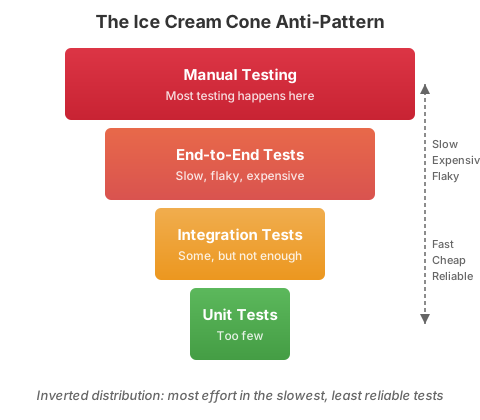
The anti-pattern: the ice cream cone
Most teams that struggle with CD have an inverted test distribution - too many slow, expensive
end-to-end tests and too few fast, focused tests.
The ice cream cone makes CD impossible. Manual testing gates block every release. End-to-end tests
take hours, fail randomly, and depend on external systems being healthy. The pipeline cannot give
a fast, reliable answer about deployability, so deployments become high-ceremony events.
What to Test - and What Not To
Before diving into the architecture, internalize the mindset that makes it work. The test
architecture below is not just a structure to follow - it flows from a few principles about
what testing should focus on and what it should ignore.
Interfaces are the most important thing to test
Most integration failures originate at interfaces - the boundaries where your system talks to
other systems. These boundaries are the highest-risk areas in your codebase, and they deserve
the most testing attention. But testing interfaces does not require integrating with the real
system on the other side.
When you test an interface you consume, the question is: “Can I understand the response and
act accordingly?” If you send a request for a user’s information, you do not test that you
get that specific user back. You test that you receive and understand the properties you need -
that your code can parse the response structure and make correct decisions based on it. This
distinction matters because it keeps your tests deterministic and focused on what you control.
Use contract mocks, virtual services, or any
test double that faithfully represents the interface contract. The test validates your side of
the conversation, not theirs.
Frontend and backend follow the same pattern
Both frontend and backend applications provide interfaces to consumers and consume interfaces
from providers. The only difference is the consumer: a frontend provides an interface for
humans, while a backend provides one for machines. The testing strategy is the same.
For a frontend:
Validate the interface you provide. The UI contains the components it should and they
appear correctly. This is the equivalent of verifying your API returns the right response
structure.
Test behavior isolated from presentation. Use your unit test framework to test the
logic that UI controls trigger, separated from the rendering layer. This gives you the same
speed and control you get from testing backend logic in isolation.
Verify that controls trigger the right logic. Confirm that user actions invoke the
correct behavior, without needing a running backend or browser-based E2E test.
This approach gives you targeted testing with far more control. Testing exception flows -
what happens when a service returns an error, when a network request times out, when data is
malformed - becomes straightforward instead of requiring elaborate E2E setups that are hard
to make fail on demand.
If you cannot fix it, do not test for it
This is the principle that most teams get wrong. You should never test the behavior of
services you consume. Testing their behavior is the responsibility of the team that builds
them. If their service returns incorrect data, you cannot fix that - so testing for it is
waste.
What you should test is how your system responds when a consumed service is unstable or
unavailable. Can you degrade gracefully? Do you return a meaningful error? Do you retry
appropriately? These are behaviors you own and can fix, so they belong in your test suite.
This principle directly enables the test architecture below. When you stop testing things you
cannot fix, you stop depending on external systems in your pipeline. Your tests become faster,
more deterministic, and more focused on the code your team actually ships.
Test Architecture for the CD Pipeline
A test architecture is the deliberate structure of how different test types work together across
your pipeline to give you deployment confidence. The Testing section
provides the full architecture reference, including five layers of tests (unit, integration,
functional, contract, and end-to-end), how they map to pipeline stages, pre-merge vs post-merge
strategies, a decision matrix for choosing test types, and best practices.
The key principle: everything that blocks deployment must be deterministic and under your
control. Everything that involves external systems runs asynchronously or post-deployment.
This gives you the independence to deploy any time, regardless of the state of the world
around you.
Starting Without Full Coverage
Teams often delay adopting CI because their existing code lacks tests. This is backwards. You do
not need tests for existing code to begin. You need one rule applied without exception:
Every new change gets a test. We will not go lower than the current level of code coverage.
Record your current coverage percentage as a baseline. Configure CI to fail if coverage drops
below that number. This does not mean the baseline is good enough - it means the trend only moves
in one direction. Every bug fix, every new feature, and every refactoring adds tests. Over time,
coverage grows organically in the areas that matter most: the code that is actively changing.
Do not attempt to retrofit tests across the entire codebase before starting CI. That approach
takes months, delivers no incremental value, and often produces low-quality tests written by
developers who are testing code they did not write and do not fully understand.
Test Quality Over Coverage Percentage
Code coverage tells you which lines executed during tests. It does not tell you whether the tests
verified anything meaningful. A test suite with 90% coverage and no assertions has high coverage
and zero value.
Better questions than “what is our coverage percentage?”:
When a test fails, does it point directly to the defect?
When we refactor, do tests break because behavior changed or because implementation details
shifted?
Do our tests catch the bugs that actually reach production?
Can a developer trust a green build enough to deploy immediately?
Why coverage mandates are harmful. When teams are required to hit a coverage target, they
write tests to satisfy the metric rather than to verify behavior. This produces tests that
exercise code paths without asserting outcomes, tests that mirror implementation rather than
specify behavior, and tests that inflate the number without improving confidence. The metric goes
up while the defect escape rate stays the same. Worse, meaningless tests add maintenance cost and
slow down the suite.
Instead of mandating a coverage number, set a floor (as described above) and focus team
attention on test quality: mutation testing scores, defect escape rates, and whether developers
actually trust the suite enough to deploy on green.
Quick-Start Action Plan
If your test suite is not yet ready to support CD, use this focused action plan to make immediate
progress.
Audit your current test suite
Assess where you stand before making changes.
Actions:
Run your full test suite 3 times. Note total duration and any tests that pass intermittently
(flaky tests).
Count tests by type: unit, integration, functional, end-to-end.
Identify tests that require external dependencies (databases, APIs, file systems) to run.
Record your baseline: total test count, pass rate, duration, flaky test count.
Map each test type to a pipeline stage. Which tests gate deployment? Which run asynchronously?
Which tests couple your deployment to external systems?
Output: A clear picture of your test distribution and the specific problems to address.
Fix or remove flaky tests
Flaky tests are worse than no tests. They train developers to ignore failures, which means real
failures also get ignored.
Actions:
Quarantine all flaky tests immediately. Move them to a separate suite that does not block the
build.
For each quarantined test, decide: fix it (if the behavior it tests matters) or delete it (if
it does not).
Common causes of flakiness: timing dependencies, shared mutable state, reliance on external
services, test order dependencies.
Target: zero flaky tests in your main test suite.
Decouple your pipeline from external dependencies
This is the highest-leverage change for CD. Identify every test that calls a real external service
and replace that dependency with a test double.
Actions:
List every external service your tests depend on: databases, APIs, message queues, file
storage, third-party services.
For each dependency, decide the right test double approach:
In-memory fakes for databases (e.g., SQLite, H2, testcontainers with local instances).
HTTP stubs for external APIs (e.g., WireMock, nock, MSW).
Fakes for message queues, email services, and other infrastructure.
Replace the dependencies in your unit, integration, and functional tests.
Move the original tests that hit real services into a separate suite - these become your
starting contract tests or E2E smoke tests.
Output: A test suite where everything that blocks the build is deterministic and runs without
network access to external systems.
Add functional tests for critical paths
If you don’t have functional tests (component tests) that exercise your whole service in
isolation, start with the most critical paths.
Actions:
Identify the 3-5 most critical user journeys or API endpoints in your application.
Write a functional test for each: boot the application, stub external dependencies, send a
real request or simulate a real user action, verify the response.
Each functional test should prove that the feature works correctly assuming external
dependencies behave as expected (which your test doubles encode).
Run these in CI on every commit.
Set up contract tests for your most important dependency
Pick the external dependency that changes most frequently or has caused the most production
issues. Set up a contract test for it.
Actions:
Write a contract test that validates the response structure (types, required fields, status
codes) of the dependency’s API.
Run it on a schedule (e.g., every hour or daily), not on every commit.
When it fails, update your test doubles to match the new reality and re-verify your
functional tests.
If the dependency is owned by another team in your organization, explore consumer-driven
contracts with a tool like Pact.
Test-Driven Development (TDD)
TDD is the practice of writing the test before the code. It is the most effective way to build a
reliable test suite because it ensures every piece of behavior has a corresponding test.
The TDD cycle:
Red: Write a failing test that describes the behavior you want.
Green: Write the minimum code to make the test pass.
Refactor: Improve the code without changing the behavior. The test ensures you do not
break anything.
Why TDD supports CD:
Every change is automatically covered by a test
The test suite grows proportionally with the codebase
Tests describe behavior, not implementation, making them more resilient to refactoring
Developers get immediate feedback on whether their change works
TDD is not mandatory for CD, but teams that practice TDD consistently have significantly faster
and more reliable test suites.
Getting started with TDD
If your team is new to TDD, start small:
Pick one new feature or bug fix this week.
Write the test first, watch it fail.
Write the code to make it pass.
Refactor.
Repeat for the next change.
Do not try to retroactively TDD your entire codebase. Apply TDD to new code and to any code you
modify.
Using Tests to Find and Eliminate Defect Sources
A test suite that catches bugs is good. A test suite that helps you stop producing those bugs
is transformational. Every test failure is evidence of a defect, and every defect has a source. If
you treat test failures only as things to fix, you are doing rework. If you treat them as
diagnostic data about where your process breaks down, you can make systemic changes that prevent
entire categories of defects from occurring.
This is the difference between a team that writes more tests to catch more bugs and a team that
changes how it works so that fewer bugs are created in the first place.
Two questions sharpen this thinking:
What is the earliest point we can detect this defect? The later a defect is found, the
more expensive it is to fix. A requirements defect caught during example mapping costs
minutes. The same defect caught in production costs days of incident response, rollback,
and rework.
Can AI help us detect it earlier? AI-assisted tools can now surface defects at stages
where only human review was previously possible, shifting detection left without adding
manual effort.
Trace every defect to its origin
When a test catches a defect - or worse, when a defect escapes to production - ask: where was
this defect introduced, and what would have prevented it from being created?
Defects do not originate randomly. They cluster around specific causes. The
CD Defect Detection and Remediation Catalog
documents over 30 defect types across eight categories, with detection methods, AI
opportunities, and systemic fixes for each. The examples below illustrate the pattern for
the defect sources most commonly encountered during a CD migration.
Requirements
Example defects
Building the right thing wrong, or the wrong thing right
Earliest detection
Discovery - before coding begins, during story refinement or example mapping
LLM review of acceptance criteria to flag ambiguity, missing edge cases, or contradictions before development begins. AI-generated test scenarios from user stories to validate completeness.
Systemic fix
Acceptance criteria as user outcomes, not implementation tasks. Three Amigos sessions before work starts. Example mapping to surface edge cases before coding begins.
Missing domain knowledge
Example defects
Business rules encoded incorrectly, implicit assumptions, tribal knowledge loss
Earliest detection
During coding - when the developer writes the logic
Traditional detection
Magic number detection, knowledge-concentration metrics, bus factor analysis from git history
AI-assisted detection
Identify undocumented business rules, missing context that a new developer would hit, and knowledge gaps. Compare implementation against domain documentation or specification files.
Systemic fix
Embed domain rules in code using ubiquitous language (DDD). Pair programming to spread knowledge. Living documentation generated from code. Rotate ownership regularly.
Integration boundaries
Example defects
Interface mismatches, wrong assumptions about upstream behavior, race conditions at service boundaries
Earliest detection
During design - when defining the interface contract
Review code and documentation to identify undocumented behavioral assumptions (timeouts, retries, error semantics). Predict which consumers break from API changes based on usage patterns when formal contracts do not exist.
Systemic fix
Contract tests mandatory per boundary. API-first design. Document behavioral contracts, not just data schemas. Circuit breakers as default at every external boundary.
Untested edge cases
Example defects
Null handling, boundary values, error paths
Earliest detection
Pre-commit - through null-safe type systems and static analysis in the IDE
Analyze code paths and generate tests for untested boundaries, null paths, and error conditions the developer did not consider. Triage surviving mutants by risk.
Systemic fix
Require a test for every bug fix. Adopt property-based testing for logic with many input permutations. Boundary value analysis as a standard practice. Enforce null-safe type systems.
Unintended side effects
Example defects
Change to module A breaks module B, unexpected feature interactions
Earliest detection
At commit time - when CI runs the full test suite
Traditional detection
Mutation testing, change impact analysis, feature flag interaction matrix
AI-assisted detection
Reason about semantic change impact beyond syntactic dependencies. Map a diff to affected modules and flag untested downstream paths before the commit reaches CI.
Systemic fix
Small focused commits. Trunk-based development (integrate daily so side effects surface immediately). Feature flags with controlled rollout. Modular design with clear boundaries.
Accumulated complexity
Example defects
Defects cluster in the most complex, most-changed files
Earliest detection
Continuously - through static analysis in the IDE and CI
Identify architectural drift, abstraction decay, and calcified workarounds that static analysis misses. Cross-reference change frequency with defect history to prioritize refactoring.
Systemic fix
Refactoring as part of every story, not deferred to a “tech debt sprint.” Dedicated complexity budget. Treat rising complexity as a leading indicator.
Pre-commit for branch age; CI for pipeline and batching issues
Traditional detection
Branch age alerts, merge conflict frequency, pipeline audit for manual gates, changes-per-deploy metrics, rollback testing
AI-assisted detection
Automated risk scoring from change diffs and deployment history. Blast radius analysis. Auto-approve low-risk changes and flag high-risk with evidence, replacing manual change advisory boards.
Systemic fix
Trunk-based development. Automate every step from commit to production. Single-piece flow with feature flags. Blue/green or canary as default deployment strategy.
Predict downstream impact of schema changes by understanding how consumers actually use data. Flag code where optional fields are used without null checks, even in non-strict languages.
Systemic fix
Enforce null-safe types. Expand-then-contract for all schema changes. Design for idempotency. Short TTLs over complex cache invalidation.
For the complete catalog covering all defect categories - including product and discovery,
dependency and infrastructure, testing and observability gaps, and more - see the
CD Defect Detection and Remediation Catalog.
Build a defect feedback loop
Knowing the categories is not enough. You need a process that systematically connects test
failures to root causes and root causes to systemic fixes.
Step 1: Classify every defect. When a test fails or a bug is reported, tag it with its origin
category from the table above. This takes seconds and builds a dataset over time.
Step 2: Look for patterns. Monthly (or during retrospectives), review the defect
classifications. Which categories appear most often? That is where your process is weakest.
Step 3: Apply the systemic fix, not just the local fix. When you fix a bug, also ask: what
systemic change would prevent this entire category of bug? If most defects come from integration
boundaries, the fix is not “write more integration tests” - it is “make contract tests mandatory
for every new boundary.” If most defects come from untested edge cases, the fix is not “increase
code coverage” - it is “adopt property-based testing as a standard practice.”
Step 4: Measure whether the fix works. Track defect counts by category over time. If you
applied a systemic fix for integration boundary defects and the count does not drop, the fix is
not working and you need a different approach.
The test-for-every-bug-fix rule
One of the most effective systemic practices: every bug fix must include a test that
reproduces the bug before the fix and passes after. This is non-negotiable for CD because:
It proves the fix actually addresses the defect (not just the symptom).
It prevents the same defect from recurring.
It builds test coverage exactly where the codebase is weakest - the places where bugs actually
occur.
Over time, it shifts your test suite from “tests we thought to write” to “tests that cover
real failure modes.”
Advanced detection techniques
As your test architecture matures, add techniques that find defects humans overlook:
Technique
What It Finds
When to Adopt
Mutation testing (Stryker, PIT)
Tests that pass but do not actually verify behavior - your test suite’s blind spots
When basic coverage is in place but defect escape rate is not dropping
Property-based testing
Edge cases and boundary conditions across large input spaces that example-based tests miss
When defects cluster around unexpected input combinations
Chaos engineering
Failure modes in distributed systems - what happens when a dependency is slow, returns errors, or disappears
When you have functional tests and contract tests in place and need confidence in failure handling
Static analysis and linting
Null safety violations, type errors, security vulnerabilities, dead code
With a reliable test suite in place, automate your build process so that building, testing, and
packaging happens with a single command. Continue to Build Automation.
Inverted Test Pyramid - Anti-pattern where too many slow E2E tests replace fast unit tests
Pressure to Skip Testing - Anti-pattern where testing is treated as optional under deadline pressure
3 - Build Automation
Automate your build process so a single command builds, tests, and packages your application.
Phase 1 - Foundations
Build automation is the mechanism that turns trunk-based development and testing into a continuous integration loop. If you cannot build, test, and package your application with a single command, you cannot automate your pipeline. This page covers the practices that make your build reproducible, fast, and trustworthy.
What Build Automation Means
Build automation is the practice of scripting every step required to go from source code to a deployableartifact. A single command - or a single CI trigger - should execute the entire sequence:
Compile the source code (if applicable)
Run all automated tests
Package the application into a deployable artifact (container image, binary, archive)
Report the result (pass or fail, with details)
No manual steps. No “run this script, then do that.” No tribal knowledge about which flags to set or which order to run things. One command, every time, same result.
The Litmus Test
Ask yourself: “Can a new team member clone the repository and produce a deployable artifact with a single command within 15 minutes?”
If the answer is no, your build is not fully automated.
The same commit always produces the same artifact, on any machine
Speed
Automated builds can be optimized, cached, and parallelized
Confidence
If the build passes, the artifact is trustworthy
Developer experience
Developers run the same build locally that CI runs, eliminating “works on my machine”
Pipeline foundation
The CD pipeline is just the build running automatically on every commit
Without build automation, every other practice in this guide breaks down. You cannot have continuous integration if the build requires manual intervention. You cannot have a deterministic pipeline if the build produces different results depending on who runs it.
Key Practices
1. Version-Controlled Build Scripts
Your build configuration lives in the same repository as your code. It is versioned, reviewed, and tested alongside the application.
Anti-pattern: Build instructions that exist only in a wiki, a Confluence page, or one developer’s head. If the build steps are not in the repository, they will drift from reality.
2. Dependency Management
All dependencies must be declared explicitly and resolved deterministically.
Practices:
Lock files: Use lock files (package-lock.json, Pipfile.lock, go.sum) to pin exact dependency versions. Check lock files into version control.
Reproducible resolution: Running the dependency install twice should produce identical results.
No undeclared dependencies: Your build should not rely on tools or libraries that happen to be installed on the build machine. If you need it, declare it.
Dependency scanning: Automate vulnerability scanning of dependencies as part of the build. Do not wait for a separate security review.
Anti-pattern: “It builds on Jenkins because Jenkins has Java 11 installed, but the Dockerfile uses Java 17.” The build must declare and control its own runtime.
3. Build Caching
Fast builds keep developers in flow. Caching is the primary mechanism for build speed.
What to cache:
Dependencies: Download once, reuse across builds. Most build tools (npm, Maven, Gradle, pip) support a local cache.
Docker layers: Structure your Dockerfile so that rarely-changing layers (OS, dependencies) are cached and only the application code layer is rebuilt.
Test fixtures: Prebuilt test data or container images used by tests.
Guidelines:
Cache aggressively for local development and CI
Invalidate caches when dependencies or build configuration change
Do not cache test results - tests must always run
4. Single Build Script Entry Point
Developers, CI, and CD should all use the same entry point.
Makefile as single build entry point
# Example: Makefile as the single entry point

.PHONY: build test package all

all: build test package

build:
	./gradlew compileJava

test:
	./gradlew test

package:
	docker build -t myapp:$(GIT_SHA) .

clean:
	./gradlew clean
	docker rmi myapp:$(GIT_SHA) || true
The CI server runs make all. A developer runs make all. The result is the same. There is no separate “CI build script” that diverges from what developers run locally.
5. Artifact Versioning
Every build artifact must be traceable to the exact commit that produced it.
Practices:
Tag artifacts with the Git commit SHA or a build number derived from it
Store build metadata (commit, branch, timestamp, builder) in the artifact or alongside it
Never overwrite an existing artifact - if the version exists, the artifact is immutable
The CI server is the mechanism that runs your build automatically. In Phase 1, the setup is straightforward:
What the CI Server Does
Watches the trunk for new commits
Runs the build (the same command a developer would run locally)
Reports the result (pass/fail, test results, build duration)
Notifies the team if the build fails
Minimum CI Configuration
Regardless of which CI tool you use (GitHub Actions, GitLab CI, Jenkins, CircleCI), the configuration follows the same pattern:
Conceptual minimum CI configuration
# Conceptual CI configuration (adapt to your tool)trigger:branch: main # Run on every commit to trunksteps:-checkout: source code
-install: dependencies
-run: build
-run: tests
-run: package
-report: test results and build status
CI Principles for Phase 1
Run on every commit. Not nightly, not weekly, not “when someone remembers.” Every commit to trunk triggers a build.
Keep the build green. A failing build is the team’s top priority. Work stops until trunk is green again. (See Working Agreements.)
Run the same build everywhere. The CI server runs the same script as local development. No CI-only steps that developers cannot reproduce.
Fail fast. Run the fastest checks first (compilation, unit tests) before the slower ones (integration tests, packaging).
Build Time Targets
Build speed directly affects developer productivity and integration frequency. If the build takes 30 minutes, developers will not integrate multiple times per day.
Build Phase
Target
Rationale
Compilation
< 1 minute
Developers need instant feedback on syntax and type errors
Unit tests
< 3 minutes
Fast enough to run before every commit
Integration tests
< 5 minutes
Must complete before the developer context-switches
Full build (compile + test + package)
< 10 minutes
The outer bound for fast feedback
If Your Build Is Too Slow
Slow builds are a common constraint that blocks CD adoption. Address them systematically:
Profile the build. Identify which steps take the most time. Optimize the bottleneck, not everything.
Parallelize tests. Most test frameworks support parallel execution. Run independent test suites concurrently.
Use build caching. Avoid recompiling or re-downloading unchanged dependencies.
Split the build. Run fast checks (lint, compile, unit tests) as a “fast feedback” stage. Run slower checks (integration tests, security scans) as a second stage.
Upgrade build hardware. Sometimes the fastest optimization is more CPU and RAM.
The target is under 10 minutes for the feedback loop that developers use on every commit. Longer-running validation (E2E tests, performance tests) can run in a separate stage.
Common Anti-Patterns
Manual Build Steps
Symptom: The build process includes steps like “open this tool and click Run” or “SSH into the build server and execute this script.”
Problem: Manual steps are error-prone, slow, and cannot be parallelized or cached. They are the single biggest obstacle to build automation.
Fix: Script every step. If a human must perform the step today, write a script that performs it tomorrow.
Environment-Specific Builds
Symptom: The build produces different artifacts for different environments (dev, staging, production). Or the build only works on specific machines because of pre-installed tools.
Problem: Environment-specific builds mean you are not testing the same artifact you deploy. Bugs that appear in production but not in staging become impossible to diagnose.
Fix: Build one artifact and configure it per environment at deployment time. The artifact is immutable; the configuration is external. (See Application Config in Phase 2.)
Build Scripts That Only Run in CI
Symptom: The CI pipeline has build steps that developers cannot run locally. Local development uses a different build process.
Problem: Developers cannot reproduce CI failures locally, leading to slow debugging cycles and “push and pray” development.
Fix: Use a single build entry point (Makefile, build script) that both CI and developers use. CI configuration should only add triggers and notifications, not build logic.
Missing Dependency Pinning
Symptom: Builds break randomly because a dependency released a new version overnight.
Problem: Without pinned dependencies, the build is non-deterministic. The same code can produce different results on different days.
Fix: Use lock files. Pin all dependency versions. Update dependencies intentionally, not accidentally.
Long Build Queues
Symptom: Developers commit to trunk, but the build does not run for 20 minutes because the CI server is processing a queue.
Problem: Delayed feedback defeats the purpose of CI. If developers do not see the result of their commit for 30 minutes, they have already moved on.
Fix: Ensure your CI infrastructure can handle your team’s commit frequency. Use parallel build agents. Prioritize builds on the main branch.
With build automation in place, you can build, test, and package your application reliably. The next foundation is ensuring that the work you integrate daily is small enough to be safe. Continue to Work Decomposition.
Everything as Code - Companion guide for versioning build scripts, pipelines, and infrastructure
Build Duration - Metric for tracking build speed improvements
4 - Work Decomposition
Break features into small, deliverable increments that can be completed in 2 days or less.
Phase 1 - Foundations
Trunk-based development requires daily integration, and daily integration requires small work. If a feature takes two weeks to build, you cannot integrate it daily without decomposing it first. This page covers the techniques for breaking work into small, deliverable increments that flow through your pipeline continuously.
Why Small Work Matters for CD
Continuous delivery depends on a simple equation: small changes, integrated frequently, are safer than large changes integrated rarely.
Every practice in Phase 1 reinforces this:
Trunk-based development requires that you integrate at least daily. You cannot integrate a two-week feature daily unless you decompose it.
Testing fundamentals work best when each change is small enough to test thoroughly.
Code review is fast when the change is small. A 50-line change can be reviewed in minutes. A 2,000-line change takes hours - if it gets reviewed at all.
The data supports this. The DORA research consistently shows that smaller batch sizes correlate with higher delivery performance. Small changes have:
Lower risk: If a small change breaks something, the blast radius is limited, and the cause is obvious.
Faster feedback: A small change gets through the pipeline quickly. You learn whether it works today, not next week.
Easier rollback: Rolling back a 50-line change is straightforward. Rolling back a 2,000-line change often requires a new deployment.
Better flow: Small work items move through the system predictably. Large work items block queues and create bottlenecks.
The 2-Day Rule
If a work item takes longer than 2 days to complete, it is too big.
This is not arbitrary. Two days gives you at least one integration to trunk per day (the minimum for TBD) and allows for the natural rhythm of development: plan, implement, test, integrate, move on.
When a developer says “this will take a week,” the answer is not “go faster.” The answer is “break it into smaller pieces.”
What “Complete” Means
A work item is complete when it is:
Integrated to trunk
All tests pass
The change is deployable (even if the feature is not yet user-visible)
If a story requires a feature flag to hide incomplete user-facing behavior, that is fine. The code is still integrated, tested, and deployable.
Story Slicing Techniques
Story slicing is the practice of breaking user stories into the smallest possible increments that still deliver value or make progress toward delivering value.
The INVEST Criteria
Good stories follow INVEST:
Criterion
Meaning
Why It Matters for CD
Independent
Can be developed and deployed without waiting for other stories
Enables parallel work and avoids blocking
Negotiable
Details can be discussed and adjusted
Allows the team to find the smallest valuable slice
Valuable
Delivers something meaningful to the user or the system
Prevents “technical stories” that do not move the product forward
Estimable
Small enough that the team can reasonably estimate it
Large stories are unestimable because they hide unknowns
The most important slicing technique for CD is vertical slicing: cutting through all layers of the application to deliver a thin but complete slice of functionality.
Vertical slice (correct):
“As a user, I can log in with my email and password.”
This slice touches the UI (login form), the API (authentication endpoint), and the database (user lookup). It is deployable and testable end-to-end.
Horizontal slice (anti-pattern):
“Build the database schema for user accounts.”
“Build the authentication API.”
“Build the login form UI.”
Each horizontal slice is incomplete on its own. None is deployable. None is testable end-to-end. They create dependencies between work items and block flow.
Vertical slicing in distributed systems
The example above assumes a team that owns every layer from the UI to the database. In large distributed systems, most teams own a subdomain. They are full-stack within that subdomain but may not own any user-facing surface.
The principle does not change. A vertical slice still cuts through all layers end-to-end. “End-to-end” means different things in each context.
A vertical slice: one behavior delivered through the service boundary (the API contract), the business logic, and the data store. The team does not own or coordinate with any consumer - whether a UI or another service - except through the API contract. They define a stable contract and deploy behind it independently.
The real difference between these two contexts is whether the public interface is designed for humans or machines. A full-stack product team owns a human-facing surface: the slice is done when a user can observe the behavior through that interface. A subdomain product team owns a machine-facing surface: the slice is done when the API contract satisfies the agreed behavior for its service consumers. In both cases, the question is the same - does this change deliver complete, observable behavior through the interface your team owns? If it only touches one layer beneath that interface, it is a horizontal slice regardless of how you label it.
When teams in a distributed system split work by layer - schema changes in one story, business logic in another, contract changes in a third - nothing is deployable until all layers converge. Slicing vertically within the domain means each story is independently deployable behind a stable contract. See Horizontal Slicing for the full treatment of this failure mode in distributed systems.
Slicing Strategies
When a story feels too big, apply one of these strategies:
Strategy
How It Works
Example
By workflow step
Implement one step of a multi-step process
“User can add items to cart” (before “user can checkout”)
By business rule
Implement one rule at a time
“Orders over $100 get free shipping” (before “orders ship to international addresses”)
“Create a new customer” (before “edit customer” or “delete customer”)
By performance
Get it working first, optimize later
“Search returns results” (before “search returns results in under 200ms”)
By platform
Support one platform first
“Works on desktop web” (before “works on mobile”)
Happy path first
Implement the success case first
“User completes checkout” (before “user sees error when payment fails”)
Example: Decomposing a Feature
Original story (too big):
“As a user, I can manage my profile including name, email, avatar, password, notification preferences, and two-factor authentication.”
Decomposed into vertical slices:
“User can view their current profile information” (read-only display)
“User can update their name” (simplest edit)
“User can update their email with verification” (adds email flow)
“User can upload an avatar image” (adds file handling)
“User can change their password” (adds security validation)
“User can configure notification preferences” (adds preferences)
“User can enable two-factor authentication” (adds 2FA flow)
Each slice is independently deployable, testable, and completable within 2 days. Each delivers incremental value. The feature is built up over a series of small deliveries rather than one large batch.
BDD as a Decomposition Tool
Behavior-Driven Development (BDD) is not just a testing practice - it is a powerful tool for decomposing work into small, clear increments.
Three Amigos
Before work begins, hold a brief “Three Amigos” session with three perspectives:
Business/Product: What should this feature do? What is the expected behavior?
Development: How will we build it? What are the technical considerations?
Testing: How will we verify it? What are the edge cases?
This 15-30 minute conversation accomplishes two things:
Shared understanding: Everyone agrees on what “done” looks like before work begins.
Natural decomposition: Discussing specific scenarios reveals natural slice boundaries.
Specification by Example
Write acceptance criteria as concrete examples, not abstract requirements.
Abstract (hard to slice):
“The system should validate user input.”
Concrete (easy to slice):
Given an email field, when the user enters “not-an-email”, then the form shows “Please enter a valid email address.”
Given a password field, when the user enters fewer than 8 characters, then the form shows “Password must be at least 8 characters.”
Given a name field, when the user leaves it blank, then the form shows “Name is required.”
Each concrete example can become its own story or task. The scope is clear, the acceptance criteria are testable, and the work is small.
Given-When-Then Format
Structure acceptance criteria in Given-When-Then format to make them executable:
Given-When-Then: user login scenarios
Feature: User login

  Scenario: Successful login with valid credentials
    Given a registered user with email "user@example.com"
    When they enter their correct password and click "Log in"
    Then they are redirected to the dashboard

  Scenario: Failed login with wrong password
    Given a registered user with email "user@example.com"
    When they enter an incorrect password and click "Log in"
    Then they see the message "Invalid email or password"
    And they remain on the login page
Each scenario is a natural unit of work. Implement one scenario at a time, integrate to trunk after each one.
Task Decomposition Within Stories
Even well-sliced stories may contain multiple tasks. Decompose stories into tasks that can be completed and integrated independently.
Example story: “User can update their name”
Tasks:
Add the name field to the profile API endpoint (backend change, integration test)
Add the name field to the profile form (frontend change, unit test)
Connect the form to the API endpoint (integration, E2E test)
Each task results in a commit to trunk. The story is completed through a series of small integrations, not one large merge.
Guidelines for task decomposition:
Each task should take hours, not days
Each task should leave trunk in a working state after integration
Tasks should be ordered so that the simplest changes come first
If a task requires a feature flag or stub to be integrated safely, that is fine
Common Anti-Patterns
Horizontal Slicing
Symptom: Stories are organized by architectural layer: “build the database schema,” “build the API,” “build the UI.”
Problem: No individual slice is deployable or testable end-to-end. Integration happens at the end, which is where bugs are found and schedules slip.
Fix: Slice vertically. Every story should touch all the layers needed to deliver a thin slice of complete functionality.
Technical Stories
Symptom: The backlog contains stories like “refactor the database access layer” or “upgrade to React 18” that do not deliver user-visible value.
Problem: Technical work is important, but when it is separated from feature work, it becomes hard to prioritize and easy to defer. It also creates large, risky changes.
Fix: Embed technical improvements in feature stories. Refactor as you go. If a technical change is necessary, tie it to a specific business outcome and keep it small enough to complete in 2 days.
Stories That Are Really Epics
Symptom: A story has 10+ acceptance criteria, or the estimate is “8 points” or “2 weeks.”
Problem: Large stories hide unknowns, resist estimation, and cannot be integrated daily.
Fix: If a story has more than 3-5 acceptance criteria, it is an epic. Break it into smaller stories using the slicing strategies above.
Splitting by Role Instead of by Behavior
Symptom: Separate stories for “frontend developer builds the UI” and “backend developer builds the API.”
Problem: This creates handoff dependencies and delays integration. The feature is not testable until both stories are complete.
Fix: Write stories from the user’s perspective. The same developer (or pair) implements the full vertical slice.
Deferring “Edge Cases” Indefinitely
Symptom: The team builds the happy path and creates a backlog of “handle error case X” stories that never get prioritized.
Problem: Error handling is not optional. Unhandled edge cases become production incidents.
Fix: Include the most important error cases in the initial story decomposition. Use the “happy path first” slicing strategy, but schedule edge case stories immediately after, not “someday.”
Small, well-decomposed work flows through the system quickly - but only if code review does not become a bottleneck. Continue to Code Review to learn how to keep review fast and effective.
Streamline code review to provide fast feedback without blocking flow.
Phase 1 - Foundations
Code review is essential for quality, but it is also the most common bottleneck in teams adopting trunk-based development. If reviews take days, daily integration is impossible. This page covers review techniques that maintain quality while enabling the flow that CD requires.
Why Code Review Matters for CD
Code review serves multiple purposes:
Defect detection: A second pair of eyes catches bugs that the author missed.
Knowledge sharing: Reviews spread understanding of the codebase across the team.
Consistency: Reviews enforce coding standards and architectural patterns.
Mentoring: Junior developers learn by having their code reviewed and by reviewing others’ code.
These are real benefits. The challenge is that traditional code review - open a pull request, wait for someone to review it, address comments, wait again - is too slow for CD.
In a CD workflow, code review must happen within minutes or hours, not days. The review is still rigorous, but the process is designed for speed.
The Core Tension: Quality vs. Flow
Traditional teams optimize review for thoroughness: detailed comments, multiple reviewers, extensive back-and-forth. This produces high-quality reviews but blocks flow.
CD teams optimize review for speed without sacrificing the quality that matters. The key insight is that most of the quality benefit of code review comes from small, focused reviews done quickly, not from exhaustive reviews done slowly.
Traditional Review
CD-Compatible Review
Review happens after the feature is complete
Review happens continuously throughout development
Large diffs (hundreds or thousands of lines)
Small diffs (< 200 lines, ideally < 50)
Multiple rounds of feedback and revision
One round, or real-time feedback during pairing
Review takes 1-3 days
Review takes minutes to a few hours
Review is asynchronous by default
Review is synchronous by preference
2+ reviewers required
1 reviewer (or pairing as the review)
Synchronous vs. Asynchronous Review
Synchronous Review (Preferred for CD)
In synchronous review, the reviewer and author are engaged at the same time. Feedback is immediate. Questions are answered in real time. The review is done when the conversation ends.
Methods:
Pair programming: Two developers work on the same code at the same time. Review is continuous. There is no separate review step because the code was reviewed as it was written.
Mob programming: The entire team (or a subset) works on the same code together. Everyone reviews in real time.
Over-the-shoulder review: The author walks the reviewer through the change in person or on a video call. The reviewer asks questions and provides feedback immediately.
Advantages for CD:
Zero wait time between “ready for review” and “review complete”
Higher bandwidth communication (tone, context, visual cues) catches more issues
Immediate resolution of questions - no async back-and-forth
Knowledge transfer happens naturally through the shared work
Asynchronous Review (When Necessary)
Sometimes synchronous review is not possible - time zones, schedules, or team preferences may require asynchronous review. This is fine, but it must be fast.
Rules for async review in a CD workflow:
Review within 2 hours. If a pull request sits for a day, it blocks integration. Set a team working agreement: “pull requests are reviewed within 2 hours during working hours.”
Keep changes small. A 50-line change can be reviewed in 5 minutes. A 500-line change takes an hour and reviewers procrastinate on it.
Use draft PRs for early feedback. If you want feedback on an approach before the code is complete, open a draft PR. Do not wait until the change is “perfect.”
Avoid back-and-forth. If a comment requires discussion, move to a synchronous channel (call, chat). Async comment threads that go 5 rounds deep are a sign the change is too large or the design was not discussed upfront.
Review Techniques Compatible with TBD
Pair Programming as Review
When two developers pair on a change, the code is reviewed as it is written. There is no separate review step, no pull request waiting for approval, and no delay to integration.
How it works with TBD:
Two developers sit together (physically or via screen share)
They discuss the approach, write the code, and review each other’s decisions in real time
When the change is ready, they commit to trunk together
Both developers are accountable for the quality of the code
When to pair:
New or unfamiliar areas of the codebase
Changes that affect critical paths
When a junior developer is working on a change (pairing doubles as mentoring)
Any time the change involves design decisions that benefit from discussion
Pair programming satisfies most organizations’ code review requirements because two developers have actively reviewed and approved the code.
Mob Programming as Review
Mob programming extends pairing to the whole team. One person drives (types), one person navigates (directs), and the rest observe and contribute.
When to mob:
Establishing new patterns or architectural decisions
Complex changes that benefit from multiple perspectives
Onboarding new team members to the codebase
Working through particularly difficult problems
Mob programming is intensive but highly effective. Every team member understands the code, the design decisions, and the trade-offs.
Rapid Async Review
For teams that use pull requests, rapid async review adapts the pull request workflow for CD speed.
Practices:
Auto-assign reviewers. Do not wait for someone to volunteer. Use tools to automatically assign a reviewer when a PR is opened.
Keep PRs small. Target < 200 lines of changed code. Smaller PRs get reviewed faster and more thoroughly.
Provide context. Write a clear PR description that explains what the change does, why it is needed, and how to verify it. A good description reduces review time dramatically.
Use automated checks. Run linting, formatting, and tests before the human review. The reviewer should focus on logic and design, not style.
Approve and merge quickly. If the change looks correct, approve it. Do not hold it for nitpicks. Nitpicks can be addressed in a follow-up commit.
What to Review
Not everything in a code change deserves the same level of scrutiny. Focus reviewer attention where it matters most.
High Priority (Reviewer Should Focus Here)
Behavior correctness: Does the code do what it is supposed to do? Are edge cases handled?
Security: Does the change introduce vulnerabilities? Are inputs validated? Are secrets handled properly?
Clarity: Can another developer understand this code in 6 months? Are names clear? Is the logic straightforward?
Test coverage: Are the new behaviors tested? Do the tests verify the right things?
API contracts: Do changes to public interfaces maintain backward compatibility? Are they documented?
Error handling: What happens when things go wrong? Are errors caught, logged, and surfaced appropriately?
Low Priority (Automate Instead of Reviewing)
Code style and formatting: Use automated formatters (Prettier, Black, gofmt). Do not waste reviewer time on indentation and bracket placement.
Import ordering: Automate with linting rules.
Naming conventions: Enforce with lint rules where possible. Only flag naming in review if it genuinely harms readability.
Unused variables or imports: Static analysis tools catch these instantly.
Consistent patterns: Where possible, encode patterns in architecture decision records and lint rules rather than relying on reviewers to catch deviations.
Rule of thumb: If a style or convention issue can be caught by a machine, do not ask a human to catch it. Reserve human attention for the things machines cannot evaluate: correctness, design, clarity, and security.
Review Scope for Small Changes
In a CD workflow, most changes are small - tens of lines, not hundreds. This changes the economics of review.
Change Size
Expected Review Time
Review Depth
< 20 lines
2-5 minutes
Quick scan: is it correct? Any security issues?
20-100 lines
5-15 minutes
Full review: behavior, tests, clarity
100-200 lines
15-30 minutes
Detailed review: design, contracts, edge cases
> 200 lines
Consider splitting the change
Large changes get superficial reviews
Research consistently shows that reviewer effectiveness drops sharply after 200-400 lines. If you are regularly reviewing changes larger than 200 lines, the problem is not the review process - it is the work decomposition.
Working Agreements for Review SLAs
Establish clear team agreements about review expectations. Without explicit agreements, review latency will drift based on individual habits.
Recommended Review Agreements
Agreement
Target
Response time
Review within 2 hours during working hours
Reviewer count
1 reviewer (or pairing as the review)
PR size
< 200 lines of changed code
Blocking issues only
Only block a merge for correctness, security, or significant design issues
Nitpicks
Use a “nit:” prefix. Nitpicks are suggestions, not merge blockers
Stale PRs
PRs open for > 24 hours are escalated to the team
Self-review
Author reviews their own diff before requesting review
How to Enforce Review SLAs
Track review turnaround time. If it consistently exceeds 2 hours, discuss it in retrospectives.
Make review a first-class responsibility, not something developers do “when they have time.”
If a reviewer is unavailable, any other team member can review. Do not create single-reviewer dependencies.
Consider pairing as the default and async review as the exception. This eliminates the review bottleneck entirely.
Code Review and Trunk-Based Development
Code review and TBD work together, but only if review does not block integration. Here is how to reconcile them:
TBD Requirement
How Review Adapts
Integrate to trunk at least daily
Reviews must complete within hours, not days
Branches live < 24 hours
PRs are opened and merged within the same day
Trunk is always releasable
Reviewers focus on correctness, not perfection
Small, frequent changes
Small changes are reviewed quickly and thoroughly
If your team finds that review is the bottleneck preventing daily integration, the most effective solution is to adopt pair programming. It eliminates the review step entirely by making review continuous.
Measuring Success
Metric
Target
Why It Matters
Review turnaround time
< 2 hours
Prevents review from blocking integration
PR size (lines changed)
< 200 lines
Smaller PRs get faster, more thorough reviews
PR age at merge
< 24 hours
Aligns with TBD branch age constraint
Review rework cycles
< 2 rounds
Multiple rounds indicate the change is too large or design was not discussed upfront
Next Step
Code review practices need to be codified in team agreements alongside other shared commitments. Continue to Working Agreements to establish your team’s definitions of done, ready, and CI practice.
Establish shared definitions of done and ready to align the team on quality and process.
Phase 1 - Foundations
The practices in Phase 1 - trunk-based development, testing, small work, and fast review - only work when the whole team commits to them. Working agreements make that commitment explicit. This page covers the key agreements a team needs before moving to pipeline automation in Phase 2.
Why Working Agreements Matter
A working agreement is a shared commitment that the team creates, owns, and enforces together. It is not a policy imposed from outside. It is the team’s own answer to the question: “How do we work together?”
Without working agreements, CD practices drift. One developer integrates daily; another keeps a branch for a week. One developer fixes a broken build immediately; another waits until after lunch. These inconsistencies compound. Within weeks, the team is no longer practicing CD - they are practicing individual preferences.
Working agreements prevent this drift by making expectations explicit. When everyone agrees on what “done” means, what “ready” means, and how CI works, the team can hold each other accountable without conflict.
Definition of Done
The Definition of Done (DoD) is the team’s shared standard for when a work item is complete. For CD, the Definition of Done must include deployment.
Minimum Definition of Done for CD
A work item is done when all of the following are true:
Code is integrated to trunk
All automated tests pass
Code has been reviewed (via pairing, mob, or pull request)
Relevant documentation is updated (API docs, runbooks, etc.)
Feature flags are in place for incomplete user-facing features
Why “Deployed to Production” Matters
Many teams define “done” as “code is merged.” This creates a gap between “done” and “delivered.” Work accumulates in a staging environment, waiting for a release. Risk grows with each unreleased change.
In a CD organization, “done” means the change is in production (or ready to be deployed to production at any time). This is the ultimate test of completeness: the change works in the real environment, with real data, under real load.
In Phase 1, you may not yet have the pipeline to deploy every change to production automatically. That is fine - your DoD should still include “deployable to production” as the standard, even if the deployment step is not yet automated. The pipeline work in Phase 2 will close that gap.
Extending Your Definition of Done
As your CD maturity grows, extend the DoD:
Phase
Addition to DoD
Phase 1 (Foundations)
Code integrated to trunk, tests pass, reviewed, deployable
Change deployed to production behind a feature flag
Phase 4 (Deliver on Demand)
Change deployed to production and monitored
Definition of Ready
The Definition of Ready (DoR) answers: “When is a work item ready to be worked on?” Pulling unready work into development creates waste - unclear requirements lead to rework, missing acceptance criteria lead to untestable changes, and oversized stories lead to long-lived branches.
Minimum Definition of Ready for CD
A work item is ready when all of the following are true:
Acceptance criteria are defined and specific (using Given-When-Then or equivalent)
The work item is small enough to complete in 2 days or less
The work item is testable - the team knows how to verify it works
Dependencies are identified and resolved (or the work item is independent)
The team has discussed the work item (Three Amigos or equivalent)
The work item is estimated (or the team has agreed estimation is unnecessary for items this small)
Common Mistakes with Definition of Ready
Making it too rigid. The DoR is a guideline, not a gate. If the team agrees a work item is understood well enough, it is ready. Do not use the DoR to avoid starting work.
Requiring design documents. For small work items (< 2 days), a conversation and acceptance criteria are sufficient. Formal design documents are for larger initiatives.
Skipping the conversation. The DoR is most valuable as a prompt for discussion, not as a checklist. The Three Amigos conversation matters more than the checkboxes.
CI Working Agreement
The CI working agreement codifies how the team practices continuous integration. This is the most operationally critical working agreement for CD.
The CI Agreement
The team agrees to the following practices:
Integration:
Every developer integrates to trunk at least once per day
Branches (if used) live for less than 24 hours
No long-lived feature, development, or release branches
Build:
All tests must pass before merging to trunk
The build runs on every commit to trunk
Build results are visible to the entire team
Broken builds:
A broken build is the team’s top priority - it is fixed before any new work begins
The developer(s) who broke the build are responsible for fixing it immediately
If the fix will take more than 10 minutes, revert the change and fix it offline
No one commits to a broken trunk (except to fix the break)
Finishing existing work takes priority over starting new work
The team limits work in progress to maintain flow
If a developer is blocked, they help a teammate before starting a new story
Why “Broken Build = Top Priority”
This is the single most important CI agreement. When the build is broken:
No one can integrate safely. Changes are stacking up.
Trunk is not releasable. The team has lost its safety net.
Every minute the build stays broken, the team accumulates risk.
“Fix the build” is not a suggestion. It is an agreement that the team enforces collectively. If the build is broken and someone starts a new feature instead of fixing it, the team should call that out. This is not punitive - it is the team protecting its own ability to deliver.
Stop the Line - Why All Work Stops
Some teams interpret “fix the build” as “stop merging until it is green.” That is not enough. When the build is red, all feature work stops - not just merges. Every developer on the team shifts attention to restoring green.
This sounds extreme, but the reasoning is straightforward:
Work closer to production is more valuable than work further away. A broken trunk means nothing in progress can ship. Fixing the build is the highest-leverage activity anyone on the team can do.
Continuing feature work creates a false sense of progress. Code written against a broken trunk is untested against the real baseline. It may compile, but it has not been validated. That is not progress - it is inventory.
The team mindset matters more than the individual fix. When everyone stops, the message is clear: the build belongs to the whole team, not just the person who broke it. This shared ownership is what separates teams that practice CI from teams that merely have a CI server.
Two Timelines: Stop vs. Do Not Stop
Consider two teams that encounter the same broken build at 10:00 AM.
Team A stops all feature work:
10:00 - Build breaks. The team sees the alert and stops.
10:05 - Two developers pair on the fix while a third reviews the failing test.
10:20 - Fix is pushed. Build goes green.
10:25 - The team resumes feature work. Total disruption: roughly 30 minutes.
Team B treats it as one person’s problem:
10:00 - Build breaks. The developer who caused it starts investigating alone.
10:30 - Other developers commit new changes on top of the broken trunk. Some changes conflict with the fix in progress.
11:30 - The original developer’s fix does not work because the codebase has shifted underneath them.
14:00 - After multiple failed attempts, the team reverts three commits (the original break plus two that depended on the broken state).
15:00 - Trunk is finally green. The team has lost most of the day, and three developers need to redo work. Total disruption: 5+ hours.
The team that stops immediately pays a small, predictable cost. The team that does not stop pays a large, unpredictable one.
The Revert Rule
If a broken build cannot be fixed within 10 minutes, revert the offending commit and fix the issue on a branch. This keeps trunk green and unblocks the rest of the team. The developer who made the change is not being punished - they are protecting the team’s flow.
Reverting feels uncomfortable at first. Teams worry about “losing work.” But a reverted commit is not lost - the code is still in the Git history. The developer can re-apply their change after fixing the issue. The alternative - a broken trunk for hours while someone debugs - is far more costly.
When to Forward Fix vs. Revert
Not every broken build requires a revert. If the developer who broke it can identify the cause quickly, a forward fix is faster and simpler. The key is a strict time limit:
Start a 15-minute timer the moment the build goes red.
If the developer has a fix ready and pushed within 15 minutes, ship the forward fix.
If the timer expires and the fix is not in trunk, revert immediately - no extensions, no “I’m almost done.”
The timer prevents the most common failure mode: a developer who is “five minutes away” from a fix for an hour. After 15 minutes without a fix, the probability of a quick resolution drops sharply, and the cost to the rest of the team climbs. Revert, restore green, and fix the problem offline without time pressure.
Common Objections to Stop-the-Line
Teams adopting stop-the-line discipline encounter predictable pushback. These responses can help.
Objection
Response
“We can’t afford to stop - we have a deadline.”
You cannot afford not to stop. Every minute the build is red, you accumulate changes that are untested against the real baseline. Stopping for 20 minutes now prevents losing half a day later. The fastest path to your deadline runs through a green build.
“Stopping kills our velocity.”
Velocity that includes work built on a broken trunk is an illusion. Those story points will come back as rework, failed deployments, or production incidents. Real velocity requires a releasable trunk.
“We already stop all the time - it’s not working.”
Frequent stops indicate a different problem: the team is merging changes that break the build too often. Address that root cause with better pre-merge testing, smaller commits, and pair programming on risky changes. Stop-the-line is the safety net, not the solution for chronic build instability.
“It’s a known flaky test - we can ignore it.”
A flaky test you ignore trains the team to ignore all red builds. Fix the flaky test or remove it. There is no middle ground. A red build must always mean “something is wrong” or the signal loses all value.
“Management won’t support stopping feature work.”
Frame it in terms management cares about: lead time and rework cost. Show the two-timeline comparison above. Teams that stop immediately have shorter cycle times and less unplanned rework. This is not about being cautious - it is about being fast.
How Working Agreements Support the CD Migration
Each working agreement maps directly to a Phase 1 practice:
Without these agreements, individual practices exist in isolation. Working agreements connect them into a coherent way of working.
Template: Create Your Own Working Agreements
Use this template as a starting point. Customize it for your team’s context. The specific targets may differ, but the structure should remain.
Team Working Agreement Template
Team Working Agreement Template
# [Team Name] Working Agreement
Date: [Date]
Participants: [All team members]
## Definition of Done
A work item is done when:
- [ ] Code is integrated to trunk
- [ ] All automated tests pass
- [ ] Code has been reviewed (method: [pair / mob / PR])
- [ ] The change is deployable to production
- [ ] No known defects are introduced
-[] [Add team-specific criteria]## Definition of Ready
A work item is ready when:
- [ ] Acceptance criteria are defined (Given-When-Then)
- [ ] The item can be completed in [X] days or less
- [ ] The item is testable
- [ ] Dependencies are identified
- [ ] The team has discussed the item
-[] [Add team-specific criteria]## CI Practices- Integration frequency: at least [X] per developer per day
- Maximum branch age: [X] hours
- Review turnaround: within [X] hours
- Broken build response: fix within [X] minutes or revert
- WIP limit: [X] items per developer
## Review Practices- Default review method: [pair / mob / async PR]
- PR size limit: [X] lines
- Review focus: [correctness, security, clarity]
- Style enforcement: [automated via linting]
## Meeting Cadence- Standup: [time, frequency]
- Retrospective: [frequency]
- Working agreement review: [frequency, e.g., monthly]
## Agreement Review
This agreement is reviewed and updated [monthly / quarterly].
Any team member can propose changes at any time.
All changes require team consensus.
Tips for Creating Working Agreements
Include everyone. Every team member should participate in creating the agreement. Agreements imposed by a manager or tech lead are policies, not agreements.
Start simple. Do not try to cover every scenario. Start with the essentials (DoD, DoR, CI) and add specifics as the team identifies gaps.
Make them visible. Post the agreements where the team sees them daily - on a team wiki, in the team channel, or on a physical board.
Review regularly. Agreements should evolve as the team matures. Review them monthly. Remove agreements that are second nature. Add agreements for new challenges.
Enforce collectively. Working agreements are only effective if the team holds each other accountable. This is a team responsibility, not a manager responsibility.
Start with agreements you can keep. If the team is currently integrating once a week, do not agree to integrate three times daily. Agree to integrate daily, practice for a month, then tighten.
With working agreements in place, your team has established the foundations for continuous delivery: daily integration, reliable testing, automated builds, small work, fast review, and shared commitments.
You are ready to move to Phase 2: Pipeline, where you will build the automated path from commit to production.
Every artifact that defines your system - infrastructure, pipelines, configuration, database schemas, monitoring - belongs in version control and is delivered through pipelines.
Phase 1 - Foundations
If it is not in version control, it does not exist. If it is not delivered through a pipeline, it
is a manual step. Manual steps block continuous delivery. This page establishes the principle that
everything required to build, deploy, and operate your system is defined as code, version
controlled, reviewed, and delivered through the same automated pipelines as your application.
The Principle
Continuous delivery requires that any change to your system - application code, infrastructure,
pipeline configuration, database schema, monitoring rules, security policies - can be made through
a single, consistent process: change the code, commit, let the pipeline deliver it.
When something is defined as code:
It is version controlled. You can see who changed what, when, and why. You can revert any
change. You can trace any production state to a specific commit.
It is reviewed. Changes go through the same review process as application code. A second
pair of eyes catches mistakes before they reach production.
It is tested. Automated validation catches errors before deployment. Linting, dry-runs,
and policy checks apply to infrastructure the same way unit tests apply to application code.
It is reproducible. You can recreate any environment from scratch. Disaster recovery is
“re-run the pipeline,” not “find the person who knows how to configure the server.”
It is delivered through a pipeline. No SSH, no clicking through UIs, no manual steps. The
pipeline is the only path to production for everything, not just application code.
When something is not defined as code, it is a liability. It cannot be reviewed, tested, or
reproduced. It exists only in someone’s head, a wiki page that is already outdated, or a
configuration that was applied manually and has drifted from any documented state.
What “Everything” Means
Application code
This is where most teams start, and it is the least controversial. Your application source code
is in version control, built and tested by a pipeline, and deployed as an immutable artifact.
If your application code is not in version control, start here. Nothing else in this page matters
until this is in place.
Infrastructure
Every server, network, database instance, load balancer, DNS record, and cloud resource should be
defined in code and provisioned through automation.
What this looks like:
Cloud resources defined in Terraform, Pulumi, CloudFormation, or similar tools
Server configuration managed by Ansible, Chef, Puppet, or container images
Network topology, firewall rules, and security groups defined declaratively
Environment creation is a pipeline run, not a ticket to another team
What this replaces:
Clicking through cloud provider consoles to create resources
SSH-ing into servers to install packages or change configuration
Filing tickets for another team to provision an environment
“Snowflake” servers that were configured by hand and nobody knows how to recreate
Why it matters for CD: If creating or modifying an environment requires manual steps, your
deployment frequency is limited by the availability and speed of the person who performs those
steps. If a production server fails and you cannot recreate it from code, your mean time to
recovery is measured in hours or days instead of minutes.
Pipeline definitions
Your pipeline configuration belongs in the same repository as the code it builds and
deploys. The pipeline is code, not a configuration applied through a UI.
What this looks like:
Pipeline definitions in .github/workflows/, .gitlab-ci.yml, Jenkinsfile, or equivalent
Pipeline changes go through the same review process as application code
Pipeline behavior is deterministic - the same commit always produces the same pipeline behavior
Teams can modify their own pipelines without filing tickets
What this replaces:
Pipeline configuration maintained through a Jenkins UI that nobody is allowed to touch
A “platform team” that owns all pipeline definitions and queues change requests
Pipeline behavior that varies depending on server state or installed plugins
Why it matters for CD: The pipeline is the path to production. If the pipeline itself cannot
be changed through a reviewed, automated process, it becomes a bottleneck and a risk. Pipeline
changes should flow with the same speed and safety as application changes.
Database schemas and migrations
Database schema changes should be defined as versioned migration scripts, stored in version
control, and applied through the pipeline.
What this looks like:
Migration scripts in the repository (using tools like Flyway, Liquibase, Alembic, or
ActiveRecord migrations)
Every schema change is a numbered, ordered migration that can be applied and rolled back
Migrations run as part of the deployment pipeline, not as a manual step
Schema changes follow the expand-then-contract pattern: add the new column, deploy code that
uses it, then remove the old column in a later migration
What this replaces:
A DBA manually applying SQL scripts during a maintenance window
Schema changes that are “just done in production” and not tracked anywhere
Database state that has drifted from what is defined in any migration script
Why it matters for CD: Database changes are one of the most common reasons teams cannot deploy
continuously. If schema changes require manual intervention, coordinated downtime, or a separate
approval process, they become a bottleneck that forces batching. Treating schemas as code with
automated migrations removes this bottleneck.
Application configuration
Environment-specific configuration - database connection strings, API endpoints, feature flag
states, logging levels - should be defined as code and managed through version control.
What this looks like:
Configuration values stored in a config management system (Consul, AWS Parameter Store,
environment variable definitions in infrastructure code)
Configuration changes are committed, reviewed, and deployed through a pipeline
The same application artifact is deployed to every environment; only the configuration differs
What this replaces:
Configuration files edited manually on servers
Environment variables set by hand and forgotten
Configuration that exists only in a deployment runbook
See Application Config for detailed guidance on
externalizing configuration.
Monitoring, alerting, and observability
Dashboards, alert rules, SLO definitions, and logging configuration should be defined as code.
What this looks like:
Alert rules defined in Terraform, Prometheus rules files, or Datadog monitors-as-code
Dashboards defined as JSON or YAML, not built by hand in a UI
SLO definitions tracked in version control alongside the services they measure
Logging configuration (what to log, where to send it, retention policies) in code
What this replaces:
Dashboards built manually in a monitoring UI that nobody knows how to recreate
Alert rules that were configured by hand during an incident and never documented
Monitoring configuration that exists only on the monitoring server
Why it matters for CD: If you deploy ten times a day, you need to know instantly whether each
deployment is healthy. If your monitoring and alerting configuration is manual, it will drift,
break, or be incomplete. Monitoring-as-code ensures that every service has consistent, reviewed,
reproducible observability.
Security policies
Security controls - access policies, network rules, secret rotation schedules, compliance
checks - should be defined as code and enforced automatically.
What this looks like:
IAM policies and RBAC rules defined in Terraform or policy-as-code tools (OPA, Sentinel)
Security scanning integrated into the pipeline (SAST, dependency scanning, container image
scanning)
Secret rotation automated and defined in code
Compliance checks that run on every commit, not once a quarter
What this replaces:
Security reviews that happen at the end of the development cycle
Access policies configured through UIs and never audited
Compliance as a manual checklist performed before each release
Why it matters for CD: Security and compliance requirements are the most common organizational
blockers for CD. When security controls are defined as code and enforced by the pipeline, you can
prove to auditors that every change passed security checks automatically. This is stronger
evidence than a manual review, and it does not slow down delivery.
The “One Change, One Process” Test
For every type of artifact in your system, ask:
If I need to change this, do I commit a code change and let the pipeline deliver it?
If the answer is yes, the artifact is managed as code. If the answer involves SSH, a UI, a
ticket to another team, or a manual step, it is not.
Security as a gate instead of a guardrail, audit failures
The goal is for every row in this table to be “yes.” You will not get there overnight, but every
artifact you move from manual to code-managed removes a bottleneck and a risk.
How to Get There
Start with what blocks you most
Do not try to move everything to code at once. Identify the artifact type that causes the most
pain or blocks deployments most frequently:
If environment provisioning takes days, start with infrastructure as code.
If database changes are the reason you cannot deploy more than once a week, start with
schema migrations as code.
If pipeline changes require tickets to a platform team, start with pipeline as code.
If configuration drift causes production incidents, start with configuration as code.
Apply the same practices as application code
Once an artifact is defined as code, treat it with the same rigor as application code:
Store it in version control (ideally in the same repository as the application it supports)
Review changes before they are applied
Test changes automatically (linting, dry-runs, policy checks)
Deliver changes through a pipeline
Never modify the artifact outside of this process
Eliminate manual pathways
The hardest part is closing the manual back doors. As long as someone can SSH into a server and
make a change, or click through a UI to modify infrastructure, the code-defined state will drift
from reality.
The principle is the same as Single Path to Production
for application code: the pipeline is the only way any change reaches production. This applies to
infrastructure, configuration, schemas, monitoring, and policies just as much as it applies to
application code.
Measuring Progress
Metric
What to look for
Artifact types managed as code
Track how many of the categories above are fully code-managed. The number should increase over time.
Manual changes to production
Count any change made outside of a pipeline (SSH, UI clicks, manual scripts). Target: zero.
Environment recreation time
How long does it take to recreate a production-like environment from scratch? Should decrease as more infrastructure moves to code.
Mean time to recovery
When infrastructure-as-code is in place, recovery from failures is “re-run the pipeline.” MTTR drops dramatically.
Related Content
Build Automation - The build itself must be a single, version-controlled command