These symptoms indicate problems with your deployment and release process. When deploying is
painful, teams deploy less often, which increases batch size and risk. Each page describes what
you are seeing and links to the anti-patterns most likely causing it.
How to use this section
Start with the symptom that matches what your team experiences. Each symptom page explains what
you are seeing, identifies the most likely root causes (anti-patterns), and provides diagnostic
questions to narrow down which cause applies to your situation. Follow the anti-pattern link to
find concrete fix steps.
Breaking API changes reach all consumers simultaneously. Teams are afraid to evolve APIs because they do not know who depends on them.
What you are seeing
The team renames a field in an API response and a half-dozen consuming services start failing within minutes of deployment. Some consumers had documentation saying the API might change. Most assumed stability because the API had not changed in two years. The team spends the afternoon rolling back, notifying downstream owners, and coordinating a migration plan that will take weeks.
The harder problem is that the team does not know who depends on their API. Internal consumers are spread across teams and may not have registered their dependency anywhere. External consumers may have been added by third-party integrators years ago. Changing the API requires identifying every consumer and coordinating their migration - a process so expensive that the team simply stops evolving the API. It calcifies around its original design.
This leads to two failure modes: teams break APIs and cause incidents because they underestimate consumer impact, or teams freeze APIs and accumulate technical debt because the coordination cost of changing anything is too high.
Common causes
Distributed monolith
When services that are nominally independent must be coordinated in practice, API changes require simultaneous updates across multiple services. The consuming service cannot be deployed until the providing service is deployed, which requires coordinating deployment timing, which turns an API change into a coordinated release event.
Services that are truly independent can manage API compatibility through versioning or parallel versions: the old endpoint stays available while consumers migrate to the new one at their own pace. Consumers stop breaking on deployment day because they were never forced to migrate simultaneously - they adopt the new interface on their own schedule.
Tightly coupled services share data structures and schemas in ways that make changing any shared interface expensive. A change to a shared type propagates through the codebase to every caller. There is no stable interface boundary; internal implementation details leak through the API surface.
Services with well-defined interface contracts - stable public APIs backed by flexible internal implementations - can evolve their internals without breaking consumers. The contract is the stable surface; everything behind it can change.
When knowledge of who consumes which API lives in one person’s head or in nobody’s head, the team cannot assess the impact of a change. The inventory of consumers is a prerequisite for safe API evolution. Without it, every API change is a known unknown: the team cannot know what they are breaking until it is broken.
Maintaining a service catalog, using contract testing, or even an informal registry of consumer relationships gives the team the ability to evaluate change impact before deploying. The half-dozen services that used to fail within minutes of a deployment now have owners who were notified and prepared in advance - because the team finally knew they existed.
Does the team know every consumer of their APIs? If consumer inventory is incomplete or unknown, any API change carries unknown risk. Start with Knowledge silos.
Must consuming services be deployed at the same time as the providing service? If coordinated deployment is required, the services are not truly independent. Start with Distributed monolith.
Do internal implementation changes frequently affect the public API surface? If internal refactoring breaks consumers, the interface boundary is not stable. Start with Tightly coupled monolith.
Build outputs are discarded and rebuilt for each environment. Production is not running the artifact that was tested.
What you are seeing
The build runs in dev, produces an artifact, and tests run against it. Then the artifact is discarded and a new build runs for the staging branch. The staging artifact is tested, then discarded. A third build runs from the production branch. This is the artifact that gets deployed. The team has no way to verify that the artifact deployed to production is equivalent to the one that was tested in staging.
The problem is subtle until it causes an incident. A build that includes a library version cached in the dev builder but not in the staging builder. A build that captures a slightly different git state because a commit was made between the staging and production builds. An environment variable baked into the build artifact that differs between environments. These differences are usually invisible - until they cause a failure in production that cannot be reproduced anywhere else.
The team treats this as normal because “it has always worked this way.” The process was designed when builds were simple and deterministic. As dependencies, build tooling, and environment configurations have grown more complex, the assumption of build equivalence has become increasingly unreliable.
Common causes
Snowflake environments
When build environments differ between stages - different OS versions, cached dependency states, or tool versions - the same source code produces different artifacts in different environments. The “staging artifact” and the “production artifact” are built from nominally the same source but in environments with different characteristics.
Standardized build environments defined as code produce the same artifact from the same source, regardless of where the build runs. When the dev build, the staging build, and the production build all run in the same container with the same pinned dependencies, the team can verify that equivalence rather than assuming it. The production failure that could not be reproduced elsewhere becomes reproducible because the environments are no longer different in invisible ways.
A pipeline that promotes a single artifact through environments eliminates the per-environment rebuild entirely. The artifact is built once, assigned a version identifier, stored in an artifact registry, and deployed to each environment in sequence. The artifact that reaches production is exactly the artifact that was tested.
Without a pipeline with artifact promotion, rebuilding per environment is the natural default. Each environment has its own build process, and the relationship between artifacts built for different environments is assumed rather than guaranteed.
Is a separate build triggered for each environment? If staging and production builds run independently, the artifacts are not guaranteed to be equivalent. Start with Missing deployment pipeline.
Are the build environments for each stage identical? If dev, staging, and production builds run on different machines with different configurations, the same source will produce different artifacts. Start with Snowflake environments.
Can the team identify the exact artifact version running in production and trace it back to a specific test run? If not, there is no artifact provenance and no guarantee of what was tested. Start with Missing deployment pipeline.
3 - Every Change Requires a Ticket and Approval Chain
Change management overhead is identical for a one-line fix and a major rewrite. The process creates a queue that delays all changes equally.
What you are seeing
The team has a change management process. Every production change requires a change ticket, an impact assessment, a rollback plan document, a peer review, and final approval from a change board. The process was designed with major infrastructure changes in mind. It is now applied uniformly to every change, including renaming a log message.
The change board meets once a week. If a change misses the cutoff, it waits until next week. Urgent changes require emergency approval, which means tracking down the right people and interrupting them at unpredictable hours. The overhead for a critical security patch is the same as for a feature release. The team has learned to batch changes together to amortize the approval cost, which makes each deployment larger and riskier.
The intent of change management - reducing the risk of production changes - is accomplished here by slowing everything down rather than by increasing confidence in individual changes. The process treats all changes as equally risky regardless of their actual scope or the automated evidence available about their safety.
Common causes
CAB gates
Change advisory boards apply manual approval uniformly to all changes. The board reviews documentation rather than evidence from automated testing and deployment pipelines. This adds calendar time proportional to the board’s meeting cadence, not proportional to the risk of the change. A one-line fix and a major architectural change wait in the same queue.
Automated deployment systems with pipeline-generated evidence - test results, code coverage, artifact provenance - can satisfy the intent of change management without the calendar overhead. Low-risk changes pass automatically; high-risk changes get human review based on objective criteria rather than because everything gets reviewed.
When deployments are manual, the change management process exists partly as a compensating control. Since the deployment itself is not automated or auditable, the team adds process before and after to create accountability. Manual processes require manual oversight.
Automated deployments with pipeline logs create a built-in audit trail: which artifact was deployed, which tests it passed, who triggered the deployment, and what the environment state was before and after. This evidence replaces the need for pre-approval documentation for routine changes.
A pipeline provides objective evidence that a change was tested and what those tests found. Test results, code coverage, dependency scans, and deployment logs are generated as a natural output of the pipeline. This evidence can satisfy auditors and change reviewers without requiring manual documentation.
Without a pipeline, teams substitute documentation for evidence. The change ticket describes what the developer intended to test. It cannot verify that the tests were actually run or that they passed. A pipeline generates verifiable evidence rather than requiring trust in self-reported documentation.
Does a committee approve individual production changes? Manual approval boards add calendar-driven delays independent of change risk. Start with CAB gates.
Is the deployment process automated with pipeline-generated audit logs? If deployment requires manual documentation because there is no automated record, the pipeline is the missing foundation. Start with Missing deployment pipeline.
Do small, low-risk changes go through the same process as major changes? If the process is uniform regardless of risk, the classification mechanism - not just the process - needs to change. Start with CAB gates.
Ready to fix this? The most common cause is CAB gates. Start with its How to Fix It section for week-by-week steps.
4 - Multiple Services Must Be Deployed Together
Changes cannot go to production until multiple services are deployed in a specific order during a coordinated release window.
What you are seeing
A developer finishes a change to one service. It is tested, reviewed, and ready to deploy. But it
cannot go out alone. The change depends on a schema migration in a shared database, a new endpoint
in another service, and a UI update in a third. All three teams coordinate a release window.
Someone writes a deployment runbook with numbered steps. If step four fails, steps one through
three need to be rolled back manually.
The team cannot deploy on a Tuesday afternoon because the other teams are not ready. The change
sits in a branch (or merged to main but feature-flagged off) waiting for the coordinated release
next Thursday. By then, more changes have accumulated, making the release larger and riskier.
Common causes
Tightly Coupled Architecture
When services share a database, call each other without versioned contracts, or depend on
deployment order, they cannot be deployed independently. A change to Service A’s data model breaks
Service B if Service B is not updated at the same time. The architecture forces coordination
because the boundaries between services are not real boundaries. They are implementation details
that leak across service lines.
The organization moved from a monolith to services, but the service boundaries are wrong. Services
were decomposed along technical lines (a “database service,” an “auth service,” a “notification
service”) rather than along domain lines. The result is services that cannot handle a business
request on their own. Every user-facing operation requires a synchronous chain of calls across
multiple services. If one service in the chain is unavailable or deploying, the entire operation
fails.
This is a monolith distributed across the network. It has all the operational complexity of
microservices (network latency, partial failures, distributed debugging) with none of the
benefits (independent deployment, team autonomy, fault isolation). Deploying one service still
requires deploying the others because the boundaries do not correspond to independent units of
business functionality.
When work for a feature is decomposed by service (“Team A builds the API, Team B updates the UI,
Team C modifies the processor”), each team’s change is incomplete on its own. Nothing is
deployable until all teams finish their part. The decomposition created the coordination
requirement. Vertical slicing within each team’s domain, with stable contracts between services,
allows each team to deploy when their slice is ready.
Sometimes the coordination requirement is artificial. The service could technically be deployed
independently, but the team’s definition of done requires a cross-service integration test that
only runs during the release window. Or deployment is gated on a manual approval from another
team. The coordination is not forced by the architecture but by process decisions that bundle
independent changes into a single release event.
Do services share a database or call each other without versioned contracts? If yes, the
architecture forces coordination. Changes to shared state or unversioned interfaces cannot be
deployed independently. Start with
Tightly Coupled Monolith.
Does every user-facing request require a synchronous chain across multiple services? If a
single business operation touches three or more services in sequence, the service boundaries
were drawn in the wrong place. You have a distributed monolith. Start with
Distributed Monolith.
Was the feature decomposed by service or team rather than by behavior? If each team built
their piece of the feature independently and now all pieces must go out together, the work was
sliced horizontally. Start with
Horizontal Slicing.
Could each service technically be deployed on its own, but process or policy prevents it?
If the coupling is in the release process (shared release window, cross-team sign-off, manual
integration test gate) rather than in the code, the constraint is organizational. Start with
Undone Work and examine whether the definition
of done requires unnecessary coordination.
Lead Time - Measure the cost of coordination in delivery speed
5 - Work Requires Sign-Off from Teams Not Involved in Delivery
Changes cannot ship without approval from architecture review boards, legal, compliance, or other teams that are not part of the delivery process and have their own schedules.
What you are seeing
A change is ready to ship. Before it can go to production, it requires sign-off from an
architecture review board, a legal review for data handling, a compliance team for regulatory
requirements, or some combination of these. Each reviewing team has its own meeting cadence.
The architecture board meets every two weeks. Legal responds when they have capacity. Compliance
has a queue.
The team submits the request and waits. In the meantime, the code sits in a branch or is
merged behind a feature flag, accumulating risk as the codebase moves around it. When approval
finally arrives, the original context has faded. If the reviewer requests changes, the wait
restarts. The team learns to front-load reviews by submitting for approval before development
is complete, but the timing never aligns perfectly and changes after approval trigger new review
cycles.
Common causes
Compliance Interpreted as Manual Approval
Compliance requirements - security controls, audit trails, regulatory evidence - are real and
necessary. The problem is when compliance is operationalized as manual sign-off rather than as
automated verification. A control that requires a human to review and approve every change is a
bottleneck by design. The same control expressed as an automated check in the pipeline is fast,
consistent, and more reliable. Manual approval processes grow over time as new requirements are
added and old ones are never removed.
Separation of duties is a legitimate control for high-risk changes. It becomes an anti-pattern
when it is implemented as a structural requirement that every change go through a different team
for approval, regardless of risk level. Low-risk routine changes get the same review overhead as
high-risk changes. The review team becomes a bottleneck because they are reviewing everything
rather than focusing on changes that actually warrant scrutiny.
Are approval gates mandatory regardless of change risk? If a trivial config change and
a major architectural change go through the same review process, the gate is not calibrated
to risk. Start with
Separation of Duties as Separate Teams.
Could the compliance requirement be expressed as an automated check? If the review
consists of a human verifying something that a tool could verify faster and more consistently,
the control should be automated. Start with
Compliance Interpreted as Manual Approval.
6 - Database Migrations Block or Break Deployments
Schema changes require downtime, lock tables, or leave the database in an unknown state when they fail mid-run.
What you are seeing
Deploying a schema change is a stressful event. The team schedules a maintenance window, notifies users, and runs the migration hoping nothing goes wrong. Some migrations take minutes; others run for hours and lock tables the application needs. When a migration fails halfway through, the database is in an intermediate state that neither the old nor the new version of the application can handle correctly.
The team has developed rituals to cope. Migrations are reviewed by the entire team before running. Someone sits at the database console during the deployment ready to intervene. A migration runbook exists listing each migration and its estimated run time. New features requiring schema changes get batched with the migration to minimize the number of deployment events.
Feature development is constrained by when migrations can safely run. The team avoids schema changes when possible, leading to workarounds and accumulated schema debt. When a migration does run, it is a high-stakes event rather than a routine operation.
Common causes
Manual deployments
When deployments are manual, migration execution is manual too. There is no standardized approach to handling migration failures, rollback, or state verification. Each migration is a custom operation executed by whoever is available that day, following a procedure remembered from the last time rather than codified in an automated step.
Automated pipelines that run migrations as a defined step - with pre-migration backups, health checks after migration, and defined rollback procedures - replace the maintenance window ritual with a repeatable process. Failures trigger automated alerts rather than requiring someone to sit at the console. When migrations run the same way every time, the team stops batching them to minimize deployment events because each one is no longer a high-stakes manual operation.
When environments differ from production in undocumented ways, migrations that pass in staging fail in production. Data volumes are different. Index configurations were set differently. Existing data in production that was not in staging violates a constraint the migration adds. These differences are invisible until the migration runs against real data and fails.
Environments that match production in structure and configuration allow migrations to be validated before the maintenance window. When staging has production-like data volume and index configuration, a migration that completes without locking tables in staging will behave the same way in production. The team stops discovering migration failures for the first time during the deployment that users are waiting on.
A pipeline can enforce migration ordering and safety practices as part of every deployment. Expand-contract patterns - adding new columns before removing old ones - can be built into the pipeline structure. Pre-migration schema checks and post-migration application health verification become automatic steps.
Without a pipeline, migration ordering is left to whoever is executing the deployment. The right sequence is known by the person who thought through the migration, but that knowledge is not enforced at deployment time - which is why the team schedules reviews and sits someone at the console. The pipeline encodes that knowledge so it runs correctly without anyone needing to supervise it.
When a large application shares a single database schema, any migration affects the entire system simultaneously. There is no safe way to migrate incrementally because all code runs against the same schema at the same time. A column rename requires updating every query in every module before the migration runs.
Decomposed services with separate databases can migrate their own schema independently. A migration to the payment service schema does not require coordinating with the user service, scheduling a shared maintenance window, or batching with unrelated changes to amortize the disruption. Each service manages its own schema on its own schedule.
Are migrations run manually during deployment? If someone executes migration scripts by hand, the process lacks the consistency and failure handling of automation. Start with Manual deployments.
Do migrations behave differently in staging versus production? Environment differences - data volume, configuration, existing data - are the likely cause. Start with Snowflake environments.
Does the deployment pipeline handle migration ordering and validation? If migrations run outside the pipeline, they lack the pipeline’s safety checks. Start with Missing deployment pipeline.
Do schema changes require coordination across multiple teams or modules? If one migration touches code owned by many teams, the coupling is the root issue. Start with Tightly coupled monolith.
Ready to fix this? The most common cause is Manual deployments. Start with its How to Fix It section for week-by-week steps.
7 - Every Deployment Is Immediately Visible to All Users
There is no way to deploy code without activating it for users. All deployments are full releases with no controlled rollout.
What you are seeing
The team deploys and releases in a single step. When code reaches production, it is immediately live for every user. There is no mechanism to deploy an incomplete feature, route traffic to a new version gradually, or test new behavior in production before a full rollout.
This constraint shapes how the team works. Features must be fully complete before they can be deployed. Partially built functionality cannot live in production even in a dormant state. The team must complete entire features end to end before getting production feedback, which means feedback arrives only at the end of development - when changing course is most expensive.
For teams shipping to large user bases, the absence of controlled rollout means every deployment is an all-or-nothing event. An issue that affects 10% of users under specific conditions immediately affects 100% of users. The team cannot limit blast radius by controlling exposure, cannot validate behavior with a subset of real traffic, and cannot respond to emerging problems before they become full incidents.
Common causes
Monolithic work items
When work items are large, the absence of release separation matters more. A feature that takes one week to build can be deployed as a cohesive unit with acceptable risk. A feature that takes three months has accumulated enough scope and uncertainty that deploying it to all users simultaneously carries substantial risk. Large work items amplify the need for controlled rollout.
Decomposing work into smaller items reduces the blast radius of any individual deployment even without explicit release mechanisms. When each deployment contains a small, focused change, an issue that surfaces in production affects a narrow area. The team is no longer in the position where a single all-or-nothing deployment immediately affects every user with no ability to limit exposure.
A pipeline that supports blue-green deployments, canary releases, or feature flag integration requires infrastructure that does not exist without deliberate investment. Traffic routing, percentage rollouts, and gradual exposure are capabilities built on top of a mature deployment pipeline. Without the pipeline foundation, these capabilities cannot be added.
A pipeline with deployment controls transforms release strategy from “deploy everything now” to “deploy to N percent of traffic, watch metrics, expand or roll back.” The team moves from all-or-nothing deployments that immediately expose every user to a new version, to controlled rollouts where a problem that would have affected 100% of users is caught when it affects 5%.
When stories are organized by technical layer rather than user-visible behavior, complete functionality requires all layers to be done before anything ships. An API endpoint with no UI and a UI component that calls no API are both non-functional in isolation. The team cannot deploy incrementally because nothing is usable until all layers are complete.
Vertical slices deliver thin but complete functionality - a user can accomplish something with each slice. These can be deployed as soon as they are done, independently of other slices. The team gets production feedback continuously rather than at the end of a large batch.
Can the team deploy code to production without immediately exposing it to users? If every deployment activates immediately for all users, deploy and release are coupled. Start with Missing deployment pipeline.
How large are typical deployments? Large deployments have more surface area for problems. Start with Monolithic work items.
Are features built as complete end-to-end slices or as technical layers? Layered development prevents incremental delivery. Start with Horizontal slicing.
Production deployments cause anxiety because they frequently fail. The team delays deployments, which increases batch size, which increases risk.
What you are seeing
Nobody wants to deploy on a Friday. Or a Thursday. Ideally, deployments happen early in the week
when the team is available to respond to problems. The team has learned through experience that
deployments break things, so they treat each deployment as a high-risk event requiring maximum
staffing and attention.
Developers delay merging “risky” changes until after the next deploy so their code does not get
caught in the blast radius. Release managers add buffer time between deploys. The team informally
agrees on a deployment cadence (weekly, biweekly) that gives everyone time to recover between
releases.
The fear is rational. Deployments do break things. But the team’s response (deploy less often,
batch more changes, add more manual verification) makes each deployment larger, riskier, and more
likely to fail. The fear becomes self-reinforcing.
Common causes
Manual Deployments
When deployment requires human execution of steps, each deployment carries human error risk. The
team has experienced deployments where a step was missed, a script was run in the wrong order, or
a configuration was set incorrectly. The fear is not of the code but of the deployment process
itself. Automated deployments that execute the same steps identically every time eliminate the
process-level risk.
When there is no automated path from commit to production, the team has no confidence that the
deployed artifact has been properly built and tested. Did someone run the tests? Are we deploying
the right version? Is this the same artifact that was tested in staging? Without a pipeline that
enforces these checks, every deployment requires the team to manually verify the prerequisites.
When the team cannot observe production health after a deployment, they have no way to know
quickly whether the deploy succeeded or failed. The fear is not just that something will break but
that they will not know it broke until a customer reports it. Monitoring and automated health
checks transform deployment from “deploy and hope” to “deploy and verify.”
When the team has no automated tests, they have no confidence that the code works before
deploying it. Manual testing provides some coverage, but it is never exhaustive, and the team
knows it. Every deployment carries the risk that an untested code path will fail in production. A
comprehensive automated test suite gives the team evidence that the code works, replacing hope
with confidence.
When changes are large, each deployment carries more risk simply because more code is changing at
once. A deployment with 200 lines changed across 3 files is easy to reason about and easy to roll
back. A deployment with 5,000 lines changed across 40 files is unpredictable. Small, frequent
deployments reduce risk per deployment rather than accumulating it.
Is the deployment process automated? If a human runs the deployment, the fear may be of the
process, not the code. Start with
Manual Deployments.
Does the team have an automated pipeline from commit to production? If not, there is no
systematic guarantee that the right artifact with the right tests reaches production. Start with
Missing Deployment Pipeline.
Can the team verify production health within minutes of deploying? If not, the fear
includes not knowing whether the deploy worked. Start with
Blind Operations.
Does the team have automated tests that provide confidence before deploying? If not, the
fear is that untested code will break. Start with
Manual Testing Only.
How many changes are in a typical deployment? If deployments are large batches, the risk
per deployment is high by construction. Start with
Monolithic Work Items.
Ready to fix this? The most common cause is Manual Deployments. Start with its How to Fix It section for week-by-week steps.
9 - Hardening Sprints Are Needed Before Every Release
The team dedicates one or more sprints after “feature complete” to stabilize code before it can be released.
What you are seeing
After the team finishes building features, nothing is ready to ship. A “hardening sprint” is
scheduled: one or more sprints dedicated to bug fixing, stabilization, and integration testing. No
new features are built during this period. The team knows from experience that the code is not
production-ready when development ends.
The hardening sprint finds bugs that were invisible during development. Integration issues surface
because components were built in isolation. Performance problems appear under realistic load. Edge
cases that nobody tested during development cause failures. The hardening sprint is not optional
because skipping it means shipping broken software.
The team treats this as normal. Planning includes hardening time by default. A project that takes
four sprints to build is planned as six: four for features, two for stabilization.
Common causes
Manual Testing Only
When the team has no automated test suite, quality verification happens manually at the end. The
hardening sprint is where manual testers find the defects that automated tests would have caught
during development. Without automated regression testing, every release requires a full manual
pass to verify nothing is broken.
When most tests are slow end-to-end tests and few are unit tests, defects in business logic go
undetected until integration testing. The E2E tests are too slow to run continuously, so they run
at the end. The hardening sprint is when the team finally discovers what was broken all along.
When the team’s definition of done does not include deployment and verification, stories are
marked complete while hidden work remains. Testing, validation, and integration happen after the
story is “done.” The hardening sprint is where all that undone work gets finished.
When features are built as large, indivisible units, integration risk accumulates silently. Each
large feature is developed in relative isolation for weeks. The hardening sprint is the first time
all the pieces come together, and the integration pain is proportional to the batch size.
When management pressures the team to maximize feature output, testing is deferred to “later.”
The hardening sprint is that “later.” Testing was not skipped; it was moved to the end where it is
less effective, more expensive, and blocks the release.
Does the team have automated tests that run on every commit? If not, the hardening sprint
is compensating for the lack of continuous quality verification. Start with
Manual Testing Only.
Are most automated tests end-to-end or UI tests? If the test suite is slow and top-heavy,
defects are caught late because fast unit tests are missing. Start with
Inverted Test Pyramid.
Does the team’s definition of done include deployment and verification? If stories are
“done” before they are tested and deployed, the hardening sprint finishes what “done” should
have included. Start with
Undone Work.
How large are the typical work items? If features take weeks and integrate at the end, the
batch size creates the integration risk. Start with
Monolithic Work Items.
Is there pressure to prioritize features over testing? If testing is consistently deferred
to hit deadlines, the hardening sprint absorbs the cost. Start with
Pressure to Skip Testing.
Change Fail Rate - Track whether quality improves without hardening
10 - Releases Are Infrequent and Painful
Deploying happens monthly, quarterly, or less. Each release is a large, risky event that requires war rooms and weekend work.
What you are seeing
The team deploys once a month, once a quarter, or on some irregular cadence that nobody can
predict. Each release is a significant event. There is a release planning meeting, a deployment
runbook, a designated release manager, and often a war room during the actual deploy. People
cancel plans for release weekends.
Between releases, changes pile up. By the time the release goes out, it contains dozens or
hundreds of changes from multiple developers. Nobody can confidently say what is in the release
without checking a spreadsheet or release notes document. When something breaks in production, the
team spends hours narrowing down which of the many changes caused the problem.
The team wants to release more often but feels trapped. Each release is so painful that adding
more releases feels like adding more pain.
Common causes
Manual Deployments
When deployment requires a human to execute steps (SSH into servers, run scripts, click through a
console), the process is slow, error-prone, and dependent on specific people being available. The
cost of each deployment is high enough that the team batches changes to amortize it. The batch
grows, the risk grows, and the release becomes an event rather than a routine.
When there is no automated path from commit to production, every release requires manual
coordination of builds, tests, and deployments. Without a pipeline, the team cannot deploy on
demand because the process itself does not exist in a repeatable form.
When every production change requires committee approval, the approval cadence sets the release
cadence. If the Change Advisory Board meets weekly, releases happen weekly at best. If the meeting
is biweekly, releases are biweekly. The team cannot deploy faster than the approval process
allows, regardless of technical capability.
When work is not decomposed into small, independently deployable increments, each “feature” is a
large batch of changes that takes weeks to complete. The team cannot release until the feature is
done, and the feature is never done quickly because it was scoped too large. Small batches enable
frequent releases. Large batches force infrequent ones.
When every release requires a manual test pass that takes days or weeks, the testing cadence
limits the release cadence. The team cannot release until QA finishes, and QA cannot finish faster
because the test suite is manual and grows with every feature.
Is the deployment process automated? If deploying requires human steps beyond pressing a
button, the process itself is the bottleneck. Start with
Manual Deployments.
Does a pipeline exist that can take code from commit to production? If not, the team cannot
release on demand because the infrastructure does not exist. Start with
Missing Deployment Pipeline.
Does a committee or approval board gate production changes? If releases wait for scheduled
approval meetings, the approval cadence is the constraint. Start with
CAB Gates.
How large is the typical work item? If features take weeks and are delivered as single
units, the batch size is the constraint. Start with
Monolithic Work Items.
Does a manual test pass gate every release? If QA takes days per release, the testing
process is the constraint. Start with
Manual Regression Testing Gates.
Ready to fix this? The most common cause is Manual Deployments. Start with its How to Fix It section for week-by-week steps.
Developers announce merge freezes because the integration process is fragile. Deploying requires coordination in chat.
What you are seeing
A message appears in the team chat: “Please don’t merge to main, I’m about to deploy.” The
deployment process requires the main branch to be stable and unchanged for the duration of the
deploy. Any merge during that window could invalidate the tested artifact, break the build, or
create an inconsistent state between what was tested and what ships.
Other developers queue up their PRs and wait. If the deployment hits a problem, the freeze
extends. Sometimes the freeze lasts hours. In the worst cases, the team informally agrees on
“deployment windows” where merging is allowed at certain times and deployments happen at others.
The merge freeze is a coordination tax. Every deployment interrupts the entire team’s workflow.
Developers learn to time their merges around deploy schedules, adding mental overhead to routine
work.
Common causes
Manual Deployments
When deployment is a manual process (running scripts, clicking through UIs, executing a runbook),
the person deploying needs the environment to hold still. Any change to main during the deployment
window could mean the deployed artifact does not match what was tested. Automated deployments that
build, test, and deploy atomically eliminate this window because the pipeline handles the full
sequence without requiring a stable pause.
When the team does not have a reliable CI process, merging to main is itself risky. If the build
breaks after a merge, the deployment is blocked. The team freezes merges not just to protect the
deployment but because they lack confidence that any given merge will keep main green. If CI were
reliable, merging and deploying could happen concurrently because main would always be deployable.
When there is no pipeline that takes a specific commit through build, test, and deploy as a single
atomic operation, the team must manually coordinate which commit gets deployed. A pipeline pins
the deployment to a specific artifact built from a specific commit. Without it, the team must
freeze merges to prevent the target from moving while they deploy.
Is the deployment process automated end-to-end? If a human executes deployment steps, the
freeze protects against variance in the manual process. Start with
Manual Deployments.
Does the team trust that main is always deployable? If merges to main sometimes break the
build, the freeze protects against unreliable integration. Start with
Integration Deferred.
Does the pipeline deploy a specific artifact from a specific commit? If there is no
pipeline that pins the deployment to an immutable artifact, the team must manually ensure the
target does not move. Start with
Missing Deployment Pipeline.
Ready to fix this? The most common cause is Manual Deployments. Start with its How to Fix It section for week-by-week steps.
The team cannot prove what version is running in production, who deployed it, or what tests it passed.
What you are seeing
An auditor asks a simple question: what version of the payment service is currently running in production, when was it deployed, who authorized it, and what tests did it pass? The team opens a spreadsheet, checks Slack history, and pieces together an answer from memory and partial records. The spreadsheet was last updated two months ago. The Slack message that mentioned the deployment contains a commit hash but not a build number. The CI system shows jobs that ran, but the logs have been pruned.
Each deployment was treated as a one-time event. Records were not kept because nobody expected to need them. The process that makes deployments auditable is the same process that makes them reliable: a pipeline that creates a versioned artifact, records its provenance, and logs each promotion through environments.
Outside of formal audit requirements, the same problem shows up as operational confusion. The team is not sure what is running in production because deployments happen at different times by different people without a centralized record. Debugging a production issue requires determining which version introduced the behavior, which requires reconstructing the deployment history from whatever partial records exist.
Common causes
Manual deployments
Manual deployments leave no systematic record. Who ran them, what they ran, and when are questions whose answers depend on the discipline of individual operators. Some engineers write Slack messages when they deploy; others do not. Some keep notes; most do not. The audit trail is as complete as the most diligent person’s habits.
Automated deployments with pipeline logs create an audit trail as a side effect of execution. The pipeline records every run: who triggered it, what artifact was deployed, which tests passed, and what the deployment target was. This information exists without anyone having to remember to record it.
A pipeline produces structured, queryable records of every deployment. Which artifact, which environment, which tests passed, which user triggered the run - all of this is captured automatically. Without a pipeline, audit evidence must be manufactured from logs, Slack messages, and memory rather than extracted from the deployment process itself.
When auditors require evidence of deployment controls, a pipeline makes compliance straightforward. The pipeline log is the compliance record. Without a pipeline, compliance documentation is a manual reporting exercise conducted after the fact.
When environments are hand-configured, the concept of “what version is deployed” becomes ambiguous. A snowflake environment may have been modified in place after the last deployment - a config file edited directly, a package updated on the server, a manual hotfix applied. The artifact version in the deployment log may not accurately reflect the current state of the environment.
Environments defined as code have their state recorded in version control. The current state of an environment is the current state of the infrastructure code that defines it. When the auditor asks whether production was modified since the last deployment, the answer is in the git log - not in a manual check of whether someone may have edited a config file on the server.
Can the team identify the exact artifact version currently in production? If not, there is no artifact tracking. Start with Missing deployment pipeline.
Is there a complete log of who deployed what and when? If deployment records depend on engineers remembering to write Slack messages, the record will have gaps. Start with Manual deployments.
Could the environment have been modified since the last deployment? If production servers can be changed outside the deployment process, the deployment log does not represent the current state. Start with Snowflake environments.
Ready to fix this? The most common cause is Manual deployments. Start with its How to Fix It section for week-by-week steps.
13 - Deployments Are One-Way Doors
If a deployment breaks production, the only option is a forward fix under pressure. Rolling back has never been practiced or tested.
What you are seeing
When something breaks in production, the only option is a forward fix. Rolling back has never been practiced and there is no defined procedure for it. The previous version artifacts may not exist. Nobody is sure of the exact steps. The unspoken understanding is that deployments only go forward.
There is no defined reversal procedure. Database migrations run during deployment but rollback migrations were never written. The build server from the previous deployment was recycled. Configuration was updated in place. Even if someone wanted to roll back, they would need to reconstruct the previous state from memory - and that assumes the database is in a compatible state, which it often is not.
The team compensates by delaying deployments, adding more manual verification before each one, and keeping deployments large so there are fewer of them. Each of these adaptations makes deployments larger and riskier - exactly the opposite of what reduces the risk.
Common causes
Manual deployments
When deployment is a manual process, there is no corresponding automated rollback procedure. The operator who ran the deployment must figure out how to reverse each step under pressure, without having practiced the reversal. The steps that were run forward must be recalled and undone in the right order, often by someone who was not the original operator.
With automated deployments, rollback is the same procedure as a deployment - just pointed at the previous artifact. The team practices rollback every time they deploy, so when they need it, the steps are known and the process works. There is no scramble to reconstruct what the previous state was.
A pipeline creates a versioned artifact from a specific commit and promotes it through environments. That artifact can be redeployed to roll back. Without a pipeline, there is no defined artifact to restore, no promotion history to reverse, and no guarantee that a previous build can be reproduced.
When the pipeline exists, every previous artifact is stored and addressable. Rolling back means redeploying a known artifact through the same automated process used to deploy new versions. The team no longer faces the situation of needing to reconstruct a previous state from memory under pressure.
If the team cannot detect a bad deployment within minutes, they face a choice: roll back something that might be fine, or wait until the damage is certain. When detection takes hours, forward state has accumulated - new database writes, customer actions, downstream events - to the point where rollback is impractical even if someone wanted to do it.
Fast detection changes the math. When the team knows within five minutes that a deployment caused a spike in errors, rollback is still a viable option. The window for clean rollback is open. Monitoring and health checks that fire immediately after deployment keep that window open long enough to use.
When production is a hand-configured environment, “previous state” is not a well-defined concept. There is no snapshot to restore, no configuration-as-code to check out at a previous revision. Rolling back would require manually reconstructing the previous configuration from memory.
Environments defined as code have a previous state by definition: the previous commit to the infrastructure repository. Rolling back the environment means checking out that commit and applying it. The team no longer faces the situation where “previous state” is something they would have to reconstruct from memory - it is in version control and can be restored.
Is the deployment process automated? If not, rollback requires the same manual execution under pressure - without practice. Start with Manual deployments.
Does the team have an artifact registry retaining previous versions? If not, even attempting rollback requires reconstructing a previous build. Start with Missing deployment pipeline.
How quickly does the team detect deployment problems? If detection takes more than 30 minutes, rollback is often impractical by the time it is considered. Start with Blind operations.
Can the team recreate a previous environment state from code? If environments are hand-configured, there is no defined previous state to return to. Start with Snowflake environments.
Ready to fix this? The most common cause is Manual deployments. Start with its How to Fix It section for week-by-week steps.
14 - Teams Cannot Change Their Own Pipeline Without Another Team
Adding a build step, updating a deployment config, or changing an environment variable requires filing a ticket with a platform or DevOps team and waiting.
What you are seeing
A developer needs to add a security scan to the pipeline. They open the pipeline configuration
and find it lives in a repository they do not have write access to, managed by the platform
team. They file a ticket describing the change. The platform team reviews it, asks clarifying
questions, schedules it for next sprint. The change ships two weeks later.
The same pattern repeats for every pipeline modification: adding a new test stage, updating a
deployment timeout, rotating a secret, enabling a feature flag in the pipeline. Each change is
a ticket, a queue, a wait. Teams learn to live with suboptimal pipeline configurations rather
than pay the cost of requesting every improvement. The pipeline calcifies - nobody changes it
because changing it is expensive, so problems accumulate and are worked around rather than
fixed.
Common causes
Separate Ops/Release Team
When a dedicated team owns the pipeline infrastructure, delivery teams have no path to change
it themselves. The platform team controls who can modify pipeline definitions, which environments
are available, and how deployments are structured. This separation was often put in place for
consistency or security reasons, but the effect is that the teams doing the work cannot improve
the process supporting that work. Every pipeline improvement requires cross-team coordination,
which means most improvements never happen.
When pipeline configurations are managed through a GUI, a proprietary tool, or some other
mechanism outside version control, delivery teams cannot own them in the same way they own their
application code. There is no pull request process for pipeline changes, no way to review or
roll back, and no natural path for the delivery team to make changes. The configuration lives
in a system controlled by whoever administers the pipeline tool, which is typically not the
delivery team.
When infrastructure is configured manually rather than defined as code, changes require access
to systems and knowledge that delivery teams typically do not have. A delivery team cannot
self-service a new environment or update a deployment target without someone who has access
to the infrastructure tooling. Infrastructure as code puts the configuration in files the
delivery team can read, propose changes to, and own, removing the dependency on the platform
team for every modification.
Do delivery teams have write access to their own pipeline configuration? If the pipeline
lives in a repository or system the team cannot modify, they cannot own their delivery
process. Start with Separate Ops/Release Team.
Is the pipeline defined in version-controlled files? If pipeline configuration lives in
a GUI or proprietary system rather than code, there is no natural path for team ownership.
Start with Pipeline Definitions Not in Version Control.
Is infrastructure defined as code that the delivery team can read and propose changes to?
If infrastructure is managed manually by another team, self-service is not possible. Start
with No Infrastructure as Code.
15 - New Releases Introduce Regressions in Previously Working Functionality
Something that worked before the release is broken after it. The team spends time after every release chasing down what changed and why.
What you are seeing
The release goes out. Within hours, bug reports arrive for behavior that was working before the
release. A calculation that was correct is now wrong. A form submission that was completing now
errors. A feature that was visible is now missing. The team starts bisecting the release,
searching through a large set of changes to find which one caused the regression.
Post-mortems for regressions tend to follow the same pattern: the change that caused the problem
looked safe in isolation, but it interacted with another change in an unexpected way. Or the code
path that broke was not covered by any automated test, so nobody saw the breakage until a user
reported it. Or a configuration value changed alongside the code change, and the combination
behaved differently than either change alone.
Regressions erode trust in the team’s ability to release safely. The team responds by adding
more manual checks before releases, which slows the release cycle, which increases batch size,
which increases the surface area for the next regression.
Common causes
Large Release Batches
When releases contain many changes - dozens of commits, multiple features, several bug fixes -
the surface area for regressions grows with the batch size. Each change is a potential source
of breakage. Changes that are individually safe can interact in unexpected ways when they ship
together. Diagnosing which change caused the regression requires searching through a large set
of candidates. Small, frequent releases make regressions rare because each release contains
few changes, and when one does occur, the cause is obvious.
When tests run only immediately before a release rather than continuously throughout development,
regressions accumulate silently between test runs. A change that breaks existing behavior is not
detected until the pre-release test cycle, by which time more code has been built on top of the
broken behavior. The longer the gap between when the regression was introduced and when it is
found, the more expensive it is to fix.
When developers work on branches that diverge from the main codebase for days or weeks, merging
creates interactions that were never tested. Each branch was developed and tested independently.
When they merge, the combined code behaves differently than either branch alone. The larger the
divergence, the more likely the merge produces unexpected behavior that manifests as a regression
in previously working functionality.
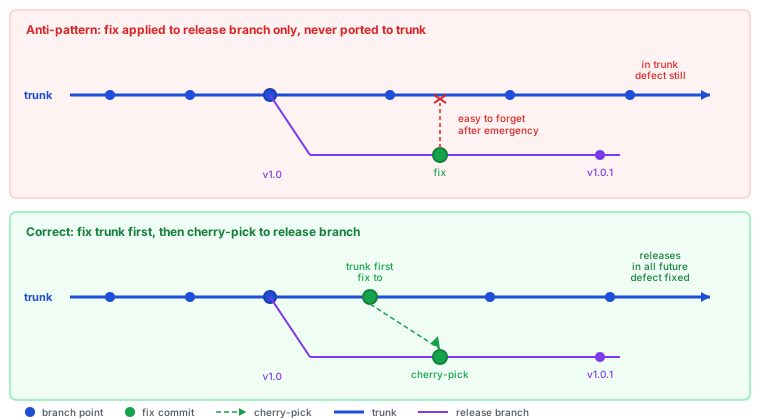
Fixes Applied to the Release Branch but Not to Trunk
When a defect is found in a released version, the team branches from the release tag and
applies a fix to that branch to ship a patch quickly. If the fix is never ported back to
trunk, the next release from trunk still contains the defect. The patch branch and trunk have
diverged: the patch has the fix, trunk does not.
The correct sequence is to fix trunk first, then cherry-pick the fix to the release branch.
This guarantees trunk always contains the fix and subsequent releases from trunk are not
affected.
How many changes does a typical release contain? If a release contains more than a
handful of commits, the batch size is a risk factor. Reducing release frequency reduces the
chance of interactions and makes regressions easier to diagnose. Start with
Infrequent, Painful Releases.
Do tests run on every commit or only before a release? If the team discovers regressions
at release time, the feedback loop is too long. Tests should catch breakage within minutes of
the change being pushed. Start with
Testing Only at the End.
Are developers working on branches that diverge from the main codebase for more than a
day? If yes, untested merge interactions are a likely source of regressions. Start with
Long-Lived Feature Branches.
Does the same regression appear in multiple releases? If a bug that was fixed in a
patch release keeps coming back, the fix was applied to the release branch but never merged
to trunk. Start with
Release Branches with Extensive Backporting.
A single person coordinates and executes all production releases. Deployments stop when that person is unavailable.
What you are seeing
Deployments stop when one person is unavailable. The team has a release manager - or someone who has informally become one - who holds the institutional knowledge of how deployments work. They know which config values need to be updated, which services need to restart in which order, which monitoring dashboards to watch, and what warning signs of a bad deploy look like. When they go on vacation, the team either waits for them to return or attempts a deployment with noticeably less confidence.
The release manager’s calendar becomes a constraint on when the team can ship. Releases are scheduled around their availability. On-call engineers will not deploy without them present because the process is too opaque to navigate alone. When a production incident requires a hotfix, the first step is “find that person” rather than “follow the rollback procedure.”
The bottleneck is rarely a single person’s fault. It reflects a deployment process that was never made systematic or automated. Knowledge accumulated in one person because the process was never documented in a way that made it executable without that person. The team worked around the complexity rather than removing it.
Common causes
Manual deployments
Manual deployments require human expertise. When the steps are not automated, a deployment is only as reliable as the person executing it. Over time, the most experienced person becomes the de-facto release manager by default - not because anyone decided this, but because they have done it the most times and accumulated the most context.
Automated deployments remove the dependency on individual skill. The pipeline executes the same steps identically every time, regardless of who triggers it. Any team member can initiate a deployment by running the pipeline; the expertise is encoded in the automation rather than in a person.
The deployment process knowledge is not written down or codified. It lives in one person’s head. When that person leaves or is unavailable, the knowledge gap is immediately felt. The team discovers gaps in their collective knowledge only when the person who filled those gaps is not present.
Externalizing deployment knowledge into runbooks, pipeline definitions, and infrastructure code means the on-call engineer can deploy without finding the one person who knows the steps. The pipeline definition is readable by any engineer. When a production incident requires a hotfix, the first step is “follow the procedure” rather than “find that person.”
When environments are hand-configured and differ from each other in undocumented ways, releases require someone who has memorized those differences. The person who configured the environment knows which server needs the manual step and which config file is different from the others. Without that person, the deployment is a minefield of undocumented quirks.
Environments defined as code have their differences captured in the code. Any engineer reading the infrastructure definition can understand what is deployed where and why. The deployment procedure is the same regardless of which environment is the target.
A pipeline codifies deployment knowledge as executable code. Every step is documented, versioned, and runnable by any team member. The pipeline is the answer to “how do we deploy” - not a person, not a wiki page, but an automated procedure that the team maintains together.
Without a pipeline, the knowledge of how to deploy stays in the people who have done it. The release manager’s calendar remains a constraint on when the team can ship because no executable procedure exists that someone else could follow in their place. Any engineer can trigger the pipeline; no one can trigger another person’s institutional memory.
Can any engineer on the team deploy to production without help? If not, the deployment process has concentrations of required knowledge. Start with Knowledge silos.
Is the deployment process automated end to end? If a human runs deployment steps manually, expertise concentrates by default. Start with Manual deployments.
Do environments have undocumented configuration differences? If different environments require different steps known only to certain people, the environments are the knowledge trap. Start with Snowflake environments.
Does a written pipeline definition exist in version control? If not, the team has no shared, authoritative record of the deployment process. Start with Missing deployment pipeline.
Ready to fix this? The most common cause is Manual deployments. Start with its How to Fix It section for week-by-week steps.
17 - Security Review Is a Gate, Not a Guardrail
Changes queue for weeks waiting for central security review. Security slows delivery rather than enabling it.
What you are seeing
The queue for security review is weeks long. Changes that are otherwise ready to deploy sit waiting while the central security team works through backlog from across the organization. When security review finally happens, it is often a cursory check because the backlog pressure is too high for thorough review.
Security reviews happen late in the development cycle, after development is complete and the team has moved on to new work. When the security team identifies a real issue, it requires context-switching back to code written weeks ago. Developers have forgotten the details. The fix takes longer than it would have if the security issue had been caught during development.
The security team does not scale with development velocity. As the organization ships more, the security queue grows. The team has learned to front-load reviews for “obviously security-sensitive” changes and skip or rush reviews for everything else - exactly the wrong approach. The changes that seem routine are often where vulnerabilities hide.
Common causes
Missing deployment pipeline
Security tools can be integrated directly into the pipeline: dependency scanning, static analysis, secret detection, container image scanning. When these checks run automatically on every commit, they catch issues immediately - while the developer still has the code in mind and fixing is fast. The central security team can focus on policy and architecture rather than reviewing individual changes.
A pipeline with automated security gates provides continuous, scalable security coverage. The coverage is consistent because it runs on every change, not just the ones that reach the security team’s queue. Issues are caught in minutes rather than weeks.
The same dynamics that make change advisory boards a bottleneck for general changes apply to security review gates. Manual approval at the end of the process creates a queue. The queue grows when the team ships more than the reviewers can process. Calendar-driven release cycles create bursts of review requests at predictable times.
Moving security left - into development tooling and pipeline gates rather than release gates - eliminates the end-of-process queue entirely. Security feedback during development is faster and cheaper than security review after development.
When security review is one of several manual gates a change must pass, the waits compound. A change waiting for regression testing cannot enter the security review queue. A change completing security review cannot go to production until the regression window opens. Each gate multiplies the total lead time for a change.
Automated testing eliminates the regression testing gate, which reduces how many changes are stacked up waiting for security review at any given time. A change that exits automated testing immediately enters the security queue rather than waiting for a regression window to open. Shrinking the queue makes each security review faster and more thorough - which is what was lost when backlog pressure turned reviews into cursory checks.
Does the team have automated security scanning in the CI pipeline? If not, security coverage depends on the central security team’s capacity, which does not scale. Start with Missing deployment pipeline.
Is security review a manual approval gate before every production deployment? If changes cannot deploy without explicit security approval, the gate is the constraint. Start with CAB gates.
Do changes queue for multiple manual approvals in sequence? If security review is one of several sequential gates, reducing other gates will also reduce security review pressure. Start with Manual regression testing gates.
18 - Services Reach Production with No Health Checks or Alerting
No criteria exist for what a service needs before going live. New services deploy to production with no observability in place.
What you are seeing
A new service ships and the team moves on. Three weeks later, an on-call engineer is paged for a production incident involving that service. They open the monitoring dashboard and find nothing. No metrics, no alerts, no logs aggregation, no health endpoint. The service has been running in production for three weeks without anyone being able to tell whether it was healthy.
The problem is not that engineers forgot. It is that nothing prevented shipping without it. “Ready to deploy” means the feature is complete and tests pass. It does not mean the service exposes a health endpoint, publishes metrics to the monitoring system, has alerts configured for error rate and latency, or appears in the on-call runbook. These are treated as optional improvements to add later, and later rarely comes.
As the team owns more services, the operational burden grows unevenly. Some services have mature observability built over years of incidents. Others are invisible. On-call engineers learn which services are opaque and dread incidents that involve them. The services most likely to cause undiscovered problems are exactly the ones hardest to observe when problems occur.
Common causes
Blind operations
When observability is not a team-wide practice and value, it does not get built into new services by default. Services are built to the standard in place when they were written. If the team did not have a culture of shipping with health checks and alerting, early services were shipped without them. Each new service follows the existing pattern.
Establishing observability as a first-class delivery requirement - part of the definition of done for any service - ensures that new services ship with production readiness built in rather than bolted on after the first incident. The situation where a service runs unmonitored in production for weeks stops occurring because no service can reach production without meeting the standard.
A pipeline can enforce deployment standards as a condition of promotion to production. A pipeline stage that checks for a functioning health endpoint, at least one defined alert, and the service appearing in the runbook prevents services from bypassing the standard. When the check fails, the deployment fails, and the engineer must add the missing observability before proceeding.
Without this gate in the pipeline, observability requirements are advisory. Engineers who are under deadline pressure deploy without meeting them. The standard becomes aspirational rather than enforced.
Does the deployment pipeline check for a functioning health endpoint before production deployment? If not, services can ship without health checks and nobody will know until an incident. Start with Missing deployment pipeline.
Does the team have an explicit standard for what a service needs before it goes to production? If the standard does not exist or is not enforced, services will reflect individual engineer habits rather than a team baseline. Start with Blind operations.
Are there services in production with no associated alerts? If yes, those services will cause incidents that the team discovers from user reports rather than monitoring. Start with Blind operations.
Ready to fix this? The most common cause is Blind operations. Start with its How to Fix It section for week-by-week steps.
19 - Staging Passes but Production Fails
Deployments pass every pre-production check but break when they reach production.
What you are seeing
Code passes tests, QA signs off, staging looks fine. Then the release
hits production and something breaks: a feature behaves differently, a dependent service times
out, or data that never appeared in staging triggers an unhandled edge case.
The team scrambles to roll back or hotfix. Confidence in the pipeline drops. People start adding
more manual verification steps, which slows delivery without actually preventing the next
surprise.
Common causes
Snowflake Environments
When each environment is configured by hand (or was set up once and has drifted since), staging
and production are never truly the same. Different library versions, different environment
variables, different network configurations. Code that works in one context silently fails in
another because the environments are only superficially similar.
Sometimes the problem is not that staging passes and production fails. It is that production
failures go undetected until a customer reports them. Without monitoring and alerting, the team
has no way to verify production health after a deploy. “It works in staging” becomes the only
signal, and production problems surface hours or days late.
Hidden dependencies between components mean that a change in one area affects behavior in
another. In staging, these interactions may behave differently because the data is smaller, the
load is lighter, or a dependent service is stubbed. In production, the full weight of real usage
exposes coupling the team did not know existed.
When deployment involves human steps (running scripts by hand, clicking through a console,
copying files), the process is never identical twice. A step skipped in staging, an extra
configuration applied in production, a different order of operations. The deployment itself
becomes a source of variance between environments.
Are your environments provisioned from the same infrastructure code? If not, or if you
are not sure, start with Snowflake Environments.
How did you discover the production failure? If a customer or support team reported it
rather than an automated alert, start with
Blind Operations.
Does the failure involve a different service or module than the one you changed? If yes,
the issue is likely hidden coupling. Start with
Tightly Coupled Monolith.
Is the deployment process identical and automated across all environments? If not, start
with Manual Deployments.
Change Fail Rate - Track deployment failures that staging should have caught
20 - Deploying Stateful Services Causes Outages
Services holding in-memory state drop connections, lose sessions, or cause cache invalidation spikes on every redeployment.
What you are seeing
Deploying the session service drops active user sessions. Deploying the WebSocket server disconnects every connected client. Deploying the in-memory cache causes a cold-start period where every request misses cache for the next thirty minutes. The team knows which services are stateful and has developed rituals around deploying them: off-peak deployment windows, user notifications, manual drain procedures, runbooks specifying exact steps.
The rituals work until they do not. Someone deploys without the drain procedure because it was not enforced. A hotfix has to go out on a Tuesday afternoon because a security vulnerability was disclosed. The “we only deploy stateful services on weekends” policy conflicts with “we need to fix this now.” Users notice.
The underlying issue is that the deployment process does not account for the service’s stateful nature. There is no automated drain, no graceful shutdown that allows in-flight requests to complete, no mechanism for the new instance to warm up before the old one is terminated. The service was designed and deployed with no thought given to how it would be upgraded without interruption.
Common causes
Manual deployments
Stateful service deployments require precise sequencing: drain connections, allow in-flight requests to complete, terminate the old instance, start the new one, allow it to warm up before accepting traffic. Manual deployments rely on humans executing this sequence correctly under time pressure, from memory, without making mistakes.
Automated deployment pipelines that include graceful shutdown hooks, configurable drain timeouts, and health check gates before traffic routing eliminate the human sequencing requirement. The procedure is defined once, tested in lower environments, and executed consistently in production. Deployments that previously caused dropped sessions or cold-start spikes complete without service interruption because the sequencing is never skipped.
A pipeline can enforce graceful shutdown logic, connection drain periods, and health check gates as part of every deployment. Blue-green deployments - starting the new instance alongside the old one, waiting for it to become healthy, then shifting traffic - eliminate the downtime window entirely for stateless services and reduce it dramatically for stateful ones.
Without a pipeline, each deployment is a custom procedure executed by the operator on duty. The procedure may exist in a runbook, but runbooks are not enforced - they are consulted selectively and executed inconsistently.
When staging environments do not replicate the stateful characteristics of production - connection volumes, session counts, cache sizes, WebSocket concurrency - the drain procedure validated in staging does not reliably translate to production behavior. A drain that completes in 30 seconds in staging may take 10 minutes in production under load.
Environments that match production in scale and configuration allow stateful deployment procedures to be validated with confidence. The drain timing is calibrated to real traffic patterns, so the procedure that completes cleanly in staging also completes cleanly in production - and deployments stop causing outages that only surface under real load.
Is there an automated drain and graceful shutdown procedure for stateful services? If drain is manual or undocumented, the deployment will cause interruptions whenever the procedure is not followed perfectly. Start with Manual deployments.
Does the pipeline include health check gates before routing traffic to the new instance? If traffic switches before the new instance is healthy, users hit the new instance while it is still warming up. Start with Missing deployment pipeline.
Do staging environments match production in connection volume and load characteristics? If not, drain timing and warm-up behavior validated in staging will not generalize. Start with Snowflake environments.
Ready to fix this? The most common cause is Manual deployments. Start with its How to Fix It section for week-by-week steps.
21 - Features Must Wait for a Separate QA Team Before Shipping
Work is complete from the development team’s perspective but cannot ship until a separate QA team tests and approves it. QA has its own queue and schedule.
What you are seeing
Development marks a story done. It moves to a “ready for QA” column and waits. The QA team
has its own sprint, its own backlog, and its own capacity constraints. The feature sits for
three days before a QA engineer picks it up. Testing takes another two days. Feedback arrives
a week after development completed. The developer has moved on to other work and has to reload
context to address the comments.
Near release time, QA becomes a bottleneck. Many features arrive at once, QA capacity cannot
absorb them all, and some features are held over to the next release. Defects found late in QA
are more expensive to fix because other work has been built on top of the untested code. The
team’s release dates become determined by QA queue depth, not by development completion.
Common causes
Siloed QA Team
When quality assurance is a separate team rather than a shared practice embedded in development,
testing becomes a handoff rather than a continuous activity. Developers write code and hand it
to QA. QA tests it and hands defects back. The two teams operate on different cadences. Because
quality is seen as QA’s responsibility, developers write less thorough tests of their own -
why duplicate the effort? The siloed structure makes late testing the structural default rather
than an avoidable outcome.
When QA sign-off is a formal gate that must be passed before any release, the gate creates a
queue. Features arrive at the gate in batches. QA must process all of them before anything
ships. If QA finds a defect, the release waits while it is fixed and retested. The gate structure
means quality problems are found late, in large batches, making them expensive to fix and
disruptive to release schedules.
Is there a “waiting for QA” column on the board, and do items spend days there? If
work regularly accumulates waiting for QA to pick it up, the team has a handoff bottleneck
rather than a continuous quality practice. Start with
Siloed QA Team.
Can the team deploy without QA sign-off? If QA approval is a required step before
any production release, the gate creates batch testing and late defect discovery. Start with
QA Signoff as a Release Gate.
Ready to fix this? The most common cause is Siloed QA Team. Start with its How to Fix It section for week-by-week steps.